
A Ring doorbell subscription is the question almost every new Ring owner faces about a month after setup, when the free trial ends and the app starts asking you to pick a plan. Do you actually need one? Which plan is worth it? And what still works if you say no?
This guide explains every Ring doorbell plan in plain language, using Ring’s current US pricing, so you can decide what fits your home. We cover what each plan includes, what your doorbell can do with no subscription at all, the add-ons Ring now sells, and a few ways to keep costs down.

Table of Contents
- Ring Doorbell Plans at a Glance (2026 Prices)
- What You Get Without a Ring Doorbell Subscription
- Ring Solo: The Plan for One Doorbell
- Ring Multi: For More Than One Device
- Ring Pro: AI Features and Professional Monitoring
- Virtual Security Guard
- Ring Add-Ons Worth Knowing About
- The Free Trial and How to Cancel
- Is a Ring Doorbell Subscription Worth It?
- Ways to Save on Ring Plans
- Which Ring Plan Fits Your Home?
- How to Download and Share Ring Videos
- Privacy: Ring End-to-End Encryption
- Is There a Way to Store Ring Videos Locally?
- How Ring Plans Compare to Other Brands
- Features With and Without a Plan
- Tips Before You Subscribe
- Frequently Asked Questions
- Final Thoughts
Ring Doorbell Plans at a Glance (2026 Prices)
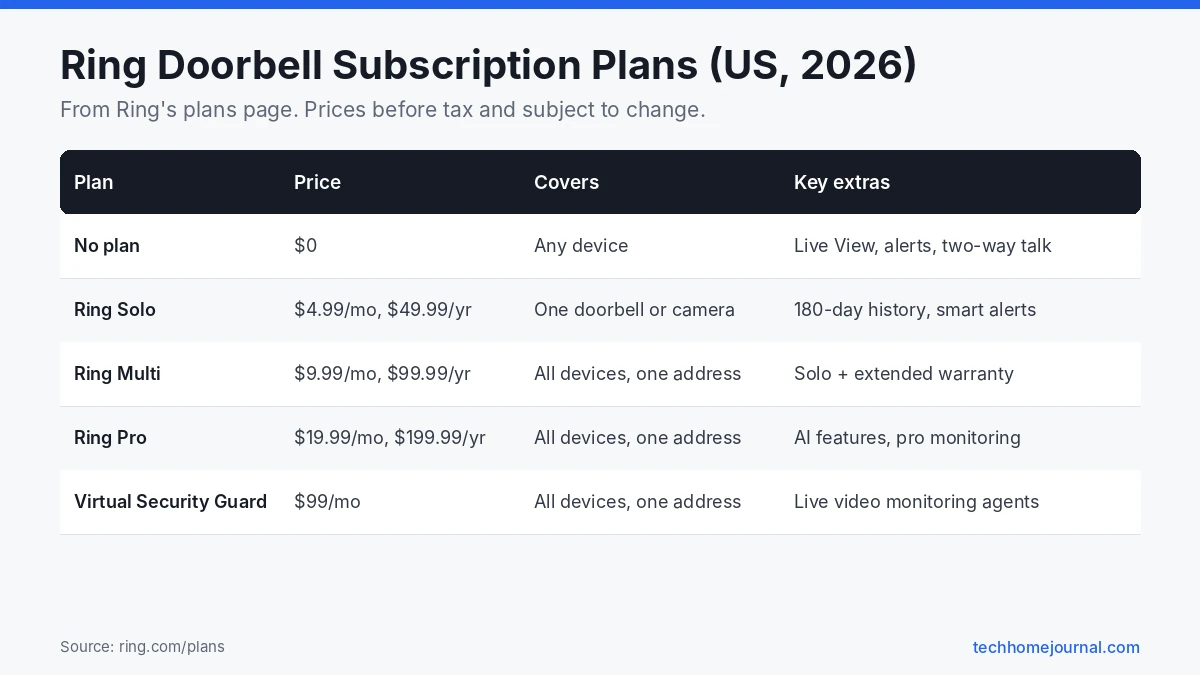
Ring renamed its plans in recent years, so you may see older names such as Basic, Standard and Premium in reviews. Ring’s plans page currently lists these US options:
Related: learn how to change your Ring doorbell sound, a free feature that works with or without a plan.
| Plan | Monthly | Yearly | Covers | Best for |
|---|---|---|---|---|
| Ring Solo | $4.99 | $49.99 | One doorbell or camera | A single Ring doorbell |
| Ring Multi | $9.99 | $99.99 | All home devices at one address | Two or more Ring devices |
| Ring Pro | $19.99 | $199.99 | All home devices at one address | Ring Alarm owners and advanced AI features |
| Virtual Security Guard | $99.00 | Not listed | All home devices at one address | Live video monitoring by agents |
Prices are before tax and can change, so check Ring’s site for the latest numbers. Plans auto-renew until you cancel, and each plan covers one address.
What You Get Without a Ring Doorbell Subscription
A Ring doorbell still works without a plan. According to Ring, its devices provide certain features with no subscription. In practice, that usually means:
- Ring alerts on your phone when someone presses the button or motion is detected.
- Live View so you can see the door in real time.
- Two-way talk to speak with visitors through the app.
- Indoor chime support through a Ring Chime or compatible wired chime.
What you do not get is recorded video. If you miss an alert, there is no clip to watch later, and you cannot save or share footage of a delivery or a stolen package. For many people, that missing history is the main reason to subscribe. If you want to avoid monthly fees entirely, see our guide to a doorbell camera with no subscription, which covers models with local storage.
Ring Solo: The Plan for One Doorbell
Ring Solo costs $4.99 a month or $49.99 a year and covers one doorbell or camera. It adds:
- Up to 180 days of video event history, so you can scroll back through recorded rings and motion events.
- Smart alerts that tell you whether it saw a person, a package or a vehicle (on supported models).
- Extended Live View and multi-camera viewing.
- Device Modes, which let you change when cameras record, such as Home or Away.
- Doorbell Calls, which make a doorbell press ring your phone like a call.
If you only have one Ring doorbell, this is usually the best value. Paying yearly saves you about two months compared with paying monthly.
Ring Multi: For More Than One Device
Ring Multi costs $9.99 a month or $99.99 a year and covers every Ring doorbell and camera at one address. It includes everything in Solo, plus extended warranty coverage on eligible devices for as long as your plan is active.
The math is simple: if you have two or more Ring devices at the same home, Multi is cheaper than paying for Solo on each one. It also means new cameras are covered automatically when you add them.

Ring Pro: AI Features and Professional Monitoring
Ring Pro costs $19.99 a month or $199.99 a year. It includes everything in Multi, plus:
- 24/7 professional monitoring for Ring Alarm systems, with dispatch requests in an emergency.
- Video Descriptions that summarize what happened in each motion clip as text.
- Familiar Faces (in beta), which can tell you who is at the door.
- Active Warnings, Unusual Event Alerts and Video Search.
- Cellular and internet backup for Ring Alarm Pro.
Ring itself recommends Pro for anyone with a Ring Alarm. If you only have a doorbell, Pro is hard to justify unless the AI features really appeal to you. Note that some recognition features are not available in certain states, including Illinois, because of local privacy laws. Ring explains how it handles video and face data on its privacy page.
Virtual Security Guard
At $99 a month, Virtual Security Guard adds live video monitoring by trained agents who can watch your cameras when triggered, talk to intruders and request police. It is aimed at people who want something closer to a staffed security service. Most homeowners with a single doorbell will not need it. Our roundup of the best home security systems compares professionally monitored options from other brands.
Ring Add-Ons Worth Knowing About
Ring now sells a few extras on top of the main plans:
- Pro Intelligence: adds Pro’s AI features to one camera for about $5 a month (requires Solo or Multi).
- 24/7 Continuous Recording: records nonstop on eligible cameras for about $3 a month per camera.
- Smoke and CO Monitoring: has agents request the fire department when compatible alarms go off, for about $5 a month (included in Pro).
These add-ons let you pay for advanced features only on the device that needs them, such as the doorbell, instead of upgrading your whole plan.
The Free Trial and How to Cancel
Ring gives you a free 30-day trial of Ring Protect when you first set up a doorbell, camera or alarm, unless your address already has a plan. Some retailers offer longer trials as a promotion.
To avoid losing recordings, choose a plan before the trial ends. Ring warns that if you do not subscribe in time, stored videos are lost and cannot be recovered. To change plans, Ring’s help article on how to subscribe to and manage a Ring plan walks through each step. To stop paying, follow Ring’s guide to canceling your Ring plan from your Ring.com account.
Is a Ring Doorbell Subscription Worth It?
It depends on how you use your doorbell:
- Worth it if you want to review missed visitors, keep evidence of package theft, or get smarter alerts that ignore cars and trees.
- Probably not worth it if you only want to see who is at the door in real time and you always check alerts right away.
- Consider another brand if you want recorded video with no monthly fee. Some doorbells store clips on a microSD card or a home base, such as the eufy options in our eufy SoloCam S340 review and our guide to security cameras without a subscription.
For most single doorbell homes, Ring Solo at about $50 a year is a reasonable middle ground. If you also own a Ring Floodlight Camera or other Ring cameras, Ring Multi usually makes more sense.
Ways to Save on Ring Plans
- Pay yearly instead of monthly.
- Use Multi once you own two or more Ring devices at the same address.
- Use the 10 percent discount on Ring.com products that comes with paid plans.
- Add only what you need, such as Pro Intelligence on one camera instead of upgrading to Pro.
- Turn off unneeded cameras before renewal if you have downsized.
Which Ring Plan Fits Your Home?
The right plan depends more on how many devices you have and what you want to see later than on the doorbell model. Use this as a quick guide:
| Your situation | Likely best choice | Why |
|---|---|---|
| One doorbell, mainly want live view and alerts | No plan | Live view and motion alerts work without a subscription |
| One doorbell, want to watch missed visitors later | Single-device plan | Adds video history, snapshots and person alerts for one device |
| Doorbell plus one or more cameras | Multi-device plan | Covers every Ring device at one address |
| Ring Alarm system with monitoring | Top-tier plan | Adds professional monitoring and extra AI features |
| Holiday home or rental | Separate plan per location | Plans are tied to one address |
Try the free trial with all features first, then check which ones you actually used before choosing a plan.
How to Download and Share Ring Videos
With a plan, every event is saved to your Event History. To keep or share a clip:
- Open the Ring app and go to History.
- Tap the event, then use the share or download option.
- Download clips you may need later, such as a package theft or a parking incident, because videos are deleted automatically after the storage period.
- On a computer, sign in at ring.com to view History and download several clips at once.
When sharing videos online or with neighbours, blur or crop out people who aren’t relevant, and only share what’s needed.
Privacy: Ring End-to-End Encryption
Ring offers optional end-to-end encryption on many devices. When it’s on, only your enrolled phone can decrypt your videos. It’s a good choice if privacy is your top concern, but there are trade-offs: some features, such as viewing on certain shared devices, Alexa video, and some AI features, stop working while it’s enabled. You can read the details in Ring’s support centre before switching it on.
Even without end-to-end encryption, turn on two-step verification and review Shared Users regularly.
Is There a Way to Store Ring Videos Locally?
Ring is mainly a cloud system. The main exception is Ring Edge, which works with the Ring Alarm Pro base station and stores video locally on a microSD card. It needs a top-tier plan, so it’s an add-on for privacy rather than a way to avoid fees.
If avoiding monthly fees is your main goal, a doorbell with built-in local storage is a better fit. Our guide to doorbell cameras without a subscription compares the best options.
How Ring Plans Compare to Other Brands
Most video doorbell brands now follow a similar model: basic live view for free, with recordings and smart alerts behind a monthly plan. The differences are in what you get for free and how storage works.
- Ring: strong app, wide range of devices and good Alexa integration. Recordings and person alerts need a plan.
- Google Nest: Nest doorbells include a short free event history, with longer history and familiar face alerts on a Google Home Premium plan.
- Arlo: most smart features, including person and package detection, need an Arlo Secure plan.
- eufy and Reolink: many models store video locally with free AI detection, so a plan is optional.
If you already own Ring cameras or a Ring Alarm, one multi-device plan usually makes Ring the cheapest choice overall. If you’re starting fresh and want to avoid fees, look at local-storage brands first. Prices change often, so always compare current plan pages before deciding.
Features With and Without a Plan
| Feature | No plan | With a plan |
|---|---|---|
| Live view | Yes | Yes |
| Motion and ring alerts | Yes | Yes |
| Two-way talk | Yes | Yes |
| Video history and downloads | No | Yes |
| Person and package alerts | No | Yes, on supported devices |
| Snapshot timeline | Limited | Yes |
| Rich notifications (preview image) | No | Yes |
| Extra AI features and monitoring | No | Higher tiers only |
Exact features depend on the device and region. Ring’s plan page lists what’s included in each tier where you live.
Tips Before You Subscribe
- Count your devices. If you have two or more Ring devices at one address, a multi-device plan is almost always cheaper than separate single-device plans.
- Pay yearly if you’re sure. Annual billing is usually cheaper than paying monthly, but only once you know you’ll keep the plan.
- Watch for bundles. Ring doorbells and camera kits sometimes include a free or discounted plan for the first months or year.
- Set a reminder before the trial ends. Decide whether you used video history enough to pay for it.
- Check storage length. Make sure the plan’s video history period suits you, especially if you travel for long periods.
- Review once a year. Plans and prices change, so compare your plan against current options when it renews.
A quick review like this often saves more than any discount code, and it only takes a few minutes in the app.
Frequently Asked Questions
Do you need a subscription for a Ring doorbell?
No. The doorbell works without one for live alerts, Live View and two-way talk. You need a plan to record and save video.
How much is a Ring doorbell subscription?
In the US, Ring Solo costs $4.99 a month or $49.99 a year. Ring Multi costs $9.99 a month or $99.99 a year, and Ring Pro costs $19.99 a month or $199.99 a year.
How long does Ring keep my videos?
Ring stores motion event videos in the cloud for up to 180 days on paid plans, depending on your settings.
Does one Ring plan cover multiple homes?
No. Each plan covers one address. A second home needs its own plan.
What happens when my Ring free trial ends?
Recording stops and you lose access to stored clips unless you subscribe. Live alerts and Live View keep working.
Can I cancel my Ring subscription any time?
Yes. Plans auto-renew until canceled, and you can manage or cancel them in your Ring.com account.
Can I use a Ring doorbell without paying anything?
Yes. You get live view, motion alerts and two-way talk for free. What you lose without a plan is saved video history and some smart alerts.
Does a Ring plan cover the Ring app on multiple phones?
Yes. Shared Users you add in the app can view live video and saved history on their own phones without paying extra.
Is a Ring plan worth it for a flat?
If deliveries often arrive while you’re out, saved video and package alerts are useful. If you only want to see who’s at the door when you’re home, the free features are usually enough.
Will my Ring doorbell stop working if I cancel my plan?
No. Live view, motion alerts and two-way talk keep working. You lose access to saved recordings and plan-only features once the plan ends, so download any clips you want first.
Do Ring plans include professional installation?
No. Plans cover features and storage. Professional installation is a separate one-off service that Ring and partners offer for some devices.
Final Thoughts
A Ring doorbell subscription is optional, but without one you lose the recorded video that makes a smart doorbell so useful. Ring Solo is the sensible choice for one doorbell, Ring Multi for two or more devices, and Ring Pro for Ring Alarm owners who want monitoring and AI features. If monthly fees are a deal breaker, compare Ring with the best smart doorbells that offer free local storage.