

The eufy SoloCam S340 is one of the few outdoor cameras that puts a solar panel, a fixed wide-angle lens and a pan-tilt telephoto lens into a single wire-free unit. That combination matters more than it sounds on paper. A normal single-lens camera has to choose between a wide view and a close-up. The S340 does both at once, so it can keep the whole yard in frame while the second lens follows a person walking up your path.
In this eufy SoloCam S340 review, we go beyond the spec sheet: how the dual-lens system actually behaves, what the solar panel needs to keep the battery topped up, where the local storage model saves you money compared with Ring, and which homes it suits best. This review is based on eufy’s official specifications, owner feedback and how the camera compares to similar models. We haven’t run our own lab tests, so treat the details below as a buyer’s guide rather than a test report.
Table of Contents
- Quick Verdict
- Quick Picks
- What Is the Eufy SoloCam S340?
- How the Dual-Camera System Works
- Video Quality and Night Vision
- AI Detection and Alerts
- Setup and Installation
- Battery Life and Solar Charging
- Storage: Local vs Cloud
- Smart Home Compatibility
- Privacy and Security
- S340 vs Alternatives
- Pros and Cons
- Common Misconceptions
- Who Should Buy the SoloCam S340?
- Frequently Asked Questions
- Final Verdict
Quick Verdict
If you want one camera that covers a wide area and can zoom in on faces or number plates, without running power cables or paying a monthly fee, the S340 is one of the most complete options at around $200. Its main compromises are 2.4GHz-only Wi-Fi, no Apple HomeKit support and a limited 60° tilt range.
- Best for: driveways, side yards and gardens where you want a wide view plus zoomed detail
- Not ideal for: HomeKit-only homes, shady north-facing walls, or anyone who wants 24/7 continuous recording
- Price: approx. $199.99 list price (check current deals, it is often discounted)
- Subscription: not required for local recording; eufy’s cloud plan is optional
Quick Picks
- eufy SoloCam S340 (single camera): best for most homes that need one well-placed, wire-free camera with zoom, approx. $200
- eufy SoloCam S340 + HomeBase S380: best if you plan to add more eufy cameras and want face recognition and expandable local storage
- Reolink Argus PT Ultra: best alternative if you want 4K and a wider tilt range, with microSD storage
- Ring Spotlight Cam Pro: best for households already invested in Ring and Alexa, as long as you’re happy to pay for a Ring plan
What Is the Eufy SoloCam S340?
The SoloCam S340 is a battery-powered outdoor security camera from eufy, Anker’s smart home brand. “Solo” means it works on its own: it connects straight to your Wi-Fi and stores clips on built-in memory, so you don’t need a hub to get started. A small solar panel sits on top and trickle-charges the battery during the day.
What sets it apart is the two-camera design. The left lens is a fixed wide-angle camera that records in 3K. The right lens is a motorised 2K telephoto camera that can pan almost all the way around and tilt up and down. Together they give you a “big picture plus close-up” view that is usually only found on more expensive wired systems.
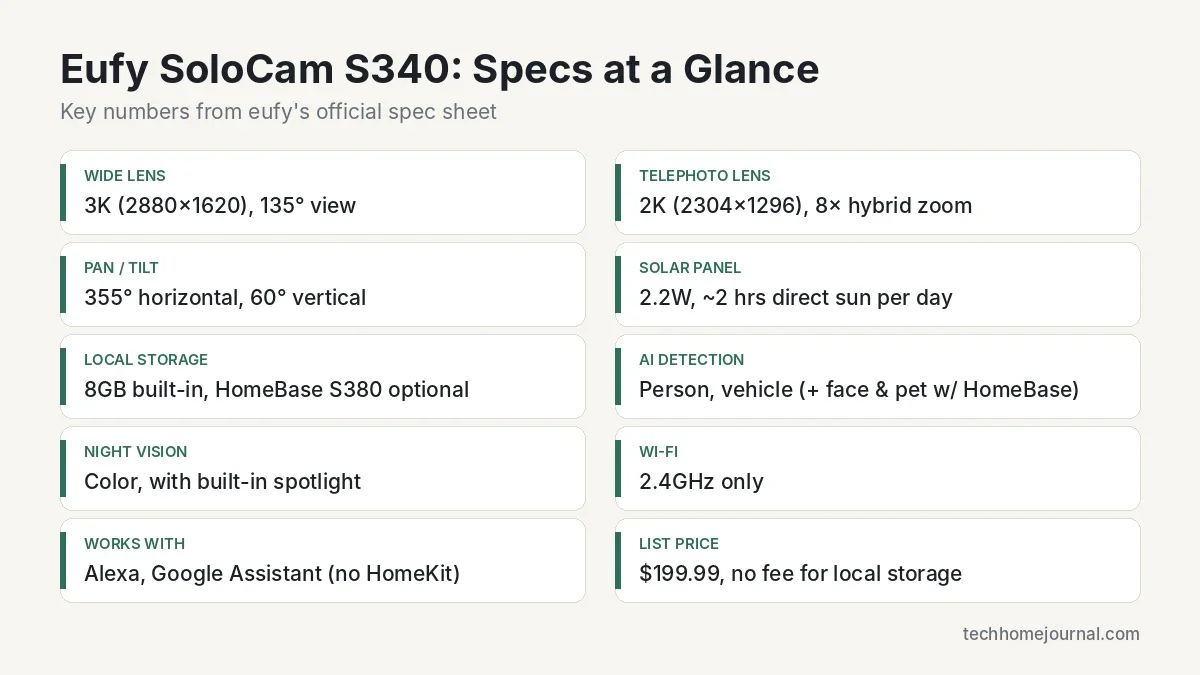
Key specs at a glance
- Wide lens: 3K (2880×1620), 135° field of view
- Telephoto lens: 2K (2304×1296) with 8× hybrid zoom, clear detail up to roughly 40 ft (12 m)
- Pan / tilt: 355° horizontal, 60° vertical
- Power: built-in rechargeable battery plus a removable, adjustable 2.2W solar panel
- Storage: 8GB built-in eMMC, expandable through HomeBase S380
- AI detection: person and vehicle on the camera; familiar faces and pets with HomeBase S380
- Night vision: color night vision with a built-in spotlight
- Extras: two-way audio, siren, weather-resistant housing, operating range of -4°F to 122°F (-20°C to 50°C)
- Connectivity: 2.4GHz Wi-Fi only
- Smart home: Amazon Alexa and Google Assistant
You can check the full spec sheet on eufy’s official SoloCam S340 page.
How the Dual-Camera System Works
Most security cameras force a trade-off. A wide lens sees everything but turns a face at 30 feet into a few blurry pixels. A zoom lens sees detail but misses what’s happening at the edges. The S340 tries to solve this by running both lenses side by side.
The wide-angle lens: your overview
The fixed 3K lens is always pointed at the same scene. Think of it as the “where” camera. It shows you the whole driveway, the gate and the corner of the garden, so you never lose context when something moves.
The telephoto lens: your detail
The 2K pan-tilt lens is the “who” camera. When the camera’s AI picks up a person, the telephoto lens can turn to follow them and zoom in, giving you a closer look at faces, clothing or a vehicle. The 8× hybrid zoom combines optical and digital zoom, so expect the sharpest results at moderate distances rather than at the very end of the zoom range.
Why it matters in daily use
In the app you can view both feeds together or switch between them. In practice this means fewer “what was that?” moments. If a delivery driver walks up the drive, the wide lens shows the van on the street, and the zoom lens shows the parcel and the person carrying it. For a single camera covering a long driveway or a deep garden, that’s a real upgrade over one fixed lens.
One limitation to keep in mind: the tilt range is 60°, which is fine for a camera mounted at a normal height but less useful if you mount it very high and want to look straight down. If you need a steep downward angle, plan your mounting height carefully or look at cameras with a wider tilt range.
Video Quality and Night Vision
During the day, 3K resolution on the wide lens gives noticeably more detail than the 1080p you still find on many budget cameras. It’s sharp enough to read a door number or see the colour of a car across a typical front yard. The 2K telephoto lens is lower resolution, but because it’s zoomed in, the detail on a person is usually better than a cropped image from the wide lens.
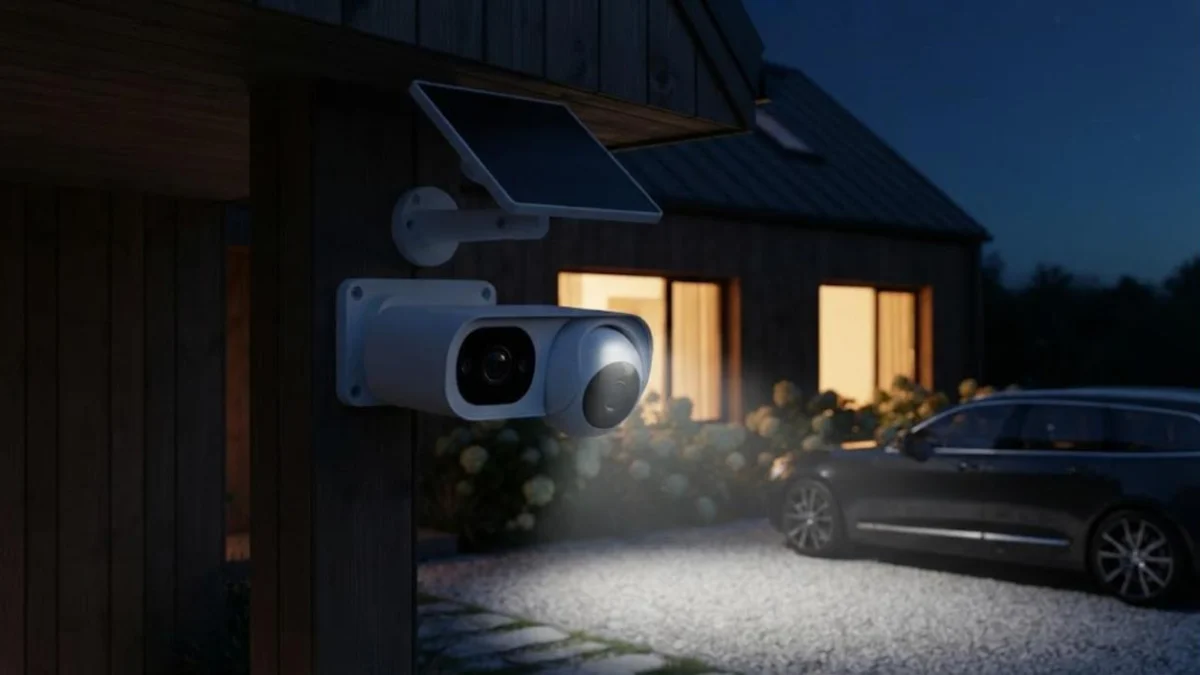
At night, the S340 uses a built-in spotlight to record in color. Color footage is far more useful than grainy black-and-white infrared when you need to describe a jacket or a car to someone. The trade-off is power: every time the spotlight switches on, it draws from the battery. If your camera faces a busy street, consider limiting the spotlight to person detections only, or using motion zones so headlights and passing cars don’t trigger it all night.
A practical tip for any spotlight camera: avoid pointing it straight at a white wall or a bright porch light. Strong reflections can wash out faces, which defeats the purpose of having color night vision in the first place.
AI Detection and Alerts
The camera runs its AI detection on the device itself, so it can tell the difference between people, vehicles and general motion without sending your footage to the cloud first. That has two benefits. Alerts are more relevant, and fewer clips are recorded for things like moving branches, which helps the battery.
- On the camera: motion, person and vehicle detection
- With HomeBase S380: eufy’s BionicMind features add familiar-face recognition and pet detection
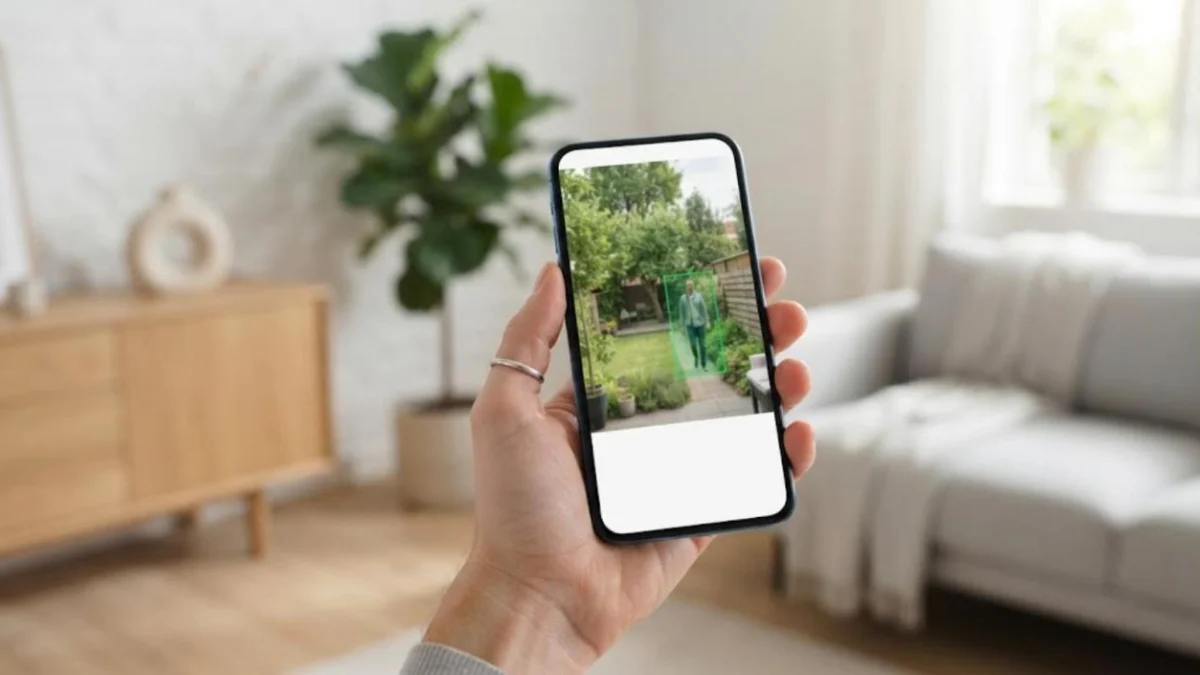
For the best results, set up activity zones in the app. Draw zones around your path, driveway and gate, and leave out the public pavement or a neighbour’s garden. This cuts false alerts and respects your neighbours’ privacy, which also matters legally in some regions.
Setup and Installation
Because the S340 is wire-free, installation is mostly about choosing the right spot. The process looks like this:
- Charge the camera fully over USB-C before mounting it, even though it has a solar panel.
- Install the eufy Security app, create an account and add the camera by scanning the QR code.
- Connect it to your 2.4GHz Wi-Fi network. If your router combines 2.4GHz and 5GHz under one name, setup usually still works, but separating the bands can help if it fails.
- Check the live view and Wi-Fi signal strength at the mounting spot before drilling.
- Mount the bracket, attach the camera and angle the solar panel towards the sun.
- Set activity zones, detection type, spotlight behaviour and notification schedule.
Mount the camera around 7 to 10 feet (2 to 3 metres) high. That’s high enough to deter tampering but low enough for the telephoto lens to capture faces rather than the tops of heads. If you’re new to placing outdoor cameras, our home security camera setup guide walks through placement step by step.
Wi-Fi is the most common pain point. A camera with a weak signal keeps retrying its connection, which drains the battery much faster. If the signal is poor at the mounting spot, a mesh node or Wi-Fi extender nearby usually fixes it. While you’re at it, make sure your network is locked down. Our guide on how to secure your home Wi-Fi network covers the basics.
Battery Life and Solar Charging
eufy rates the battery at up to around three months on a single charge, based on about 300 seconds (5 minutes) of recording per day. With the 2.2W solar panel, eufy says roughly two hours of direct sunlight per day is enough to keep the camera running continuously.
Those numbers are realistic for a quiet garden in a sunny spot. Real-world results depend on a few things:
- Activity level: a busy driveway can easily trigger 50+ recordings per day, far beyond the 5-minute baseline
- Spotlight use: color night recording uses more power than infrared
- Climate and season: short winter days, cloud and snow reduce solar input, especially at northern latitudes
- Panel position: shade from eaves, gutters or trees can cut solar charging dramatically
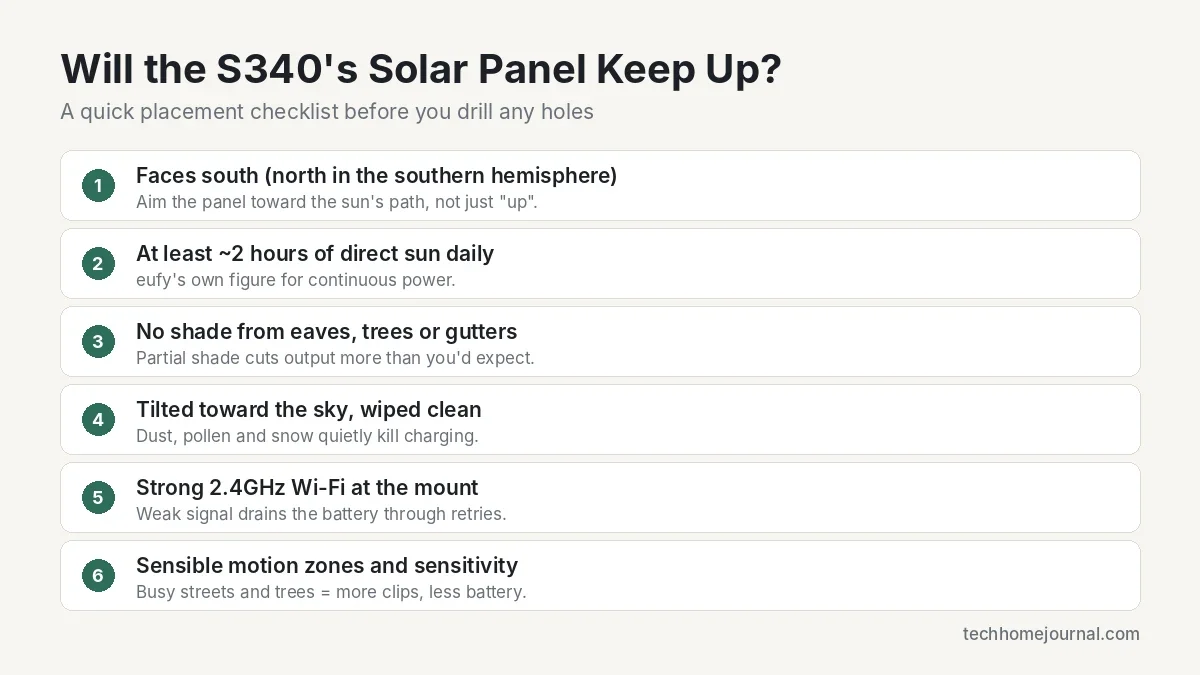
If you live somewhere with long, dark winters (much of Scandinavia, the UK, Canada or the northern US), expect to top up the battery manually now and then between November and February, or move the panel to a sunnier spot. The panel is removable, so placing it a short distance away from the camera is an option if the camera’s ideal position is in shade.
For a broader look at how other models handle this, see our guide to the best solar-powered security cameras.
Storage: Local vs Cloud
This is where the S340 can save you real money over time. Clips are stored on the camera’s 8GB built-in memory, and there’s no monthly fee to keep and review them.
Built-in 8GB storage
8GB is enough for a good amount of event clips, since the camera only records when something happens. Older clips are overwritten automatically as space fills up. The downside is that if someone steals the camera, the footage stored on it goes with it.
HomeBase S380
Pairing the camera with eufy’s HomeBase S380 (also called HomeBase 3) moves storage indoors, where it’s safe from theft. According to eufy, its storage can be expanded with a hard drive of up to 16TB. It also unlocks the extra AI features mentioned above. It’s worth it if you plan to run three or more eufy cameras, but it’s not essential for one camera.
Optional cloud plan
eufy offers an optional paid plan with cloud backup for people who want an off-site copy of their clips. It’s a nice extra, not a requirement. Compare that with Ring, where saving and reviewing recordings requires a paid plan. If you’re comparing the long-term costs of different brands, our guide to security cameras without a subscription lays it out in more detail.
Smart Home Compatibility
The S340 works with Amazon Alexa and Google Assistant. You can ask an Echo Show to display the camera feed, or cast it to a Chromecast or Google Nest Hub. This works well for a quick “who’s at the gate?” glance from the kitchen. If you use Google’s ecosystem, visit Google Home for setup details.
Apple users should note that the S340 doesn’t list HomeKit support. If your home runs on HomeKit, check our Apple HomeKit guide for cameras that work natively with the Home app. The camera also doesn’t support Matter, which currently has limited camera support across the industry anyway. Our article on Matter vs Wi-Fi explains why that matters for future-proofing.
Privacy and Security
Any camera that watches your home is also a device on your network, so security matters. eufy faced criticism in 2022 over how some camera data and thumbnails were handled, and the company has since made changes to its encryption and app. That history is worth knowing about. The practical steps are the same for any brand:
- Turn on two-factor authentication in the eufy Security app.
- Use a strong, unique password for your eufy account.
- Keep the camera firmware and app up to date.
- Use local storage if you’d rather keep footage at home.
- Point cameras at your own property, not into neighbours’ windows or gardens.
The US Cybersecurity and Infrastructure Security Agency’s Secure Our World campaign has clear, simple advice on passwords, multi-factor authentication and updates that applies to all smart home devices.
S340 vs Alternatives
The S340 isn’t the only solar-friendly camera with pan-tilt or zoom features. Here’s how it compares with two popular alternatives.
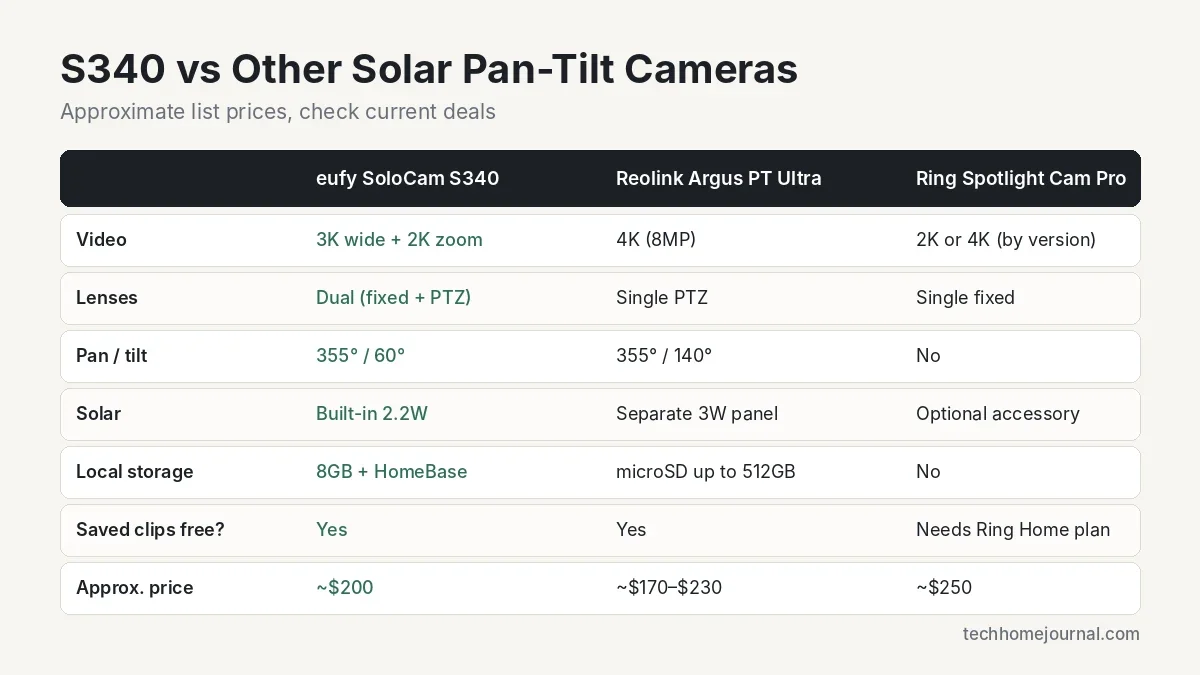
| Feature | eufy SoloCam S340 | Reolink Argus PT Ultra | Ring Spotlight Cam Pro |
|---|---|---|---|
| Video | 3K wide + 2K telephoto | 4K (8MP) | 2K or 4K, depending on version |
| Lenses | Dual (fixed + pan-tilt) | Single pan-tilt | Single fixed |
| Pan / tilt | 355° / 60° | 355° / 140° | No |
| Solar | Built-in 2.2W panel | Separate 3W panel | Optional accessory |
| Local storage | 8GB built-in + HomeBase | microSD up to 512GB | None |
| Saved clips without a plan | Yes | Yes | No, Ring plan needed |
| Approx. price | ~$200 | ~$170 to $230 | ~$250 |
Reolink Argus PT Ultra
The Reolink Argus PT Ultra offers 4K resolution and a much wider 140° tilt range, and stores footage on a microSD card of up to 512GB. It uses a single lens, though, so when it turns to follow someone it loses sight of the rest of the scene. Choose it if you want maximum resolution and flexible tilt; choose the S340 if you want both a wide view and a zoomed view at the same time.
Ring Spotlight Cam Pro
The Ring Spotlight Cam Pro has radar-based 3D motion detection, bright spotlights and excellent Alexa integration. But it has no pan-tilt lens, and you need a Ring Home plan to save and review recordings, which adds up over the years.
If you’d rather have a wired pan-tilt option, our Lorex 2K pan-tilt outdoor Wi-Fi camera article covers a plug-in alternative. For a full overview of options, see the best outdoor security camera systems.
Pros and Cons
Pros
- Dual lenses give a wide overview and zoomed detail at the same time
- Built-in solar panel means little or no manual charging in sunny locations
- No monthly fee for local storage
- Color night vision with built-in spotlight
- On-device AI for people and vehicles reduces false alerts
- Alexa and Google Assistant support
Cons
- 2.4GHz Wi-Fi only
- No Apple HomeKit or Matter support
- 60° tilt range is limited for high mounting points
- Solar output can fall short in shady spots or dark winters
- Footage on the camera can be lost if the camera is stolen (unless you use HomeBase)
Common Misconceptions
“Solar means you never need to charge it”
Solar keeps the battery topped up in the right conditions, but it isn’t magic. A shaded panel, a busy street or a dark winter can all outpace a 2.2W panel. Think of solar as “much less charging,” not “no charging.”
“8× zoom means you can read a number plate from across the street”
The hybrid zoom helps a lot at moderate distances, but detail drops off as digital zoom takes over. eufy itself quotes clear detail up to about 40 feet. Beyond that, expect softer images, especially at night.
“You need the HomeBase for it to work”
You don’t. The S340 works on its own with its built-in storage. The HomeBase adds extra storage, theft protection for your footage and advanced AI features, but it’s optional.
Who Should Buy the SoloCam S340?
The S340 makes the most sense for homeowners who want strong coverage from a single camera without running cables. It’s a particularly good fit if:
- You have a long driveway, a deep garden or a wide side yard
- You can’t easily run power to the camera’s location
- You want to avoid monthly subscription fees
- Your home uses Alexa or Google Assistant
- The mounting spot gets at least a couple of hours of direct sunlight
It’s less suitable if your home runs on Apple HomeKit, if you need continuous 24/7 recording (battery cameras only record events), or if the only possible mounting spot is in permanent shade. In those cases, a wired camera system may suit you better; see our guide to wired security camera systems.
For the Scandinavian-style homes we often feature, the white, compact housing blends in nicely against light timber or white render, and the wire-free design means no visible cables running across your facade.
Frequently Asked Questions
Does the eufy SoloCam S340 require a monthly subscription?
No. Clips are saved to the camera’s 8GB built-in storage at no extra cost. eufy offers an optional paid plan if you want cloud backup.
How long does the battery last without sunlight?
eufy rates the battery at up to about three months based on roughly five minutes of recording a day. With heavy activity or frequent spotlight use, expect much less.
Is the eufy SoloCam S340 compatible with Apple HomeKit?
No. It works with Amazon Alexa and Google Assistant, but HomeKit isn’t listed as supported.
What’s the difference between the two lenses?
The fixed 3K lens shows a wide 135° overview, while the 2K telephoto lens can pan, tilt and zoom up to 8× to follow and capture people or vehicles in more detail.
Can the SoloCam S340 work without the HomeBase?
Yes. It connects directly to your Wi-Fi and stores footage on its own memory. The HomeBase S380 is optional and adds more storage plus face and pet recognition.
Does the S340 work on 5GHz Wi-Fi?
No, it only supports 2.4GHz. Most routers broadcast 2.4GHz as well, so this is rarely a problem, but check the signal strength at your mounting spot.
Is the S340 weatherproof?
Yes, it’s designed for outdoor use and rated by eufy to operate between -4°F and 122°F (-20°C to 50°C). In very cold weather, battery performance drops, so expect more frequent charging.
Final Verdict
The eufy SoloCam S340 solves a real problem: getting wide coverage and close-up detail from one wire-free camera. The solar panel, the lack of a mandatory subscription and the dual-lens design make it one of the best-value solar security cameras around $200.
Its weak points are clear too. You need a sunny spot and decent 2.4GHz Wi-Fi, and Apple HomeKit users will need to look elsewhere. If those don’t apply to you, the S340 is an easy camera to recommend for driveways, gardens and side yards. If you’re building a broader setup, our list of the best home security systems shows how cameras like this fit into a complete system.



