

A deadbolt is the one lock on your house that actually has to stop someone. The doorknob latch is easy to slip or force, but a solid steel bolt that slides an inch into the frame is a different story. That’s why picking the right one matters more than most people think.
The good news: you don’t have to choose between security and convenience anymore. Today’s best deadbolt locks include smart keypads you can open from your phone, retrofit locks that keep your existing keys, and old-school mechanical deadbolts that cost less than a pizza and still carry a top security rating.
Below, we compare the best options for 2026, explain what security grades really mean, and show you the cheap fixes that make any deadbolt much harder to kick in.
Table of Contents
- Quick Picks: Best Deadbolt Locks 2026
- Best Deadbolt Locks Compared
- Detailed Reviews of the Top Picks
- ANSI/BHMA Security Grades Explained
- Smart vs. Mechanical Deadbolts
- What to Look for Before You Buy
- How to Make Any Deadbolt Stronger
- Installation Tips
- Frequently Asked Questions
- Final Verdict
Quick Picks: Best Deadbolt Locks 2026
- Best overall smart deadbolt: Schlage Encode Plus. Built-in Wi-Fi, Apple Home Key, top BHMA residential rating
- Best for Apple and Matter homes: Schlage Sense Pro. Hands-free unlocking with UWB and Matter-over-Thread
- Best design and flexibility: Yale Assure Lock 2. Slim, modular, add Wi-Fi or Matter later
- Best for renters: August Wi-Fi Smart Lock. Fits over your existing deadbolt, keeps your keys
- Best mechanical deadbolt: Schlage B60N: ANSI/BHMA Grade 1 for around $30
- Best on a tight budget: Kwikset 660. Simple, reliable and cheap for low-risk doors
Best Deadbolt Locks Compared
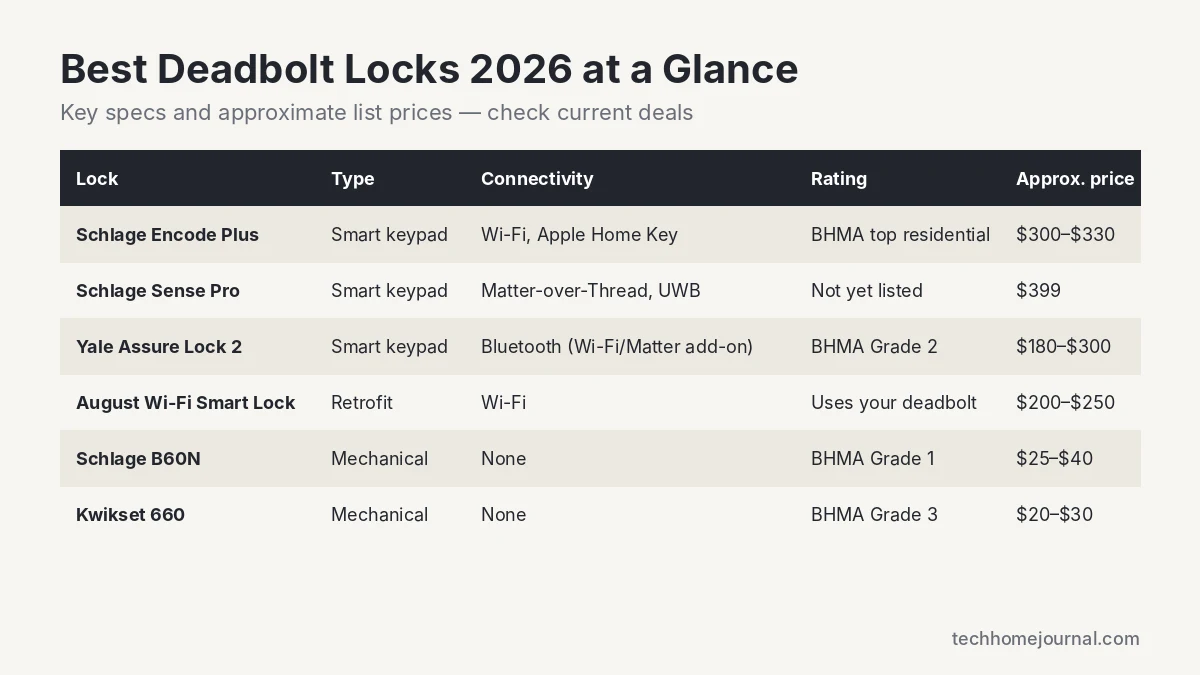
| Lock | Type | Connectivity | Security rating | Approx. price |
|---|---|---|---|---|
| Schlage Encode Plus | Smart keypad | Wi-Fi, Bluetooth, Apple Home Key | Highest BHMA residential rating | $300 to $330 |
| Schlage Sense Pro | Smart keypad | Matter-over-Thread, UWB | Not yet published | $399 |
| Yale Assure Lock 2 | Smart keypad | Bluetooth, optional Wi-Fi/Matter/Z-Wave | Exceeds BHMA Grade 2 | $180 to $300 |
| August Wi-Fi Smart Lock | Retrofit | Wi-Fi, Bluetooth | Uses your current deadbolt | $200 to $250 |
| Schlage B60N | Mechanical | None | BHMA Grade 1 | $25 to $40 |
| Kwikset 660 | Mechanical | None | BHMA Grade 3 | $20 to $30 |
Prices are approximate list prices and change often. Check the retailer for current deals before buying.
Detailed Reviews of the Top Picks
1. Schlage Encode Plus: Best Overall Smart Deadbolt
Connectivity: Wi-Fi + Bluetooth | Codes: up to 100 | Batteries: 4 AA, up to 6 months | Works with: Apple Home, Alexa, Google Assistant
The Encode Plus is the lock we’d put on our own front door. It has Wi-Fi built in, so you don’t need a hub to lock or unlock from anywhere, and it supports Apple Home Key, which means you can tap your iPhone or Apple Watch to open the door like a transit card. According to Schlage, it carries the highest residential BHMA ratings for security, durability and finish.
You get up to 100 access codes, auto-lock with an adjustable delay, and a touchscreen keypad with a fingerprint-resistant coating. A physical key is still included as backup.
- Pros: No hub needed, Apple Home Key, excellent build quality, works with all major voice assistants
- Cons: Expensive, Wi-Fi drains batteries faster than Bluetooth-only locks
2. Schlage Sense Pro: Best for Apple and Matter Homes
Connectivity: Matter-over-Thread, UWB | Codes: up to 250 | Batteries: up to 6 months, USB-C jumpstart | Price: $399
Launched in June 2026, the Schlage Sense Pro is Schlage’s most advanced smart deadbolt. Its big trick is Ultra Wideband (UWB): with a home key in Apple Wallet, the door can unlock as you walk up, without touching your phone. It also uses Matter-over-Thread, so it works with any Matter-compatible platform instead of locking you into one ecosystem.
It stores up to 250 codes and has a USB-C port to jump-start it if the batteries die. Schlage says Samsung Wallet and Google Wallet digital keys are planned later in 2026.
- Pros: Hands-free unlock, future-proof Matter support, USB-C emergency power
- Cons: Very expensive, hands-free features currently work best with iPhone, needs a Thread border router for remote access
3. Yale Assure Lock 2: Best Design and Flexibility
Connectivity: Bluetooth (Wi-Fi, Matter or Z-Wave modules available) | Rating: exceeds BHMA Grade 2 | Batteries: 4 AA
The Yale Assure Lock 2 is one of the slimmest smart deadbolts you can buy, and it’s modular. You can start with a Bluetooth version and add a Wi-Fi, Matter or Z-Wave module later, which makes it a smart pick if you’re not sure which smart home system you’ll end up with. There are keypad, touchscreen and fingerprint versions, plus a keyless option. See the full lineup on Yale’s website.
It’s rated to exceed ANSI/BHMA Grade 2, which is fine for most homes, and supports unlimited user codes and auto-unlock when you arrive.
- Pros: Slim, attractive design, upgradeable connectivity, fingerprint option
- Cons: Grade 2 rather than Grade 1, base Bluetooth model needs an add-on for remote access
4. August Wi-Fi Smart Lock: Best for Renters
Type: retrofit (replaces the inside thumb turn only) | Connectivity: Wi-Fi + Bluetooth | Works with: Alexa, Google Assistant
The August Wi-Fi Smart Lock takes a different approach. It replaces only the thumb turn on the inside of your door, so your existing deadbolt and keys stay exactly as they are. From the outside, nobody can tell you have a smart lock. That makes it perfect for renters and anyone who wants to keep a high-security deadbolt they already own.
It’s also handy for Airbnb hosts: you can send guests temporary digital keys and see an activity log of who came and went. Add the optional keypad if you want code entry.
- Pros: 10-minute install, keeps your keys and deadbolt, compact
- Cons: Security depends on your existing deadbolt, keypad sold separately
5. Schlage B60N: Best Mechanical Deadbolt
Type: mechanical single cylinder | Rating: ANSI/BHMA Grade 1 | Price: about $25 to $40
If you don’t need app control, the Schlage B60N is the easiest recommendation in this guide. It’s a Grade 1 deadbolt, the highest residential rating, and it usually costs less than $40. It’s also a great lock to pair with an August retrofit if you want a smart lock with top-tier hardware underneath.
- Pros: Grade 1 security, cheap, no batteries or apps
- Cons: No remote access or codes
6. Kwikset 660: Best on a Tight Budget
Type: mechanical single cylinder | Rating: ANSI/BHMA Grade 3 | Price: about $20 to $30
The Kwikset 660 is a basic, dependable deadbolt that installs in minutes. It’s rated Grade 3, so we’d use it on a garage entry, shed or interior door rather than your main front door. If your budget allows a few extra dollars, the Grade 1 Schlage B60N is the better buy for exterior doors.
- Pros: Very affordable, easy to install, widely available
- Cons: Grade 3 is the lowest residential rating
ANSI/BHMA Security Grades Explained
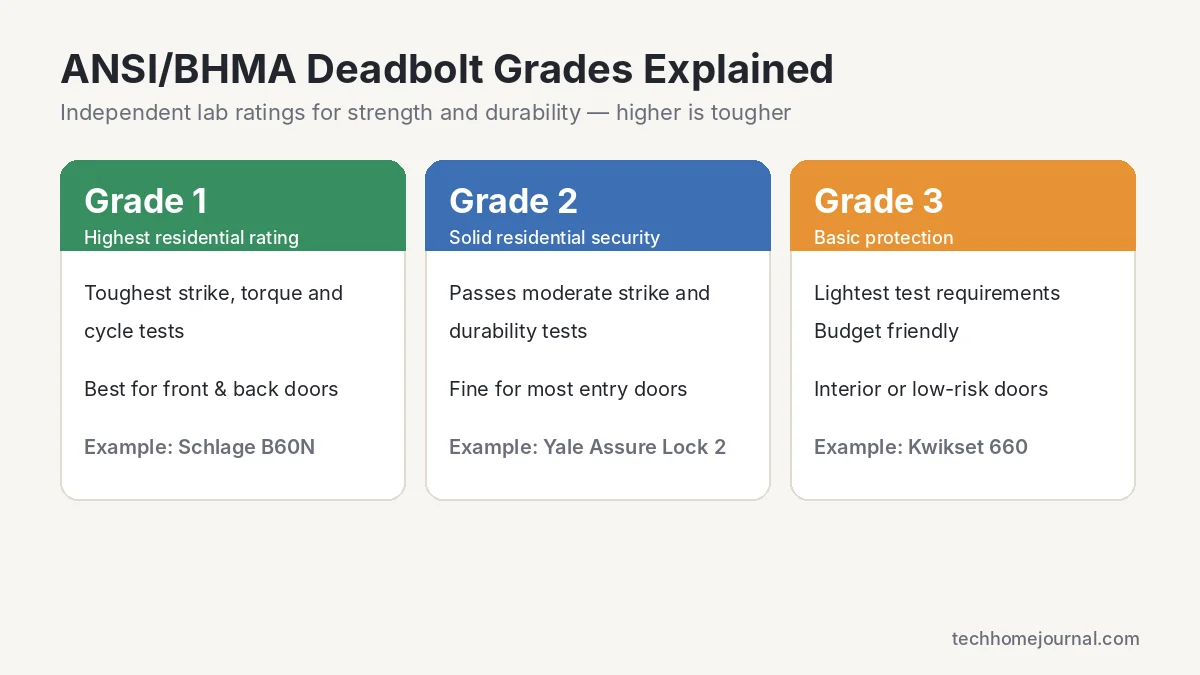
The Builders Hardware Manufacturers Association (BHMA) tests locks to standards set with ANSI. These lab tests check how a lock holds up against strikes, prying, twisting and years of daily use.
- Grade 1: The highest rating, originally meant for commercial buildings. Best choice for your front and back doors.
- Grade 2: Solid residential security that passes moderate strike and durability tests. Fine for most entry doors.
- Grade 3: Basic protection. Good for low-risk doors, but not ideal as your only line of defense.
Many smart locks now use BHMA’s newer residential ratings, which score security, durability and finish separately (for example, AAA is the top score). If a smart lock lists “highest residential rating,” that’s what it means.
Smart vs. Mechanical Deadbolts
Smart deadbolts let you unlock with a code, phone or voice, give temporary access to guests or a dog walker, and check whether you locked the door from anywhere. They’re ideal for busy families, rentals and anyone who’s ever driven back home to check the lock. The trade-offs: they cost more, need batteries, and some features depend on Wi-Fi.
Mechanical deadbolts are cheaper, never run out of battery and have nothing to hack. They’re reliable and simple, but there’s no remote access or activity log.
A popular middle ground is a Grade 1 mechanical deadbolt with a retrofit smart lock like August on top. If you’re building out a full system, our wireless home security system guide and Matter vs Wi-Fi explainer will help you pick a lock that fits the rest of your setup.
What to Look for Before You Buy
- Security rating: Aim for Grade 1 (or the top residential rating) on exterior doors.
- Bolt throw: The bolt should extend a full 1 inch into the frame.
- Smart home match: Choose a lock that works with what you already use, whether that’s Apple Home, Alexa, Google Home or Matter. Our Apple HomeKit guide covers iPhone-friendly options.
- Connectivity: Wi-Fi locks need no hub but use more battery. Bluetooth is efficient but local only. Thread/Matter locks are efficient and remote-ready with a border router.
- Backup entry: Look for a physical key, USB-C jump-start or 9V emergency contacts in case the batteries die.
- Door fit: Check your door thickness (usually 1-3/8″ to 1-3/4″) and backset (2-3/8″ or 2-3/4″).
- Weather: If your door faces direct sun or freezing temperatures, check the operating temperature range.
How to Make Any Deadbolt Stronger
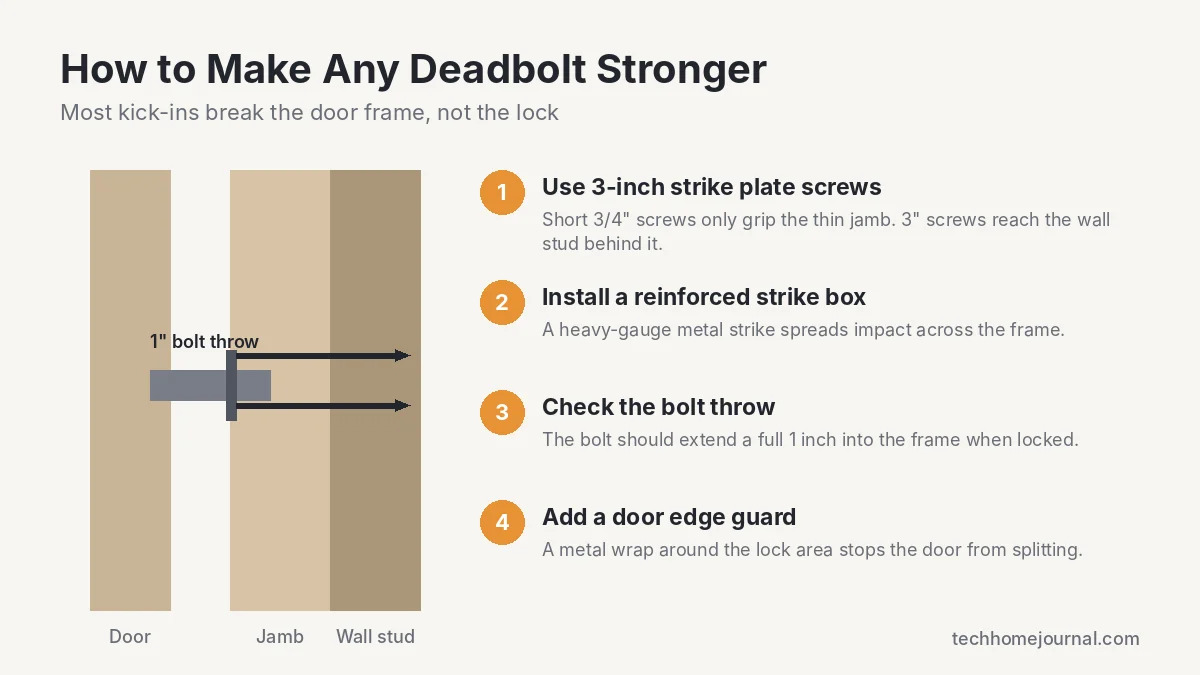
Here’s something lock packaging won’t tell you: most kick-ins don’t defeat the lock. They split the wooden door jamb around the strike plate. A $300 smart lock held in by short screws can fail faster than a $30 lock installed properly.
- Swap in 3-inch screws on the strike plate so they bite into the wall stud, not just the thin jamb.
- Upgrade to a reinforced strike box or full-length strike plate to spread impact across the frame.
- Check the hinges and use at least one long screw per hinge too.
- Add a door edge guard if your door is hollow or the area around the lock is damaged.
Pair your new lock with a video doorbell or outdoor camera for a much stronger setup. See our guides to doorbell cameras with no subscription and the Ring Floodlight Camera.
Installation Tips
Most deadbolts and smart locks install with just a screwdriver in 15 to 45 minutes if your door already has a standard deadbolt hole. Remove the old lock, check the bolt length matches your backset, feed the cable through the door (for smart locks), and screw everything back together. Always test the lock with the door open first, then closed, to make sure the bolt slides smoothly without rubbing.
If the bolt sticks, the strike plate is probably misaligned. Fixing it before you rely on the lock saves your batteries too, since a smart lock motor fighting a tight bolt drains them fast.
Related guides on Tech Home Journal:
- Bluetooth Lock Guide 2026: How It Works & Best Picks
- How to Secure a Sliding Glass Door: Complete 2026 Guide
- Smart Lock vs Traditional Lock: Which Is Safer?
Planning a smart lock along with other devices? Our free smart home cost calculator adds up locks, doorbells, cameras and installation in seconds.
Frequently Asked Questions
What is the most secure deadbolt lock for a home?
For most homes, a Grade 1 deadbolt like the Schlage B60N or a smart lock with the top BHMA residential rating like the Schlage Encode Plus. Installing it with 3-inch strike screws matters just as much as the lock itself.
Are smart locks as secure as regular deadbolts?
A well-made smart lock uses the same kind of steel bolt as a mechanical deadbolt, so it’s just as strong physically. Choose a brand with encrypted connections and regular firmware updates, and use unique access codes.
What happens if a smart lock battery dies?
You’ll get low-battery warnings for weeks beforehand. If it does die, most models have a backup key, 9V contacts or a USB-C port to give it temporary power.
Do smart locks work without Wi-Fi?
Yes. Keypad codes and Bluetooth unlocking work locally. You only lose remote access and real-time alerts until the connection comes back.
Can I install a deadbolt myself?
Yes, if your door already has a deadbolt hole. Most installs take under an hour with a screwdriver. Drilling a new hole is doable with a lock installation kit, but a locksmith is worth it if you’re not confident.
Should renters use a smart lock?
Retrofit locks like the August Wi-Fi Smart Lock are ideal because they keep the existing deadbolt and keys. Always check your lease and get landlord approval first.
Final Verdict
For most people, the Schlage Encode Plus is the best deadbolt lock you can buy in 2026: strong, easy to use and compatible with nearly every smart home. If you’re all-in on Apple or Matter, the Schlage Sense Pro is the most advanced option. Renters should look at the August Wi-Fi Smart Lock, and if you just want maximum strength for little money, the Grade 1 Schlage B60N is hard to beat.
Whatever you choose, spend an extra few dollars on 3-inch screws and a solid strike plate. It’s the cheapest security upgrade you’ll ever make. For more ways to protect your home, read our home security buyer’s guide and our guide to motion sensor alarms.



