

You’re halfway to the airport when the doubt hits: did I lock the front door? A smart lock ends that worry for good. But a smooth install depends on more than the box suggests: how well your door closes, the measurements of the old hole, and how the lock connects to your network.
This guide walks through choosing the right type, checking your door, installing step by step, setting up the app, and fixing the problems people run into most.
Table of Contents
- Quick Answer
- Choose the Right Type of Smart Lock
- Wi-Fi, Bluetooth, Z-Wave or Thread?
- Check Your Door Before You Buy
- Tools You’ll Need
- Step-by-Step Installation
- The Strike Plate Upgrade Most People Skip
- App Setup and Calibration
- Troubleshooting Common Problems
- Smart Lock Security Habits
- Frequently Asked Questions
- Wrapping Up
Quick Answer
Most smart locks replace a standard deadbolt with a screwdriver in about 30 to 60 minutes. Before you buy, make sure your deadbolt slides in without pushing the door, measure the backset (usually 2-3/8 or 2-3/4 inches), and choose a lock that connects to your smart home platform. After installing, update the firmware, calibrate the lock with the door closed, and turn on auto-lock.
Choose the Right Type of Smart Lock
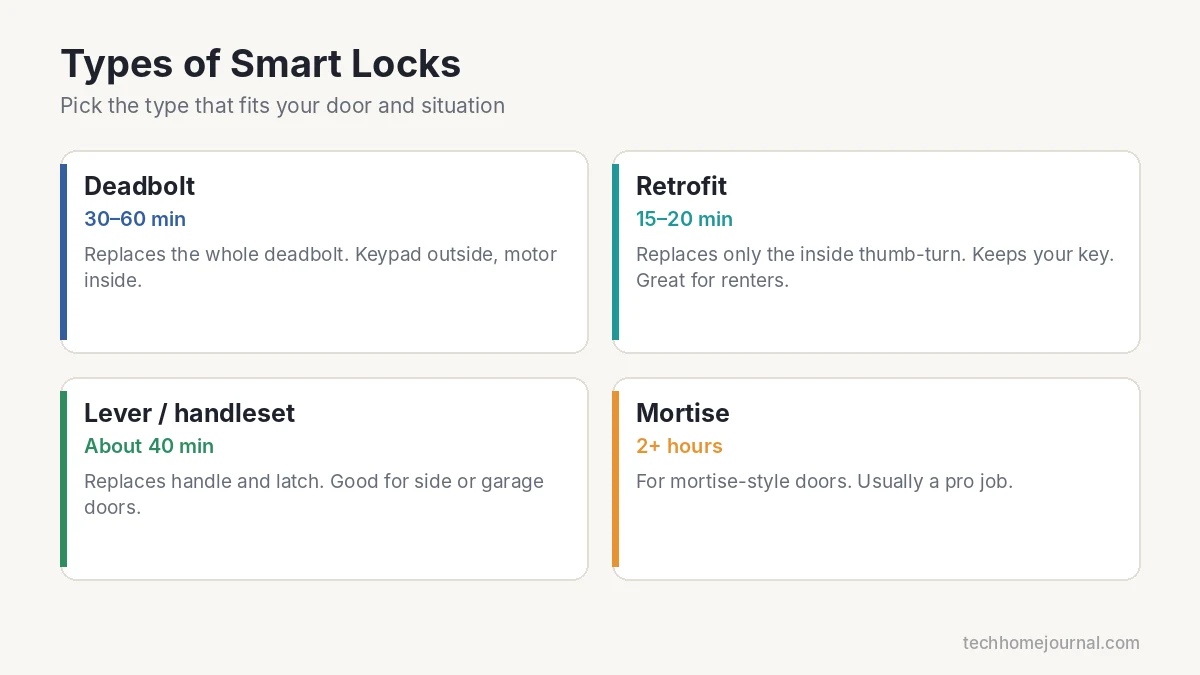
| Type | What it replaces | Skill | Typical time | Best for |
|---|---|---|---|---|
| Full deadbolt replacement | Whole deadbolt, inside and out | Beginner-Intermediate | 30 to 60 min | Homeowners who want a keypad |
| Retrofit | Only the inside thumb-turn | Beginner | 15 to 20 min | Renters; keeps your existing key |
| Smart lever / handleset | Handle and latch | Intermediate | About 40 min | Side, garage or office doors |
| Mortise smart lock | Mortise lock body | Expert | 2+ hours | Some modern and European-style doors |
For front doors, check the lock’s ANSI/BHMA grade. According to This Old House, Grade 1 locks are tested to 800,000 cycles with a 1,200-pound latch bolt strength rating, compared with 400,000 cycles for Grade 2 and 200,000 for Grade 3. Grade 2 is common for homes; Grade 1 is the toughest. Compare options in our best smart lock guide and our best deadbolt locks.
Wi-Fi, Bluetooth, Z-Wave or Thread?
- Wi-Fi: works without a hub and allows remote control, but usually drains batteries faster.
- Bluetooth: works when your phone is nearby. Remote access often needs a bridge. See our Bluetooth lock guide.
- Z-Wave or Zigbee: very efficient and reliable, but needs a compatible hub.
- Thread with Matter: low-power mesh connection through a Thread border router, such as many recent smart speakers and displays. Matter support means the lock can work with Alexa, Google Home, Apple Home and SmartThings.
If you’re unsure about hubs and platforms, read our smart home hub guide first.
Check Your Door Before You Buy
The alignment test
Close the door and lock it with the key. If you have to push, pull or lift the door to get the bolt to slide, fix that first. A small lock motor can’t force a misaligned bolt. It will jam, show errors and drain the batteries quickly. Tightening hinge screws or adjusting the strike plate usually solves it.
Measure the backset
The backset is the distance from the edge of the door to the center of the round lock hole. In the US it’s almost always 2-3/8 inches or 2-3/4 inches. Most smart locks include an adjustable latch, but confirm it before you start.
Check door thickness and hole size
Most locks fit standard doors about 1-3/8 to 1-3/4 inches thick with a 2-1/8-inch bore hole. Thicker doors may need an extension kit. Your lock’s spec sheet lists the exact range.
Tools You’ll Need
- Phillips screwdriver (a hand screwdriver is safer than a drill for small screws)
- Tape measure
- Wood chisel, in case the new latch or strike plate is slightly larger
- Drill with a small bit for pilot holes
- Fresh batteries of the type the maker recommends; lithium AA cells handle cold weather better where they are allowed
- Painter’s tape to hold the outside keypad while you work
Step-by-Step Installation
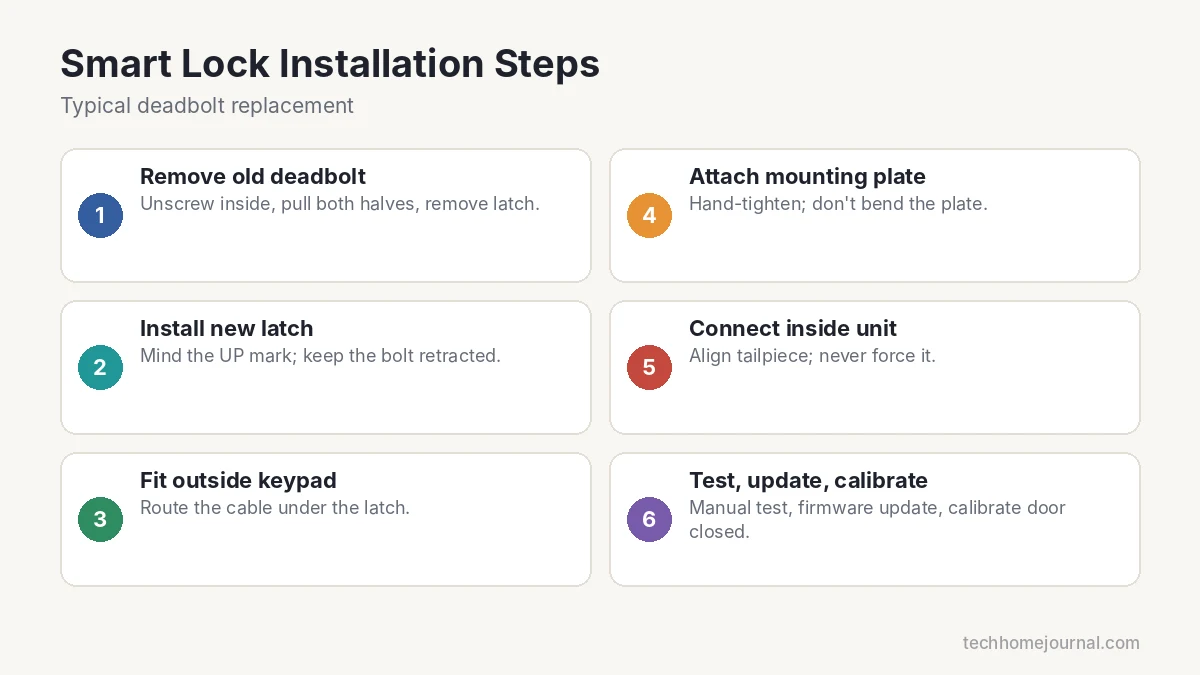
- Remove the old deadbolt. Unscrew the two long screws on the inside, pull off both sides, then remove the latch from the door edge. If paint has sealed the trim, score around it with a utility knife. Keep the old parts in a labeled bag.
- Install the new latch. Note the “UP” or “TOP” mark and keep the bolt retracted while you screw it in. Upside-down latches are a common cause of jams.
- Fit the outside keypad. Feed the thin cable under the latch, not over it. A pinched cable can work for a while and then fail.
- Attach the mounting plate. Tighten screws firmly by hand. Over-tightening can bend the plate and make the motor strain.
- Connect the inside unit. Line up the tailpiece (the flat metal bar) with the motor. If it doesn’t slide in easily, adjust the outside keypad slightly rather than forcing it.
- Insert batteries and test by hand. Lock and unlock manually a few times. The bolt should move smoothly with the door open and closed.
The Strike Plate Upgrade Most People Skip
Many door frames hold the strike plate with short screws that only reach the thin trim. A strong kick can split that wood. Replacing them with 3-inch screws that reach the framing stud behind the jamb makes the door far harder to force open. It costs a few dollars and takes five minutes, and it’s worth doing on any exterior door. For more simple upgrades, see our cheap home security ideas.
App Setup and Calibration
- Add the lock in the maker’s app or your platform app. Many Wi-Fi locks only connect on the 2.4 GHz band. If setup can’t find the lock, check that your network has 2.4 GHz enabled.
- Update the firmware first. Updates often fix motor calibration and security issues.
- Calibrate with the door closed. The lock learns where the bolt stops. If it calibrates against a misaligned strike, it may never report “locked.”
- Set auto-lock for a short delay, such as a few minutes after the door closes.
- Create user codes for family and temporary codes for guests and workers.
Troubleshooting Common Problems
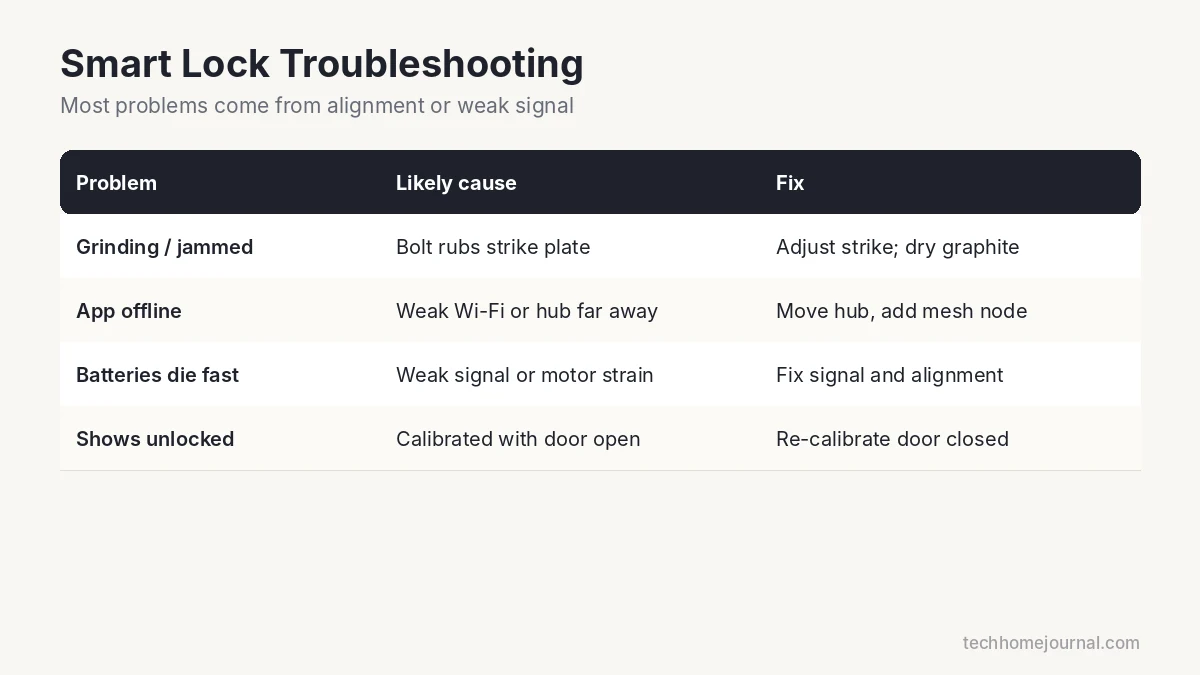
| Problem | Likely cause | Fix |
|---|---|---|
| Motor grinds or “jammed” errors | Bolt rubbing on the strike plate | Adjust the strike; use dry graphite lubricant, not oily sprays |
| App shows offline | Weak Wi-Fi, or Thread/hub too far away | Move the router or hub closer, or add a mesh node |
| Batteries die in weeks | Lock keeps searching for a weak signal, or the motor is straining | Improve the signal and fix door alignment |
| Lock reports unlocked when it’s locked | Calibration done with door open or misaligned | Re-run calibration with the door closed |
Weak signal is the root of many problems. Our home network setup guide shows how to extend coverage to the front door.
Smart Lock Security Habits
- Turn on auto-lock so the door locks itself if you forget.
- Use temporary codes for contractors and guests, and delete them afterward.
- Enable two-step verification on the lock’s app account.
- Know your backup entry. Many locks keep a physical key, and some keypads have contacts for a 9V battery to wake a dead lock. Check your model’s manual.
- Pair it with a camera. A video doorbell lets you see who you’re letting in.
Weighing smart against traditional? Read smart lock vs traditional lock.
Frequently Asked Questions
Can I install a smart lock myself?
Yes. Most deadbolt and retrofit smart locks are designed for DIY installation with a screwdriver and take under an hour.
Will a smart lock work on an older or warped door?
Only after the door closes and locks smoothly. Fix hinge or strike plate alignment first, or the motor will jam and drain batteries.
What happens if the Wi-Fi or power goes out?
Smart locks run on batteries, and keypad codes are stored on the lock, so the keypad and key usually keep working. You lose remote control and alerts until the connection returns.
How long do smart lock batteries last?
It varies by model, connection type and how often the door is used. Thread, Z-Wave and Bluetooth locks generally last longer than Wi-Fi models. A misaligned door shortens battery life a lot.
Can renters install a smart lock?
Retrofit locks are ideal for renters because they only replace the inside thumb-turn and keep the original key. Ask your landlord first.
Are smart locks easy to hack?
Locks from reputable brands use encryption. The bigger risks are weak codes, reused passwords and missing updates. Use strong codes, two-step verification and keep firmware updated.
Wrapping Up
A smart lock install takes a little patience: check the door, measure carefully, mount it gently and calibrate with the door closed. Add longer strike plate screws and turn on auto-lock, and you’ll have a front door that’s both more convenient and more secure. If you’d rather not do it yourself, see our DIY vs professional installation guide.



