

A smart home is simply a home where everyday things like lights, locks, the thermostat and cameras connect to the internet, so you can control them from your phone, by voice, or let them run on their own schedule. That’s it. No wiring degree needed, and you don’t have to buy everything at once.
This plain-English guide explains what a smart home really is, how the pieces talk to each other, what it costs, which devices are worth buying first, and the privacy basics you should know before you start.
Table of Contents
- Quick Answer
- What Makes a Home “Smart”?
- How a Smart Home Works
- Wi-Fi, Zigbee, Z-Wave, Thread and Matter Explained
- Alexa vs Google Home vs Apple Home
- The Best First Smart Home Devices
- How Much Does a Smart Home Cost?
- Real Benefits (and Honest Limits)
- Privacy and Security Basics
- How to Start: A Simple 4-Step Plan
- 5 Easy Routines to Try First
- Frequently Asked Questions
- Final Thoughts
Quick Answer
A smart home is a home with internet-connected devices that you can control remotely and automate. Most people start with a smart speaker, a few smart plugs or bulbs, and a smart thermostat or video doorbell. A useful starter setup can cost under $150, and you can add more devices over time.
What Makes a Home “Smart”?
A regular lamp only does what the switch tells it. A smart lamp can be turned on from your phone, by saying “turn on the living room lamp,” or automatically at sunset. That difference shows up in three levels:

- Remote control. You can control a device from an app, even when you’re away. Example: turning off the porch light from work.
- Automation. Devices follow rules you set once. Example: the hallway light turns on when motion is detected after dark.
- Smart routines. Several devices act together. Example: saying “good night” locks the door, turns off the lights and lowers the thermostat.
You don’t need all three on day one. Most people start with remote control and add automations once they see what’s useful in their own routine.
How a Smart Home Works
Every smart home, from a single smart plug to a fully automated house, is made of the same four parts.
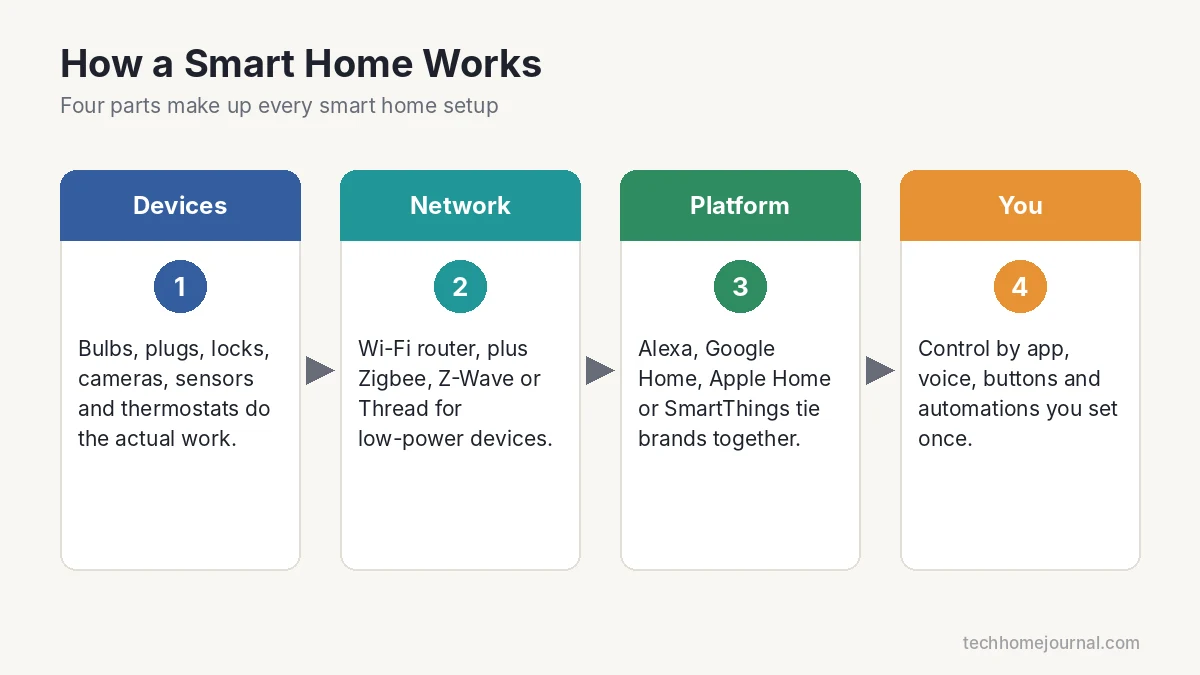
- Devices: the bulbs, plugs, locks, cameras, sensors and thermostats that do the actual work.
- Your network: usually your Wi-Fi router. Some devices use low-power networks like Zigbee, Z-Wave or Thread, which need a hub or “border router.”
- A control platform: Amazon Alexa, Google Home, Apple Home or Samsung SmartThings. This is where devices from different brands meet.
- Your controls: the phone app, voice commands, buttons and automations you create.
Because almost everything runs over your home network, good Wi-Fi coverage matters. If your router struggles to reach the garage or backyard, fix that first. Our home network setup guide walks through it step by step.
Wi-Fi, Zigbee, Z-Wave, Thread and Matter Explained
These are the “languages” smart devices use to talk. You don’t need to master them, but knowing the basics helps you avoid buying something that won’t work with your setup.
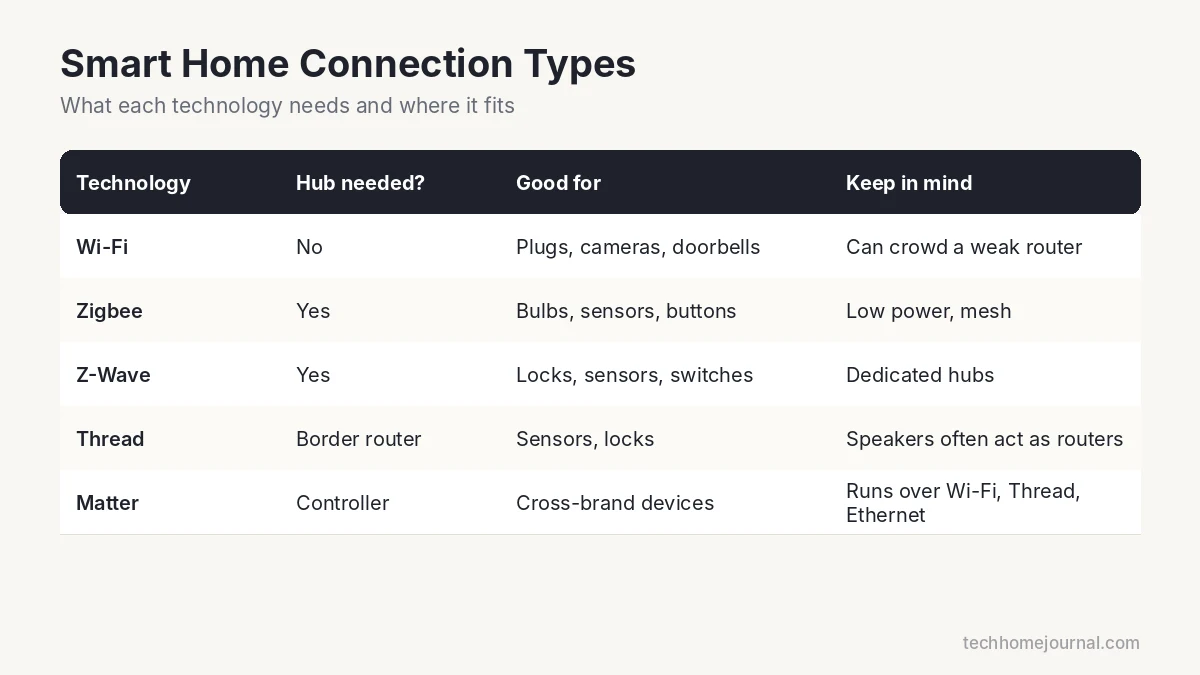
| Technology | Needs a hub? | Good for | Keep in mind |
|---|---|---|---|
| Wi-Fi | No | Plugs, cameras, doorbells, bulbs | Too many devices can crowd a weak router |
| Zigbee | Yes | Bulbs, sensors, buttons | Low power, mesh network |
| Z-Wave | Yes | Locks, sensors, switches | Mostly used with dedicated hubs |
| Thread | Border router | Sensors, locks, newer devices | Many smart speakers and displays act as border routers |
| Matter | Controller | Cross-brand compatibility | A standard that runs over Wi-Fi, Thread and Ethernet |
Matter is the one to watch. It is an industry standard from the Connectivity Standards Alliance, backed by Amazon, Apple, Google and Samsung SmartThings. A Matter-certified device is designed to work with all of those platforms, which makes future upgrades much easier. For a deeper comparison, read Matter vs Wi-Fi.
Alexa vs Google Home vs Apple Home
Choosing one main platform keeps everything in one app and makes automations simpler. Here’s a quick way to decide:
- Amazon Alexa: the widest device support and affordable Echo speakers. A safe choice if you’re unsure.
- Google Home: a natural fit for Android users and people who already use Google services.
- Apple Home: best for iPhone households. It needs a home hub (Apple TV or HomePod) for remote access and automations. See our Apple HomeKit guide.
- Samsung SmartThings: more advanced automations and wide brand support, popular with tinkerers.
A smart speaker often doubles as your controller. Compare options in our best smart speaker guide. If you prefer to avoid hubs entirely, there are good options too, covered in smart home without a hub.
The Best First Smart Home Devices
Start with devices that solve a real everyday problem. These five give the most value for beginners:
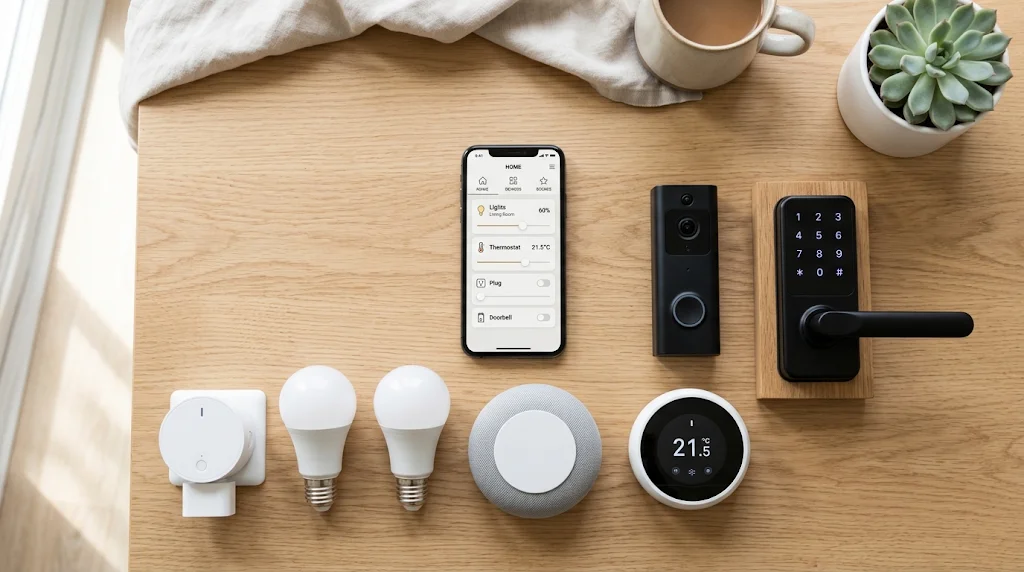
- Smart plug. The cheapest way to start. It makes any lamp or fan smart, and some models measure energy use. Learn more in what is a smart plug.
- Smart bulbs. Schedules, dimming and warm or cool light from your phone.
- Smart thermostat. Heating and cooling is the biggest energy cost in most homes. ENERGY STAR notes it is almost half of the average household energy bill, so this device usually pays back the most. See our best smart thermostat picks.
- Video doorbell. See and talk to visitors from anywhere. Many models don’t need a monthly plan, as shown in our no-subscription doorbell guide.
- Smart lock. No more hidden keys. Give temporary codes to family, cleaners or guests.
For a bigger shopping list, see our best smart home devices for beginners.
How Much Does a Smart Home Cost?
You can spend $30 or $3,000. It all depends on how many rooms and devices you include. These are rough ranges for DIY setups; prices change often, so check current deals.
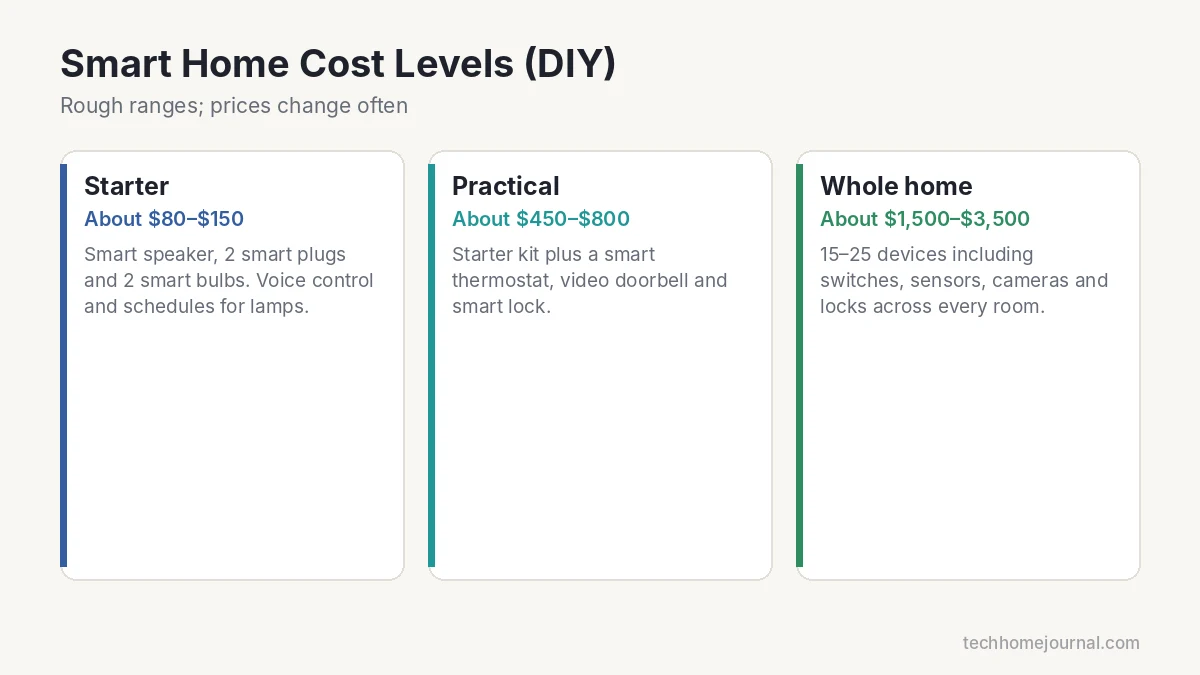
| Level | Typical devices | Approx. cost |
|---|---|---|
| Starter | Smart speaker + 2 plugs + 2 bulbs | $80 to $150 |
| Practical | Starter + thermostat + video doorbell + smart lock | $450 to $800 |
| Whole home | 15 to 25 devices: switches, sensors, cameras, locks | $1,500 to $3,500 |
Professional installation adds labor costs, mostly for wired items like thermostats, switches and cameras. Our DIY vs professional installation cost guide breaks those numbers down. Want a number for your own home? Try our free smart home cost calculator.
Real Benefits (and Honest Limits)
What you gain:
- Convenience: lights, heating and locks that follow your routine without you thinking about them.
- Energy savings: schedules and auto-off rules cut wasted electricity, especially for heating, cooling and lighting.
- Security and peace of mind: alerts when someone is at the door, a leak is detected, or the garage is left open.
- Accessibility: voice control helps older family members and anyone with limited mobility.
Honest limits:
- Devices depend on your Wi-Fi and, for many, the maker’s cloud service.
- Some cameras and doorbells push monthly subscriptions for video history.
- Mixing many brands without a plan can mean juggling several apps.
Privacy and Security Basics
Connected devices should be treated like small computers. The UK government’s guide on using smart devices safely recommends a few simple habits:
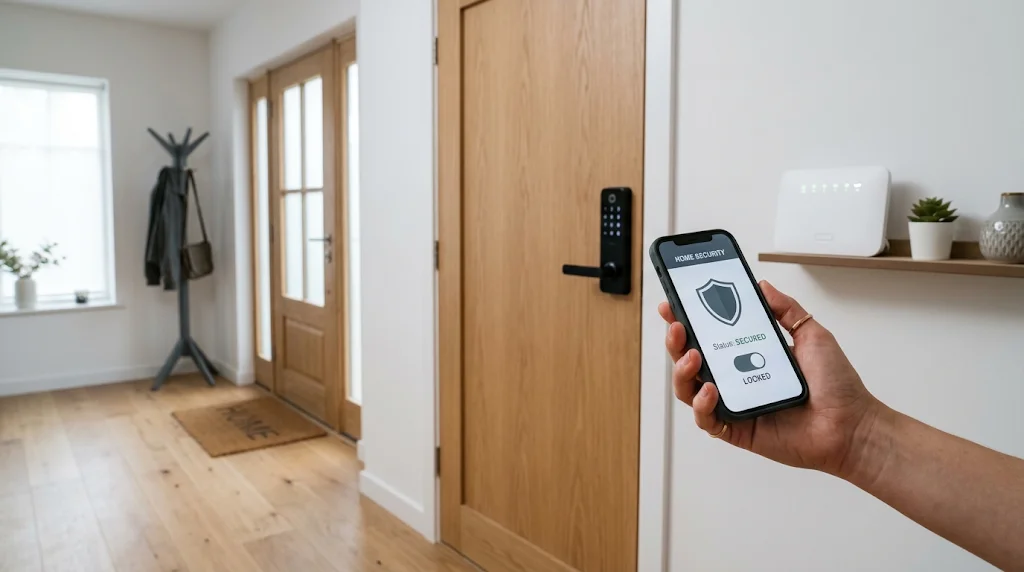
- Change any default or easy-to-guess password right away.
- Turn on two-step verification for your device accounts.
- Keep devices and apps updated, ideally with automatic updates.
- Only keep camera and microphone features on where you need them.
Protecting your router is just as important. Read how to secure your home Wi-Fi network before adding cameras or locks.
How to Start: A Simple 4-Step Plan
- Pick your platform. Alexa, Google Home or Apple Home, based on the phone and speaker you already use.
- Solve one problem. Lights left on? Start with plugs or bulbs. High bills? Start with a thermostat. Missed deliveries? Start with a doorbell.
- Buy Matter-certified when possible. It keeps your options open if you switch platforms later.
- Add one routine at a time. Begin with a “good night” or “leaving home” routine, then grow from there.
If you’d like a central controller from the start, compare options in our smart home hub guide or our explainer on smart home controllers.
5 Easy Routines to Try First
- Good morning: lights fade up slowly, the thermostat warms the house and the news plays on your speaker.
- Leaving home: lights turn off, the door locks and the thermostat switches to away mode.
- Arriving home: porch light turns on after dark when your phone gets close.
- Good night: one voice command checks the locks, turns off downstairs lights and lowers the heat.
- Vacation mode: lamps turn on and off at varied times so the house looks occupied.
Want lights that come on by themselves outside? A dusk to dawn light bulb is the simplest option, and a motion sensor light adds security.
Frequently Asked Questions
What is a smart home in simple words?
It’s a home where devices like lights, locks and the thermostat connect to the internet so you can control them from your phone or by voice, and set them to run automatically.
Do I need a hub for a smart home?
Not always. Many Wi-Fi devices work on their own with an app. A hub or smart speaker becomes useful when you want Zigbee, Z-Wave or Thread devices, or more advanced automations.
What is the cheapest way to start a smart home?
A smart plug or two and a smart speaker. That’s often under $80 and gives you voice control and schedules for lamps and small appliances.
Does a smart home work without internet?
Some features do. Many devices need internet for remote control and voice assistants, while some platforms and Matter devices can run local automations. Basic switches and locks usually still work by hand.
Is a smart home safe from hackers?
It can be very safe if you use strong unique passwords, two-step verification, regular updates and a secured Wi-Fi network. Buying from well-known brands with a track record of updates also helps.
Can renters have a smart home?
Yes. Plugs, bulbs, battery cameras, smart speakers and some retrofit smart locks need no wiring and move with you when you leave.
Final Thoughts
A smart home isn’t a gadget showroom. It’s a few well-chosen devices that quietly take care of small daily jobs. Pick one platform, start with one real problem, and grow one routine at a time. Within a few weeks you’ll wonder how you managed without it.



