

You bought a smart light switch, turned off the breaker, pulled the old switch out of the wall and found only two black wires and a bare copper ground. No white neutral wire in sight. This is incredibly common, especially in homes built before the mid-1980s, and it’s why the no neutral smart switch exists.
In this guide, we’ll explain what a neutral wire is, how to check whether you have one, how no-neutral smart switches work (and their quirks), the best options in 2026, and a simple wiring guide to get yours installed safely.

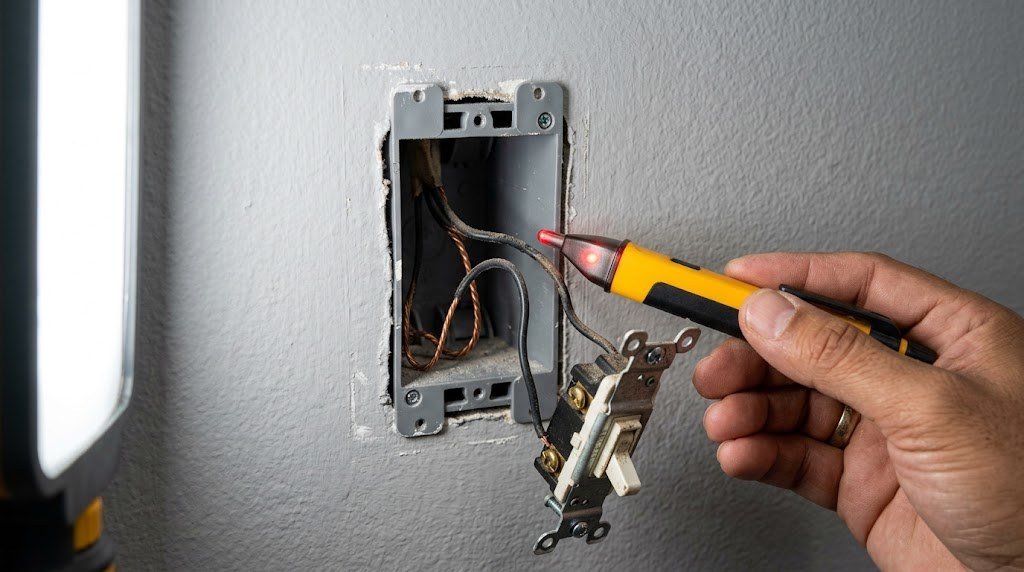
Safety first: Always turn off power at the breaker and confirm it’s off with a voltage tester before touching any wires. If you’re unsure about your wiring, especially with old aluminum wiring or multi-switch setups, hire a licensed electrician. Local codes vary.
Table of Contents
- What Is a Neutral Wire and Why Do Smart Switches Need It?
- How to Tell If You Have a Neutral Wire
- How Does a No Neutral Smart Switch Work?
- The Best No Neutral Smart Switches in 2026
- Comparison Table
- No Neutral Alternatives Worth Considering
- How to Install a No Neutral Smart Switch
- Troubleshooting Common Problems
- Smart Lighting Ideas Once It’s Installed
- How to Choose the Right No Neutral Switch
- Frequently Asked Questions
- Final Verdict
What Is a Neutral Wire and Why Do Smart Switches Need It?
In a standard light circuit, power travels from your breaker panel on the hot (line) wire, through the light bulb, and back to the panel on the neutral wire. The neutral is usually white.
A traditional light switch doesn’t need the neutral. It simply interrupts the hot wire, breaking the circuit when the light is off. But a smart switch is a small computer with a wireless radio, and it needs a little power at all times, even when the light is off, so it can listen for commands from your phone or voice assistant. Most smart switches get that constant power by connecting to both hot and neutral.
In many older homes, electricians ran the neutral directly to the light fixture and never brought it into the switch box. That’s where no-neutral smart switches come in.
How to Tell If You Have a Neutral Wire
- Turn off the power at the breaker for that light.
- Remove the switch plate and unscrew the switch from the box.
- Look inside the box. Ignore the wires attached to your switch for a moment and look at the back of the box.
- Neutral present: You’ll usually see a bundle of white wires joined with a wire nut at the back of the box, not connected to the switch.
- No neutral: You’ll see only the wires connected to the switch (typically two black, or one black and one white marked with black tape) plus a bare copper or green ground.
Watch out: A white wire connected directly to your old switch is usually NOT a neutral. In older “switch loop” wiring, a white wire is often used as a hot conductor. Use a voltage tester or ask an electrician if you’re not sure.
How Does a No Neutral Smart Switch Work?
A no-neutral smart switch gets its standby power by letting a tiny amount of current “leak” through the light bulb back to the neutral at the fixture. With old incandescent bulbs, this was easy, because the bulb’s filament passed that small current without glowing.
LED bulbs are different. They’re so efficient that even a tiny trickle of current can make them:
- Flicker or glow faintly when the switch is off
- Buzz at low brightness
- Fail to turn on reliably at low dimming levels
To deal with this, most no-neutral switches have a minimum load requirement (for example, at least 10 to 25 watts of LED lighting), and many brands offer a small bypass or load capacitor that installs at the light fixture to absorb the leak current. Lutron’s LUT-MLC is a popular example.
The good news: modern no-neutral switches from Lutron and others handle LEDs much better than early models did, and many work with a single dimmable LED bulb.
The Best No Neutral Smart Switches in 2026
1. Lutron Caséta Smart Dimmer (No Neutral): Best Overall
Lutron Caséta is the gold standard for no-neutral smart lighting. Its dimmers don’t need a neutral, work with a wide range of dimmable LED bulbs and have a reputation for rock-solid reliability. Caséta uses Lutron’s own Clear Connect wireless technology rather than Wi-Fi, so it doesn’t clog your network and it’s very fast.
You’ll need the Lutron Smart Bridge (included in starter kits), which connects to Apple Home, Alexa, Google Home, SmartThings and more. You can also add wireless Pico remotes to create “virtual” three-way switches without running new wires.
- Protocol: Lutron Clear Connect
- Hub: Lutron Smart Bridge required
- Works with: Apple Home, Alexa, Google Home, SmartThings, Home Assistant
- Type: Dimmer (on/off switches available)
Good for: Anyone who wants the most reliable no-neutral option.
Keep in mind: The bridge adds cost, and the paddle design isn’t for everyone. Lutron’s Diva Smart dimmer offers a more traditional look with the same technology.
2. Inovelli Blue Series 2-in-1: Best for Zigbee Smart Homes
The Inovelli Blue Series is a favorite with smart home enthusiasts. It works with or without a neutral, can be set as a dimmer or an on/off switch, and uses Zigbee, so it connects to Home Assistant, Hubitat, SmartThings and other Zigbee hubs. It also has a customizable LED notification bar and supports multi-tap scenes (for example, double tap up to turn on every light in the room).
- Protocol: Zigbee 3.0
- Hub: Zigbee hub required
- Works with: Home Assistant, Hubitat, SmartThings, Alexa (with compatible Echo)
- Type: Dimmer or on/off
Good for: Tech-savvy users building a local, customizable smart home.
Keep in mind: In no-neutral mode, you may need a bypass for small LED loads.
3. Aqara Smart Wall Switch H1 (No Neutral): Best Budget Zigbee Option
Aqara’s H1 no-neutral switch is affordable, sleek and works well in Apple Home, Alexa and Google Home through an Aqara hub. It’s an on/off switch rather than a dimmer, and it’s available in single and double rocker versions.
- Protocol: Zigbee
- Hub: Aqara hub required
- Works with: Apple Home, Alexa, Google Home (via hub)
- Type: On/off
Good for: Apple Home users and anyone already using Aqara sensors.
Keep in mind: No dimming, and you’ll need an Aqara hub if you don’t already have one.
4. Leviton Decora Smart No-Neutral Dimmer: Best Traditional Brand
Leviton’s no-neutral dimmer comes as a kit with a Wi-Fi bridge that handles the connection to your network. It works with Alexa, Google Home and Apple Home, and Leviton’s Decora style matches the paddle switches already in millions of homes.
- Protocol: Wi-Fi bridge
- Hub: Leviton bridge required (included in kit)
- Works with: Alexa, Google Home, Apple Home
- Type: Dimmer
Good for: Homes with Decora-style switches that want a matching look.
Keep in mind: The kit is more expensive than single switches.
5. GE Cync No Neutral Smart Dimmer: Best No-Hub Option
If you don’t want a hub at all, GE Cync’s no-neutral switches connect directly to Wi-Fi. They work with Alexa and Google Assistant and are among the most affordable no-neutral options. Some LED setups need Cync’s small load adapter at the fixture to prevent flicker.
- Protocol: Wi-Fi (and Bluetooth for setup)
- Hub: None
- Works with: Alexa, Google Assistant
- Type: Dimmer or on/off (toggle version available)
Good for: Simple setups and people who don’t want a hub.
Keep in mind: Bulb compatibility is pickier than Lutron’s, and there’s no native Apple Home support.
Comparison Table
| Switch | Protocol | Hub needed | Dimmer | Best for |
|---|---|---|---|---|
| Lutron Caséta | Clear Connect | Smart Bridge | Yes | Reliability |
| Inovelli Blue 2-in-1 | Zigbee | Zigbee hub | Yes | Enthusiasts |
| Aqara H1 No Neutral | Zigbee | Aqara hub | No | Budget, Apple Home |
| Leviton Decora No-Neutral | Wi-Fi bridge | Leviton bridge | Yes | Decora style |
| GE Cync No Neutral | Wi-Fi | No | Yes | No hub |
No Neutral Alternatives Worth Considering
If you don’t want to touch wiring at all, or you rent, there are good alternatives:
- Smart bulbs + battery remote: Use smart bulbs like Philips Hue and stick a wireless dimmer remote (like the Hue Dimmer Switch) on the wall beside or over your existing switch.
- Switch covers: Products like Lutron Aurora mount over a toggle switch, keep it permanently on and control smart bulbs with a rotary dial.
- Run a neutral: An electrician can sometimes pull a new cable with a neutral to the switch box. It costs more but gives you full choice of smart switches.
- Smart relay at the fixture: Some relays install inside the light fixture box, where the neutral is available, and work with your existing switch.
How to Install a No Neutral Smart Switch
Always follow the manufacturer’s instructions for your specific model. This is the general process for a single-pole switch (one switch controls one light).
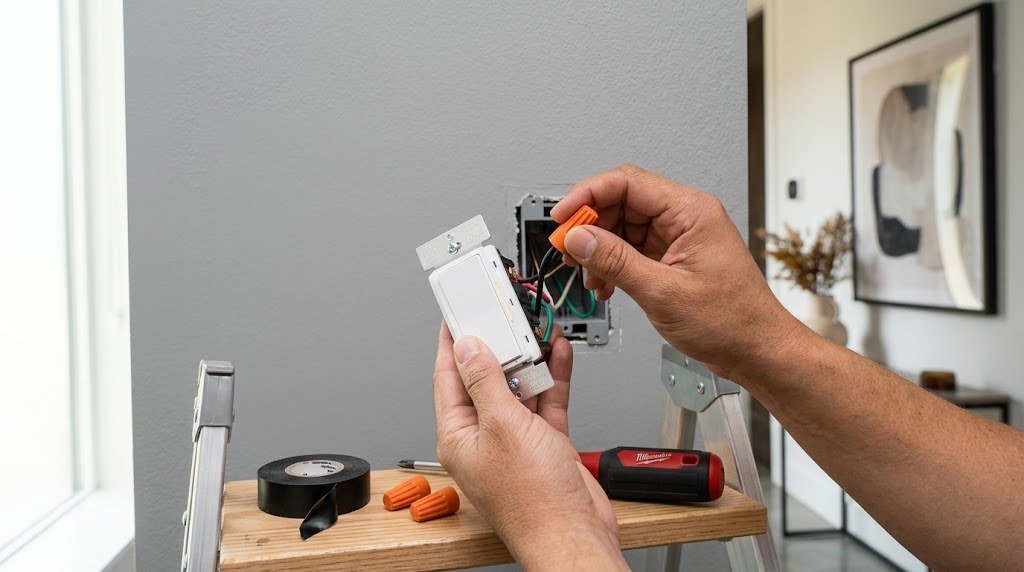
- Turn off the breaker and confirm the power is off with a non-contact voltage tester.
- Remove the old switch and take a photo of the wiring before disconnecting anything.
- Identify the wires. You should have a line (hot from the panel), a load (going to the light) and a ground. If you’re not sure which black wire is line, carefully separate them, restore power, test with a voltage tester, then turn power off again.
- Connect the ground (bare copper or green) to the switch’s green ground screw or wire.
- Connect the line and load wires to the matching terminals or wires on the smart switch using wire nuts.
- Fold the wires carefully into the box and screw the switch in place. Smart switches are deeper than regular ones, so take your time.
- Restore power and set up the switch in its app or hub.
- Test your bulbs. If LEDs flicker or glow when off, install the manufacturer’s bypass or load capacitor at the fixture, or use more compatible bulbs.
What about three-way switches?
If two switches control the same light, you have a three-way circuit. Most no-neutral systems handle this with a wireless companion switch or remote. With Lutron Caséta, for example, you install the smart dimmer at one location and replace the other switch with a Pico remote, or cap the traveler wires according to Lutron’s instructions. Check your brand’s three-way guide, and call an electrician if the wiring is confusing.
Troubleshooting Common Problems
| Problem | Likely cause | Fix |
|---|---|---|
| LED flickers or glows when off | Leak current through the bulb | Add a bypass/load capacitor or use more wattage |
| Light buzzes at low brightness | Bulb and dimmer mismatch | Try a different dimmable LED or raise low-end trim |
| Switch won’t pair | Weak signal or wrong hub | Move the hub closer or add a repeater |
| Light won’t turn on at low levels | Load below minimum | Increase load or adjust low-end trim in the app |
Smart Lighting Ideas Once It’s Installed
- Scenes: Create a “movie night” scene that dims living room lights to 20%.
- Schedules: Turn porch lights on at sunset and off at midnight.
- Away mode: Randomize lights while you’re traveling to make the home look occupied.
- Voice control: “Hey Google, dim the hallway to 50%.”

For a wider look at smart switches, including models that need a neutral, see our best smart switches buying guide. If you’re deciding whether to use Zigbee, Wi-Fi or Matter devices, read our Matter vs Wi-Fi smart home guide and our best smart hub guide.
How to Choose the Right No Neutral Switch
Before you buy, answer these four questions. They’ll narrow your options quickly.
Which smart home platform do you use?
If you live in Apple Home, Lutron Caséta and Aqara are the easiest fits. Alexa and Google users have more choice, including GE Cync. If you run Home Assistant or Hubitat, Inovelli and Lutron both integrate locally and work even when the internet is down.
Do you need dimming?
Dimmers are great for living rooms, bedrooms and dining rooms. For closets, garages and hallways, a simple on/off switch is usually enough and tends to be less fussy with LED bulbs.
What bulbs are in the fixture?
Check that your bulbs are labeled “dimmable” if you’re using a dimmer, and add up the total wattage. A single 5W LED bulb is the hardest load for a no-neutral switch. Fixtures with three or more LED bulbs usually work without any extra hardware.
Are you willing to add a hub?
Hub-based systems (Lutron, Zigbee, Aqara) are typically more reliable and responsive than Wi-Fi switches, and one hub can run dozens of devices. If you only want one or two smart switches, a Wi-Fi model without a hub may be simpler.
Related guides on Tech Home Journal:
- Best Smart Light Bulbs for Your Living Room in 2026: The Complete Buying Guide
- What Is a Smart Plug? How It Works, Uses Buying Tips (2026)
- Dusk to Dawn Light Bulb Guide 2026: How They Work Best Picks
- Motion Sensor Light Guide 2026: Types, Brightness Best Picks
- How to Lower Your Electricity Bill at Home: 30+ Tips That Work (2026)
- Doorbell Wiring Diagram: Step by Step Guide for 1 or 2 Doorbells (2026)
Official resources: Lutron Caseta smart switches and dimmers · Ground and neutral wires explained
Frequently Asked Questions
Can I install a smart switch without a neutral wire?
Yes. No-neutral smart switches from Lutron Caséta, Inovelli, Aqara, Leviton and GE Cync are designed for switch boxes without a neutral wire. They draw a small amount of standby power through the light itself.
Why does my LED light flicker with a no neutral switch?
A no-neutral switch sends a small current through the bulb to power itself. Efficient LED bulbs can react to that current by flickering or glowing. Adding a bypass or load capacitor at the fixture, increasing the total load or switching to a more compatible bulb usually fixes it.
Is a no neutral smart switch safe?
Yes, when installed correctly and used with compatible bulbs. Choose a UL-listed switch, follow the instructions and turn off power at the breaker before installing. If you’re not comfortable with wiring, hire an electrician.
Which is better: Lutron Caséta or a Wi-Fi no neutral switch?
Lutron Caséta is generally more reliable and handles LED bulbs better, but it needs the Lutron Smart Bridge. Wi-Fi switches like GE Cync don’t need a hub, but they can be pickier about bulbs and add load to your Wi-Fi network.
Can I use a white wire as a neutral?
Not always. In older switch loops, the white wire is often used as a hot conductor and isn’t a neutral. Never assume a white wire connected to your old switch is a neutral. Test it or ask an electrician.
Do no neutral switches work with Apple Home?
Some do. Lutron Caséta, Aqara H1 (via an Aqara hub) and Leviton’s no-neutral kit work with Apple Home. Inovelli works through Home Assistant or other hubs that bridge to Apple Home.
Final Verdict
Not having a neutral wire doesn’t mean you can’t have smart lighting. For most homes, the Lutron Caséta no-neutral dimmer is the most reliable choice, with excellent LED compatibility and broad smart home support. Enthusiasts will love the Inovelli Blue Series for its Zigbee customization, Apple fans can grab the affordable Aqara H1, and if you don’t want a hub, GE Cync is the simplest route.
Check your wiring carefully, stay safe with the breaker off, and you’ll have smarter lights in under an hour.



