
Many security cameras look cheap until you notice the monthly plan needed to save video. The good news: plenty of cameras record locally to a microSD card, a hub or a recorder, so you keep motion alerts and playback without paying every month.
This guide explains how no-subscription cameras work, every local storage option, how much footage each can hold, which brands support free local recording, and what you give up compared with a cloud plan.
Table of Contents
- Quick Answer
- How Cameras Work Without a Subscription
- Local Storage Options Compared
- How Much Storage Do You Need?
- Brands That Support Free Local Recording
- Best No-Subscription Setups by Home Type
- How to Set Up Local Recording
- Camera Placement Tips
- What You Gain and What You Give Up
- Buying Checklist
- How to Protect Local Footage
- Frequently Asked Questions
- Bottom Line
Want an exact number for your setup? Try our free security camera storage calculator.
Quick Answer
Security cameras without a subscription save video to local storage such as a microSD card, a base station (hub) or a network video recorder (NVR). You still get live view, motion alerts and playback in the free app. Brands like Reolink, eufy, Blink (with Sync Module 2), Lorex and TP-Link Tapo support local recording. A cloud plan mainly adds off-site backup and some extra smart features.
How Cameras Work Without a Subscription
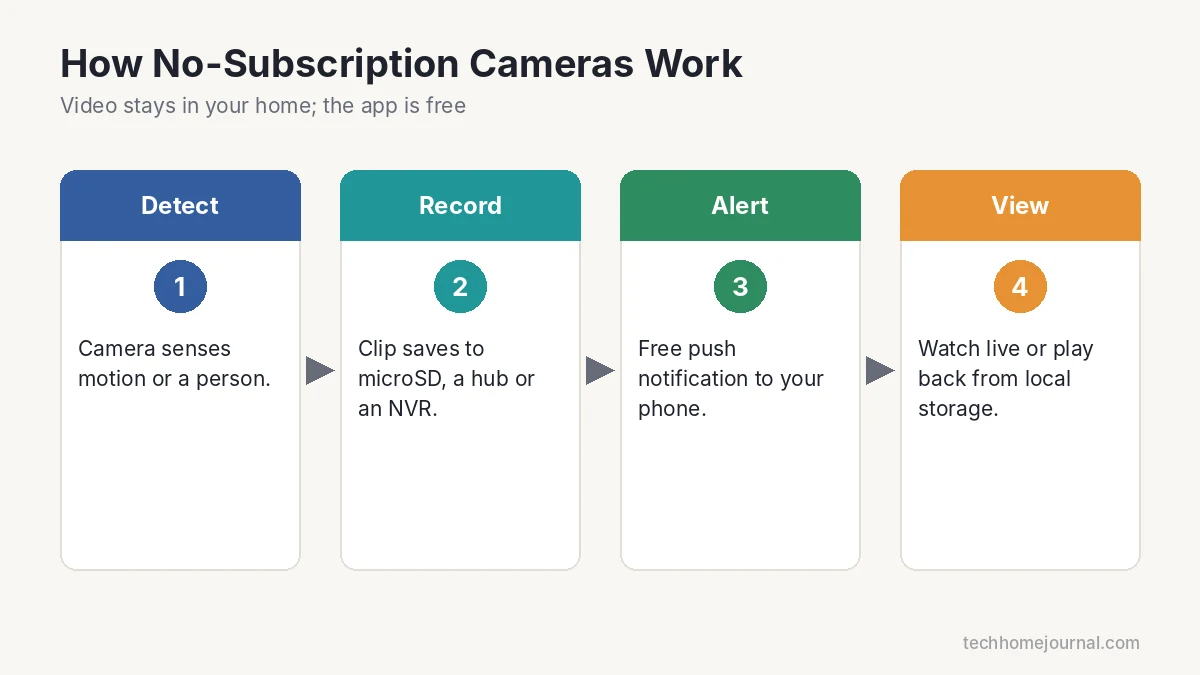
- The camera detects motion or a person.
- It records a clip, or records 24/7 on wired systems, to local storage.
- Your phone gets a push notification through the brand’s app.
- You watch live or play back the clip from that local storage.
Because the video stays on a device in your home, there’s no monthly charge to keep it. The trade-off is that if the storage device is stolen or damaged, the footage goes with it.
Local Storage Options Compared
| Option | How it works | Best for | Watch out for |
|---|---|---|---|
| microSD card in camera | Each camera saves its own clips | 1–3 cameras, renters | Card can be stolen with the camera |
| Hub / base station | Wireless cameras save to a box inside your home | Battery and Wi-Fi cameras | Hub must stay powered and online |
| USB drive on a sync module | Clips save to a USB stick on the hub | Blink users | Drive size limits |
| NVR with hard drive | Wired cameras record to one recorder | 4+ cameras, 24/7 recording | Needs cabling and setup |
A few examples from manufacturer documentation:
- Reolink says its Home Hub and NVRs work without monthly fees. The Home Hub supports up to 8 Wi-Fi cameras with microSD storage, while NVRs record wired PoE cameras to hard drives for 24/7 recording.
- eufy advertises no monthly fee for its features, with local storage on cameras or HomeBase, and says HomeBase S380 storage expands up to 16TB with an added drive.
- Blink cameras can save clips to a USB drive on the Sync Module 2 without a subscription. Blink notes drives over 256GB or under 1GB aren’t recognized.
How Much Storage Do You Need?
Storage depends on resolution, compression (H.264 or H.265), how much motion you get and whether you record 24/7. A simple way to estimate continuous recording:
GB per day ≈ bitrate in Mbps × 10.8
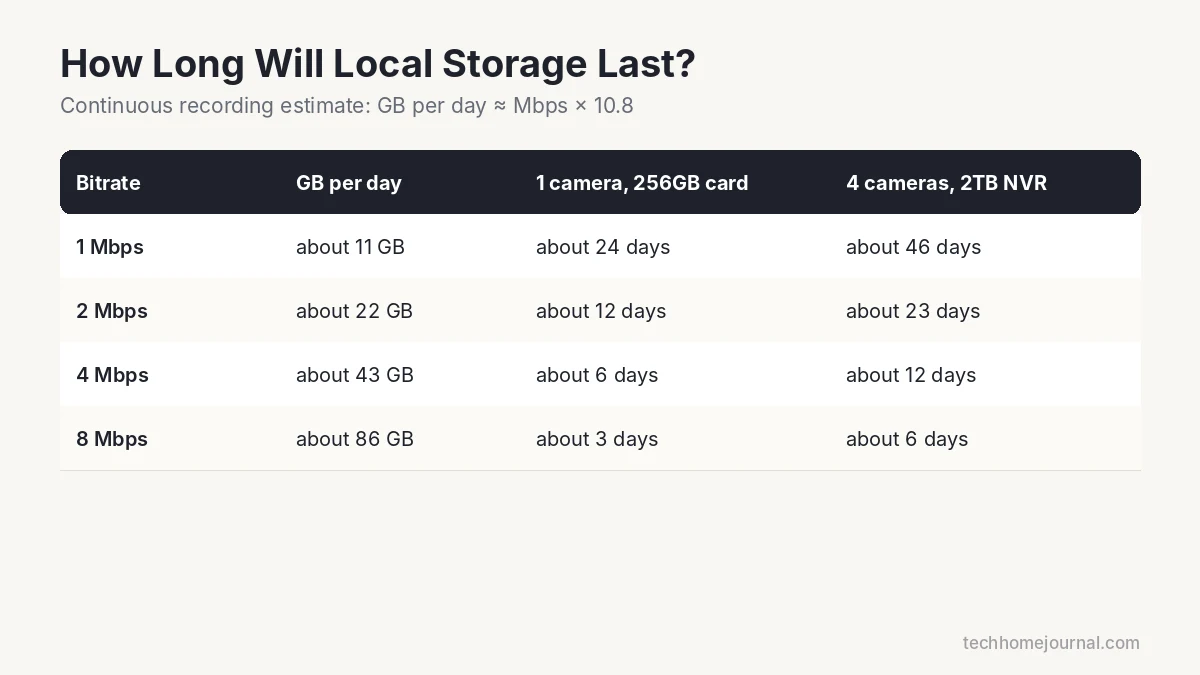
So a camera recording at 2 Mbps uses roughly 22GB a day. Four of those on a 2TB drive would hold about three weeks of 24/7 video. Motion-only recording uses far less, so a 128GB card in a single camera can often hold weeks of clips. Treat these as estimates and check the bitrate in your camera’s settings.
Brands That Support Free Local Recording
- Reolink: wide range from budget Wi-Fi cameras to 4K PoE systems, microSD on many models, Home Hub and NVR options.
- eufy: local storage on many cameras and on HomeBase, with no monthly fee for core features.
- Blink: local clip storage with a Sync Module 2 and USB drive.
- Lorex and Annke: NVR and DVR bundles designed for local recording.
- TP-Link Tapo: affordable indoor and outdoor cameras, many with microSD slots.
Before you buy, read exactly what the free tier includes for that specific model. Some brands keep person detection or longer clip history behind a plan. For doorbells specifically, see our guide to doorbell cameras with no subscription.
Best No-Subscription Setups by Home Type
Apartment or rental
One or two indoor cameras with microSD cards. No drilling, nothing to leave behind when you move. See our pick for an indoor camera that blends in.
Typical house
Three or four battery or solar cameras on a hub covering the front door, back door, driveway and garage. A solar-powered camera avoids recharging.
Larger property or 24/7 recording
A wired PoE camera kit with an NVR. One cable powers each camera and carries video, and the recorder stays safely indoors. Our PoE camera system guide walks through planning and setup.
How to Set Up Local Recording
- Format the microSD card in the camera app (not on your computer) and use a high-endurance card made for continuous recording.
- Choose the recording mode: motion/event clips save space; 24/7 recording needs a hub or NVR with a hard drive.
- Set activity zones to ignore the street and trees, and turn on person detection if available.
- Turn on loop recording so the oldest footage is overwritten automatically.
- Test playback from your phone on mobile data to confirm remote access works.
Camera Placement Tips
- Cover every entry point first: front door, back door, garage and ground-floor sliding doors.
- Mount outdoor cameras high enough to resist tampering but low enough to capture faces.
- Avoid pointing cameras straight at bright lights or the sun, which washes out the image.
- Add lighting so night footage shows color and detail, not just shapes.
- Respect privacy: aim cameras at your own property, not into neighbors’ windows.
What You Gain and What You Give Up
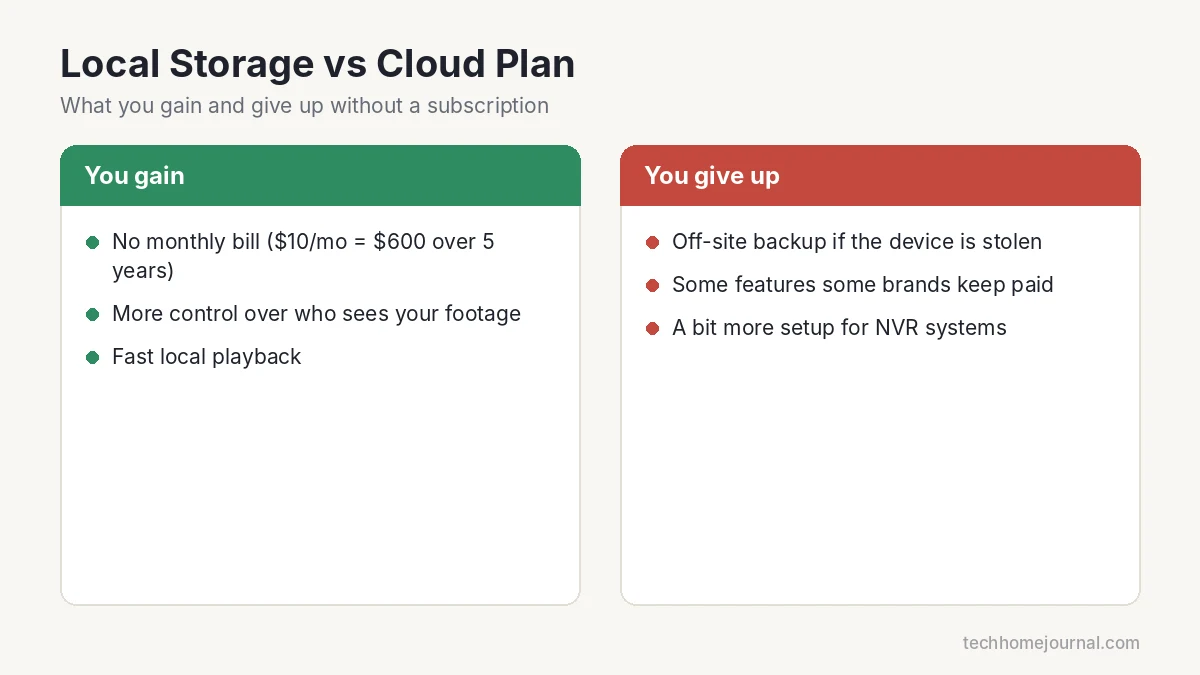
You gain:
- No monthly bill. A $10-a-month plan is $120 a year, or $600 over five years.
- More control over who can access your footage.
- Fast local playback, even if your internet upload speed is slow.
You give up:
- Off-site backup if a burglar takes the camera, card or recorder.
- Some advanced features that certain brands only offer with a plan.
- A bit more setup, especially for NVR systems.
Buying Checklist
- Free features: live view, motion alerts and local playback without limits.
- Storage: microSD slot (and maximum card size), hub or NVR support.
- Smart detection: person and vehicle detection cut false alerts. Check that it works without a plan.
- Weather rating: IP65 or higher for outdoor cameras.
- Power: battery, solar, plug-in or PoE, based on where it mounts.
- Night vision and resolution for the distance you need to cover.
- Smart home support such as Alexa or Google Home, if you want camera views on a display.
How to Protect Local Footage
- Put the hub or NVR in a closet or hidden spot, not next to the front door.
- Mount cameras out of easy reach, or use anti-theft mounts.
- Use overlapping cameras so one camera records another.
- Use strong passwords and two-step verification, and keep firmware updated. Our guide on securing your home Wi-Fi covers the network side.
- If you want a backup, some brands let you add an optional cloud plan later or export clips to your computer.
Good lighting also improves night footage and deters intruders. A motion sensor light or dusk to dawn bulb near each camera helps a lot.
Frequently Asked Questions
Are there security cameras that work without a subscription?
Yes. Many cameras from Reolink, eufy, Blink (with Sync Module 2), Lorex and TP-Link Tapo record to local storage and send free motion alerts.
How long can a camera store video without a subscription?
It depends on storage size, resolution and whether you record motion clips or 24/7. A microSD card can hold days to weeks of motion clips; an NVR with a large drive can hold weeks of continuous video.
Is local storage safer than cloud storage?
It’s more private because video stays in your home. The risk is physical theft or damage, which you can reduce by hiding the recorder and using overlapping cameras.
Do I still get motion alerts without a plan?
With most brands that support local storage, yes. Check whether smart person detection is included free on your model.
Can I view my cameras away from home without paying?
Usually yes, through the brand’s free app. Remote viewing doesn’t require a cloud recording plan on most no-subscription systems.
Which is better: microSD or NVR?
microSD is simplest for one to three cameras. An NVR is better for four or more cameras, 24/7 recording and keeping video safe indoors.
Bottom Line
You don’t need a monthly plan to protect your home. For a couple of cameras, microSD storage is easy and cheap. For a whole house, a hub or a wired NVR system gives you more storage and better protection for your footage. Check exactly what each brand includes for free, place your recorder somewhere safe, and you’ll have solid security with no monthly bill.