

Govee lights are everywhere: behind TVs, along gaming desks, wrapped around bedroom ceilings and, increasingly, clipped permanently under house eaves for holiday and everyday lighting. The brand built its reputation on colourful, affordable RGBIC LED strip lights, and it has grown into one of the biggest names in smart lighting with TV backlights, light panels, floor lamps, neon rope lights and permanent outdoor lights.
That growth also makes Govee confusing. There are dozens of products, several generations of strip lights, Wi-Fi and Bluetooth versions, Matter and non-Matter models, and a lot of marketing terms like RGBIC, RGBWW, DreamView and AI Lighting Bot. This guide explains what Govee lights are, which products are worth buying, how to choose between them, how they work with Alexa, Google Home and Apple Home, and how to make colourful lighting look stylish rather than garish, especially in a calm, Scandinavian-style room. We have not tested these products ourselves; this guide is based on manufacturer information and published specifications.
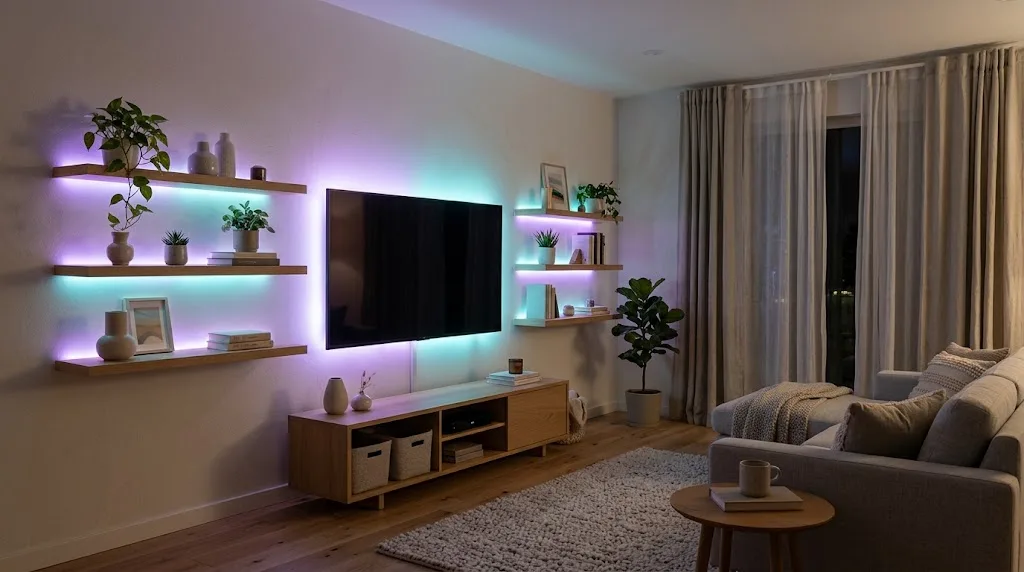
Table of Contents
- What Are Govee Lights?
- Govee Lights Lineup at a Glance
- Best Govee Strip Lights
- Govee TV Backlights and Sync Boxes
- Govee Light Panels, Neon Rope and Lamps
- Govee Smart Bulbs
- Govee Outdoor and Permanent Lights
- Govee App, DreamView and Smart Home Compatibility
- Govee Lights Ideas Room by Room
- Govee Buying Tips
- How to Make Govee Lights Look Stylish
- Installing Govee Strip Lights Properly
- Govee vs Philips Hue vs Nanoleaf
- Govee Lights Energy Use and Safety
- Govee Lights Troubleshooting
- Are Govee Lights Worth It?
- Frequently Asked Questions About Govee Lights
- Final Verdict
What Are Govee Lights?
Govee is a smart home brand founded in 2017 that specialises in affordable smart lighting. Its products are controlled through the Govee Home app, and most also work with Amazon Alexa and Google Assistant. Newer models increasingly support Matter, the cross-platform smart home standard, which allows control from Apple Home, Google Home, Alexa and SmartThings.
Govee’s signature feature is RGBIC, which stands for RGB with an independent control chip. Traditional RGB strips can only show one colour at a time along the whole length. RGBIC strips are divided into segments that can each display a different colour, enabling rainbow effects, flowing animations and gradients. Many newer Govee products add dedicated white LEDs (RGBWW or RGBICWW) so they can produce a cleaner, more natural white light.
Govee Lights Lineup at a Glance
| Product type | Examples | Best for | Approx. price range |
|---|---|---|---|
| LED strip lights | RGBIC Strip Lights, Strip Light 2 Pro, COB Strip Light 2 / 2 Pro | TV backlighting, shelves, desks, coves | $20–$170 |
| TV backlights | Envisual TV Backlight with camera, AI Sync Box kits | Lighting that matches on-screen colours | $70–$250 |
| Light panels | Glide Hexa, Hexa Light Panels, Glide Wall Light | Decorative wall art, gaming rooms | $100–$300 |
| Neon rope lights | Neon Rope Light 2 | Curved shapes, signs, outlining furniture | $80–$150 |
| Floor and table lamps | Floor Lamp 2, Table Lamp | Corner lighting with colour effects | $80–$150 |
| Smart bulbs | Govee Smart Bulbs (Matter versions available) | Lamps and fixtures | $10–$20 per bulb |
| Outdoor lights | Permanent Outdoor Lights 2 / 2 Pro, string lights, path and spot lights | Rooflines, gardens, holidays | $100–$800 |
Prices are approximate list prices; Govee discounts frequently, especially in the run-up to the holidays, so check current deals on Govee’s official store.
Best Govee Strip Lights
Strip lights are still Govee’s core product and the easiest way to start.
Govee RGBIC LED Strip Lights (basic)
The entry-level RGBIC strips are inexpensive and available in long lengths. They are ideal for bedrooms, gaming setups and kids’ rooms where colour effects matter more than perfect white light. Most use Wi-Fi and Bluetooth and work with Alexa and Google Assistant.
Pros: very affordable, colourful segment effects, long lengths available.
Cons: white light is less natural than RGBWW models, visible dots on reflective surfaces.
Govee Strip Light 2 Pro
The Strip Light 2 Pro is a step up, adding dedicated white LEDs for better whites, Matter support and more refined colour mixing. It is a good choice when you want a strip that looks good in everyday warm white and still offers colour effects for movie nights or parties.
Pros: better white light, Matter support, smoother gradients.
Cons: more expensive than basic strips.
Govee COB Strip Light 2 and 2 Pro
COB (chip-on-board) strips pack LEDs so densely that the light appears as a continuous line rather than individual dots. Govee’s latest COB Strip Light 2 Pro uses 1,344 LEDs per metre with CRI 92 and up to about 540 lumens per metre in white mode, according to launch coverage from Matter Alpha. The 5-metre Pro model is priced around $170, with the standard COB Strip Light 2 around $100.
Pros: dot-free light, high colour accuracy, great for visible installations.
Cons: premium price compared with standard strips.
For a broader look at choosing strip lights, including power supplies and adhesives, see our guide to the best smart lighting for a living room.
Govee TV Backlights and Sync Boxes
If you want lighting that reacts to what is on screen, Govee’s TV backlights are among its most popular products. Govee offers two approaches:
- Camera-based backlights (such as the Envisual range) use a small camera mounted on the TV to read the colours on screen and mirror them on an RGBIC strip behind the TV. They work with any source but depend on camera position and room lighting.
- Sync boxes (the AI Sync Box kits) sit between your HDMI sources and the TV, reading the signal directly for more accurate colour matching.
Behind-TV lighting also acts as bias lighting, reducing the contrast between a bright screen and a dark wall, which many people find easier on the eyes during long viewing sessions. If you are planning a full TV setup, our guide to TV streaming apps is a useful companion.
Tip: For a calm living room, set the backlight to a static warm white or soft neutral for everyday viewing, and save the colour-matching mode for films, sports and games.
Govee Light Panels, Neon Rope and Lamps
Glide Hexa and light panels
Govee’s hexagonal and wall light panels are decorative pieces that double as ambient lighting. They are popular in gaming rooms, streaming setups and kids’ bedrooms. In a minimalist living room they can easily look busy, so consider a small cluster in a neutral tone rather than a large rainbow wall.
Neon Rope Light 2
The Neon Rope Light 2 is a flexible silicone tube that can be shaped into curves, words and outlines. Newer versions support Matter. It works well tracing the back of a shelf, the outline of a headboard or a curved wall feature.
Floor Lamp 2 and table lamps
Govee’s floor lamps are slim corner lamps that throw coloured or white light up the wall. They are an easy way to add a coloured accent without installing anything, and they double as reading lights in warm white.
Govee Smart Bulbs
Govee also sells affordable smart bulbs, including Matter-compatible versions. They are a budget-friendly alternative to Philips Hue for lamps and ceiling fixtures, especially if you already use the Govee app for strips. Hue still has the edge for large whole-home systems thanks to its Zigbee bridge, but Govee bulbs are fine for a few rooms. Our smart light bulb buying guide compares the options.
Govee Outdoor and Permanent Lights
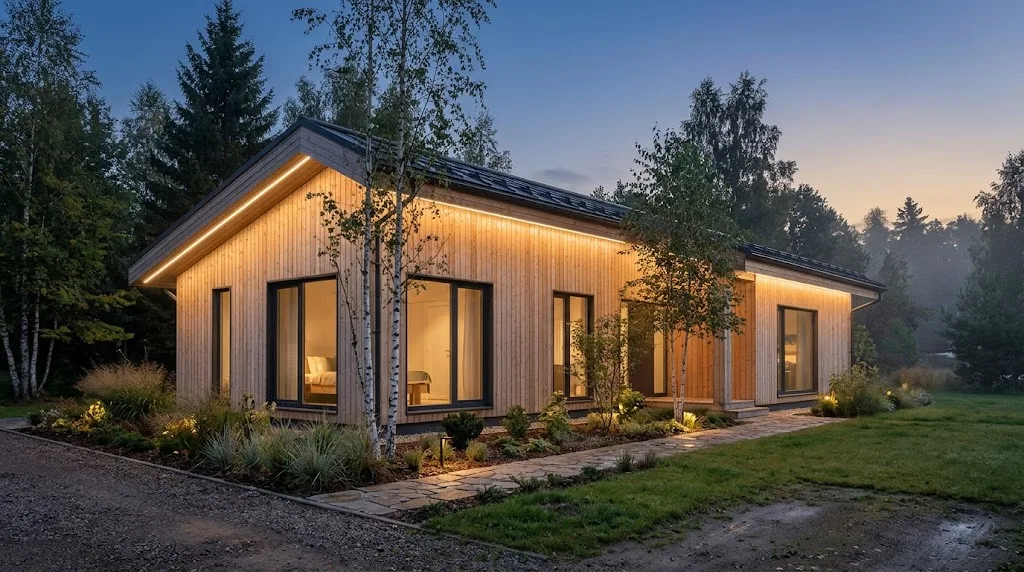
Govee’s Permanent Outdoor Lights clip under eaves or along rooflines and stay up all year. You can set warm white for everyday accent lighting, then switch to colour themes for holidays, sports games or parties without climbing a ladder.
The latest Permanent Outdoor Lights 2 Pro add dual lighting zones (up and down), RGBICWW LEDs for better white, and AI-generated scenes. Launch pricing was about $500 for a 100-foot kit and $800 for a 200-foot kit, with frequent discounts since. Govee also sells outdoor string lights, path lights, spotlights and wall lights, many with IP65 weather resistance.
If you are planning outdoor lighting for security as well as looks, combine permanent lights with motion-activated fixtures. See our guides to motion sensor lights and solar motion sensor lights.
Govee App, DreamView and Smart Home Compatibility
All Govee lights run through the Govee Home app. Key features include:
- Scenes and effects: hundreds of preset animations and colour scenes.
- Music sync: lights react to music through the built-in microphone or app audio.
- DreamView: groups multiple Govee devices so they sync together, for example a TV backlight, floor lamp and light bars all following the same on-screen colours.
- AI Lighting Bot: generates custom scenes from a text description.
- Schedules and timers: turn lights on at sunset, fade them at bedtime.
| Platform | Support |
|---|---|
| Amazon Alexa | Most Wi-Fi Govee lights |
| Google Assistant / Google Home | Most Wi-Fi Govee lights |
| Apple Home | Matter-compatible models |
| SmartThings | Many models, Matter models more fully |
| Matter | Newer models such as Strip Light 2 Pro, Neon Rope Light 2 and Matter bulbs |
If you are new to Matter, our Matter vs Wi-Fi smart home guide explains why it matters for long-term compatibility, and the Connectivity Standards Alliance Matter page has the official background.
Govee Lights Ideas Room by Room
Living room
Run a Strip Light 2 Pro or COB strip behind the TV and along the top of a bookcase, set to warm white most evenings. Add a floor lamp in a corner for colour accents during movie nights. Keep panels to a small cluster on one wall so the room stays calm.
Bedroom
A warm strip under the bed frame or behind a headboard makes a soft night light. Use schedules to fade lights to amber at bedtime and off when you sleep. Avoid bright blue and white light late in the evening.
Kitchen
Under-cabinet strips light the worktop and look great on a glossy backsplash if you use COB strips or a diffuser channel. Choose a neutral or warm white for cooking and save colours for parties.
Home office and gaming setup
Light bars behind a monitor, a strip under the desk and a few hexagon panels make a classic gaming setup. Bias lighting behind the monitor reduces eye strain during long sessions.
Kids’ rooms
Colourful panels and rope lights are fun, and schedules can create a gentle bedtime routine. Mount lights and cables out of reach and keep power supplies ventilated.
Outdoors
Permanent lights along the roofline, path lights along the garden and spotlights on trees create depth. Use warm white for everyday use and themed colours for holidays and celebrations.
Govee Buying Tips
- Check the Wi-Fi band: most Govee devices need 2.4 GHz Wi-Fi.
- Look for “Matter” on the box if you use Apple Home or want long-term cross-platform support.
- Prefer RGBWW, RGBICWW or COB models if you care about natural white light.
- Measure before you buy and remember corners, outlet positions and where the controller will sit.
- Compare bundles: Govee often sells kits with extra lengths, connectors or sync boxes at a discount.
- Buy during sales: Govee discounts heavily around Black Friday and the holidays.
Plan your lighting in seconds
How to Make Govee Lights Look Stylish
Govee lights can look amazing or cheap, and the difference is mostly in how you use them. A few principles help, especially in a calm Scandinavian-style space:
- Hide the source. Light the wall, not your eyes. Mount strips behind the TV, under shelves, behind headboards or in coves so you see the glow but not the LEDs.
- Default to warm white. Use 2700K–3000K for everyday evenings and keep colour scenes for special moments.
- Limit the palette. Two or three related colours, such as amber and soft pink or teal and deep blue, look more deliberate than a full rainbow.
- Lower the brightness. Accent lighting should be dimmer than your main lights. Twenty to forty percent is often enough.
- Use diffusers. Aluminium channels with frosted covers or COB strips eliminate visible dots on glossy surfaces.
- Automate it. Schedule lights to fade on at sunset and off at bedtime so they feel natural rather than like a gadget you play with.
For more styling ideas, see our guides on Scandinavian living room decor and small living room decor ideas on a budget.
Installing Govee Strip Lights Properly
Most complaints about Govee strips come down to installation rather than the product.
- Clean the surface with isopropyl alcohol and let it dry.
- Measure and plan corners first; use the included connectors or Govee’s corner pieces.
- Only cut strips at the marked cut points, and remember RGBIC strips cannot always be reconnected after cutting without the right connectors.
- Press the adhesive firmly along the whole length and use the included mounting clips on textured walls.
- Keep the controller and power supply accessible for resets.
- Do not exceed the recommended length per power supply.
Govee vs Philips Hue vs Nanoleaf
| Feature | Govee | Philips Hue | Nanoleaf |
|---|---|---|---|
| Price | Low to medium | High | Medium to high |
| Colour effects | Excellent RGBIC segment effects | Good, more subtle | Excellent for panels |
| White light quality | Good on RGBWW/COB models | Excellent | Good |
| Ecosystem | Huge product range | Most mature whole-home system | Strong in panels and Thread |
| Hub | Not required (Wi-Fi) | Bridge recommended | Not required; Thread border router helps |
| Best for | Budget colour lighting and TV backlights | Whole-home reliable smart lighting | Decorative panels and Thread homes |
Govee is the value choice for colourful lighting. Hue is the premium choice for reliable, whole-home white and colour lighting. Nanoleaf is strongest for decorative panels and Thread-based setups.
Govee Lights Energy Use and Safety
LED strips use very little electricity. A typical 5-metre strip draws somewhere around 10 to 30 watts at full brightness, and much less when dimmed. Running a strip for four hours every evening usually costs only a few dollars a year. The U.S. Department of Energy notes that quality LEDs use far less energy and last much longer than incandescent lighting.
For safety, use only the supplied power adapter, avoid covering the power supply with fabric or insulation, keep indoor strips away from water, and choose IP65-rated products for outdoor use. Check strips occasionally for damaged adhesive or exposed wiring.
Govee Lights Troubleshooting
| Problem | Likely cause | Fix |
|---|---|---|
| Lights will not connect to Wi-Fi | 5 GHz-only network or weak signal | Use a 2.4 GHz network, move closer to the router or add a mesh node |
| Only part of the strip lights up | Loose connector or damaged section after cutting | Reseat connectors; check the cut point and replace the damaged segment |
| Colours look wrong at the end of the strip | Voltage drop on long runs | Shorten the run or use a separate power supply as Govee recommends |
| Strip peeling off | Dusty or textured surface | Clean with alcohol, use mounting clips or an aluminium channel |
| Music sync not reacting | Microphone too far from speakers or sensitivity too low | Move the controller closer or raise sensitivity in the app |
| Device missing in Alexa or Google | Account link or device name issue | Re-link the Govee skill or re-add via Matter |
Most problems are connection or installation issues rather than faulty LEDs. If you reset a device, remove it from the Govee app first, then pair it again. Matter devices can usually be shared from one platform to another without a full reset.
Are Govee Lights Worth It?
For colourful accent lighting at a reasonable price, yes. Govee’s range is broad enough that you can light a TV, desk, bedroom, kitchen and the outside of your home from one app, and its newer RGBWW, COB and Matter models have closed much of the quality gap with more expensive brands. If you want mainly white, whole-home lighting with rock-solid reliability, a Zigbee system like Philips Hue may still suit you better. Many homes end up with both: Hue bulbs for main lighting and Govee strips for colour and effects.
Frequently Asked Questions About Govee Lights
Do Govee lights need Wi-Fi?
Many Govee lights work over Bluetooth for basic control from a nearby phone, but Wi-Fi is needed for remote control, voice assistants, schedules when you are away and most smart features. Govee lights use 2.4 GHz Wi-Fi.
Do Govee lights work with Apple HomeKit?
Matter-compatible Govee models can be added to Apple Home. Older non-Matter models do not support HomeKit natively.
Can you cut Govee LED strip lights?
Yes, at the marked cut lines. Cut sections usually cannot be reused unless you buy compatible connectors, and some RGBIC strips lose segment effects on the cut piece.
Are Govee lights good quality?
Govee offers good value. Its newer RGBWW, COB and Pro models have noticeably better white light and colour accuracy than its entry-level strips. For the best white light quality, choose COB or RGBWW models.
How long do Govee lights last?
LED lights typically last tens of thousands of hours. In practice, adhesive and power supplies are more likely to fail before the LEDs themselves.
Can I leave Govee lights on all night?
Yes, they use little power and are designed for long use, but ensure the power supply is ventilated. A schedule that turns them off at bedtime is a better habit.
Final Verdict
Govee lights are the easiest and most affordable way to add colour, mood and personality to a home. Start with a Strip Light 2 Pro or a COB strip behind the TV or under shelves, set it to warm white most evenings, and enjoy colour scenes for films, games and parties. Add a TV backlight with a sync box if you watch a lot of content, and consider Permanent Outdoor Lights if you decorate for holidays every year. Choose Matter-compatible models whenever possible so your lights work across Alexa, Google Home and Apple Home for years to come.



