

Most people assume a floodlight camera is just a porch light with a lens bolted on. It isn’t. The wiring requirements, the field of view, the subscription you’ll need and the way it talks to your other smart devices all matter more than the brightness number on the box.
This guide walks through what actually matters when you buy a Ring floodlight camera: the current models and their real specs, power options, mounting height, light color, motion settings, storage costs and installation. And if your home leans toward a clean, Scandinavian-style exterior, we’ll also cover how to make the hardware blend in instead of looking like a surveillance appliance bolted to your eaves.
Table of Contents
- Ring Floodlight Camera Models Compared (2026)
- Why Floodlight Cameras Beat Standalone Options
- Wired vs. Plug-In Power: The Real Trade-Off
- Field of View and Mounting Height
- Light Output and Color Temperature
- Motion Detection: Zones, Pets, and False Alerts
- Video Quality, Subscription and Storage
- Smart Home Integration
- Weatherproofing and Climate Considerations
- Installation: What to Check Before You Mount It
- Matching the Hardware to a Scandinavian Exterior
- Pros and Cons of a Ring Floodlight Camera
- Choosing the Right Fit for Your Home
- Frequently Asked Questions
Ring Floodlight Camera Models Compared (2026)
Ring currently sells two main floodlight families. Both use two adjustable LED light panels rated at 2,000 lumens with a warm 3000K color, a 105 dB siren, two-way talk and customizable motion zones. The big differences are video resolution, motion detection hardware and power options. You can see the full lineup on Ring’s official website.
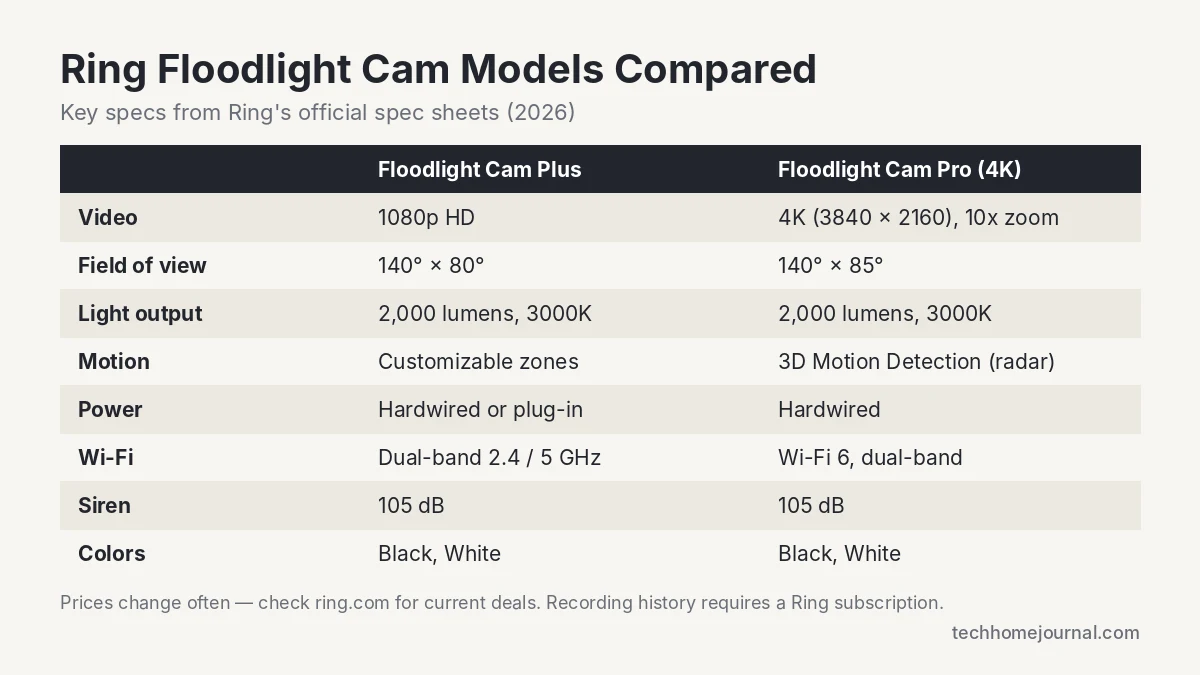
| Feature | Floodlight Cam Plus | Floodlight Cam Pro (4K, 2nd Gen) |
|---|---|---|
| Video resolution | 1080p HD with night vision | 4K (3840 × 2160) with 10x zoom |
| Field of view | 140° horizontal, 80° vertical | 140° horizontal, 85° vertical |
| Brightness | 2,000 lumens, 3000K | 2,000 lumens, 3000K |
| Motion detection | Advanced motion detection, custom zones | 3D Motion Detection with Bird’s Eye View |
| Power | Hardwired or plug-in (20 ft cord) | Hardwired (110–240V) |
| Wi-Fi | Dual-band 2.4 / 5 GHz | Wi-Fi 6, dual-band 2.4 / 5 GHz |
| Best for | Budget buyers, renters (plug-in), simple entries | Long driveways, detail at distance, plate/face clarity |
Floodlight Cam Plus is the value pick. 1080p is enough to see who is at your front door or garage, and the plug-in version lets you skip electrical work entirely if you have an outdoor outlet nearby.
Floodlight Cam Pro is worth the extra money when you need detail at distance. The 4K sensor and zoom let you crop into a face or a car at the end of a long driveway, and radar-based 3D Motion Detection shows the exact path someone walked on an aerial map. See the Floodlight Cam Pro product page for the full spec sheet.
Tip: Ring discounts both models often, sometimes by 40% or more. Check current pricing before you buy rather than going by list price.
Why Floodlight Cameras Beat Standalone Options
A floodlight camera combines three things that used to be separate purchases: a motion-activated light, a security camera and a two-way speaker with a siren. Buying them separately means three mounting points, three sets of wiring and often three apps.
The combined unit also reacts faster. When the motion sensor detects movement, the light and camera activate together. That’s useful at a front entry or driveway where you want illumination and footage at the same moment, not light first and recording seconds later. Bright light alone also deters a lot of would-be intruders, which is why floodlight cams pair well with a motion sensor alarm inside the house.
The downside is redundancy. If the unit fails, you lose lighting and camera coverage at once. Some households prefer a standalone camera near the door and a separate motion light elsewhere for that reason.
Wired vs. Plug-In Power: The Real Trade-Off
The wired Ring Floodlight Cam models connect to an existing outdoor light fixture. Ring requires a 4-inch round weatherproof junction box with 110–240V AC wiring, according to Ring’s Floodlight Cam Plus spec sheet. If you already have a floodlight or porch light where you want the camera, the swap is usually simple.
If you don’t have a fixture there, you have two options: hire an electrician to run new wiring and add a box, or buy the plug-in Floodlight Cam Plus, which mounts on the wall and plugs into a standard outdoor outlet with a 20-foot cord. Factor that labor cost or outlet location in before you commit to a model.
What about batteries? True floodlights draw too much power for a battery to make sense, which is why Ring’s battery cameras are spotlight models rather than floodlights. If you need a fully wireless camera, see our guide to battery-powered outdoor security cameras. If you’re covering a whole property, a PoE camera system with one cable per camera is another reliable option.
Field of View and Mounting Height
Ring’s floodlight cams have a 140° horizontal field of view. That sounds wide, but mounting height and angle change everything.
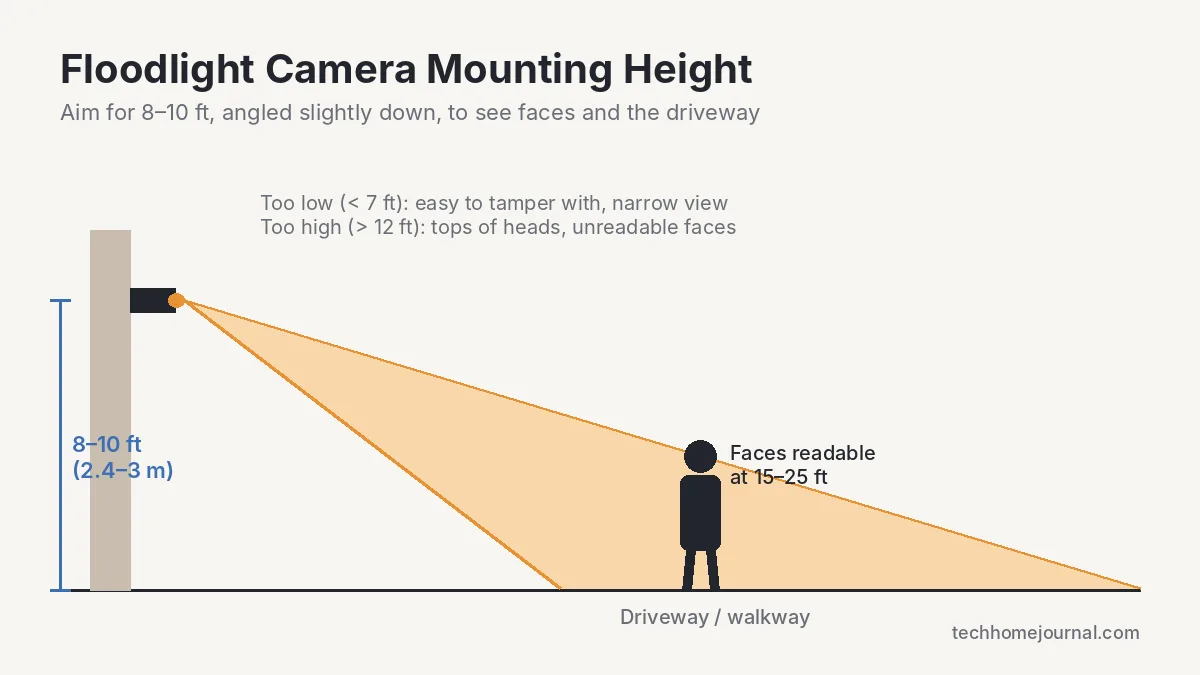
Mount it too low and you get a close-up of whoever is standing at the door with no context of the driveway, and the camera is easy to reach and tamper with. Mount it too high and you mostly see the tops of heads. Ring and most installers recommend about 8 to 10 feet off the ground, angled slightly downward.
Pro tip: walk the area at night with a flashlight held at the proposed mounting height. If you can’t see the mailbox or driveway edge clearly, the camera won’t either.
Both Ring models use two independently adjustable light heads, so you can light an L-shaped driveway or a wraparound porch that a single fixed beam would miss. Competitors like Arlo use a single light bar, which is cleaner looking but less flexible.
Light Output and Color Temperature
Brightness is measured in lumens. Most floodlight cameras fall between 1,800 and 3,000 lumens, and Ring’s models are rated at 2,000 lumens. That’s roughly what a 100 to 150-watt halogen floodlight puts out: bright enough to light a driveway, but harsh if it’s hitting your bedroom or a neighbor’s window every time a cat walks by. You can lower brightness in the Ring app if needed.
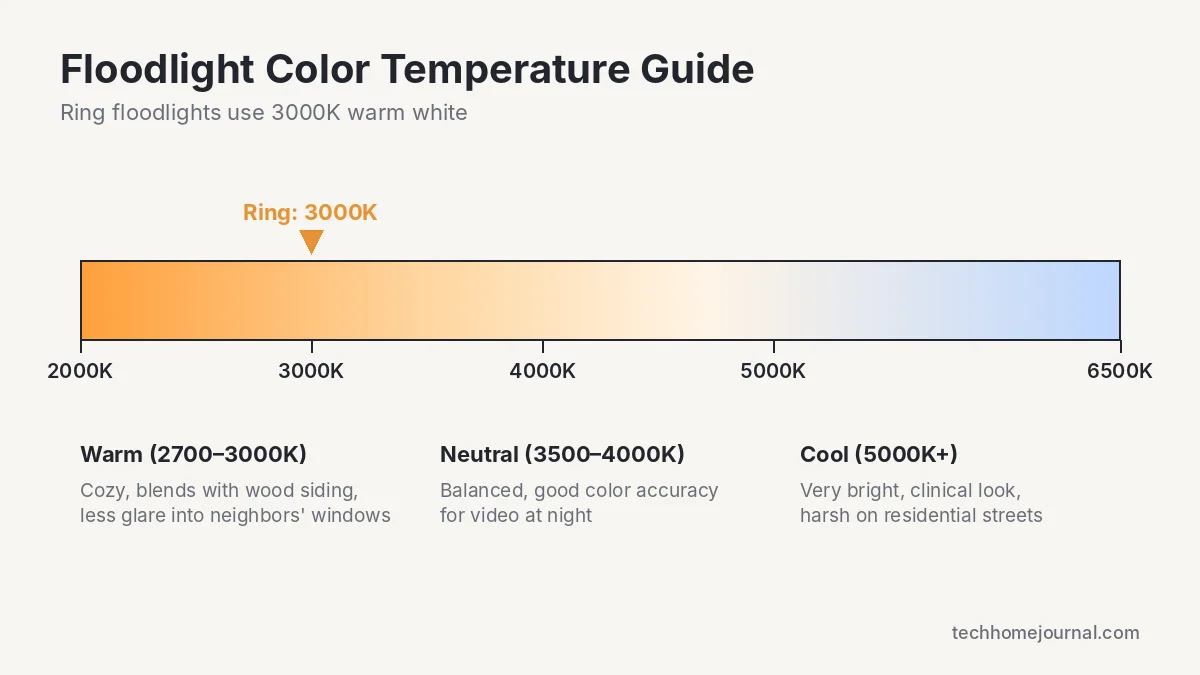
Color temperature matters just as much. Below 3000K reads warm and yellow, close to an old incandescent bulb. Above 5000K reads cold and clinical, more like a parking garage. Ring uses a fixed 3000K warm white, which blends well with most homes, especially those with warm wood tones, brick or soft white trim.
Motion Detection: Zones, Pets, and False Alerts
Early floodlight cameras triggered on anything that moved, including tree branches, passing cars and raccoons. Modern units use zone-based detection, so you can draw boundaries in the app and tell the camera to ignore the sidewalk while still watching the porch.
- Motion zones: draw custom areas to watch and leave the street or a neighbor’s yard out.
- People Only Mode: sends alerts only when a person is detected, cutting most false alerts from cars, animals and shadows.
- 3D Motion Detection (Pro): uses radar to measure distance, so you can set alerts to trigger only when someone comes within a set range.
- Motion sensitivity and schedules: fine-tune how much movement triggers alerts and pause notifications when you’re home in the yard.
Pets are the most common source of false alerts. If you have a dog in the yard, use People Only Mode and keep the lawn outside your main motion zone, otherwise expect a notification every time it does a lap at 2 a.m. Start with conservative settings, then adjust over the first week once you see what triggers alerts. Note that person detection and other smart alerts require a Ring subscription.
Video Quality, Subscription and Storage
The Floodlight Cam Plus records in 1080p and the Pro in 4K. Higher resolution helps with license plate or facial detail at the edge of the frame, but it also uses more bandwidth. Ring recommends at least 15 Mbps upload speed for the 4K Pro, so check your internet plan, not just your Wi-Fi coverage.
Storage is where Ring differs from some rivals. Ring cameras have no microSD slot. Live view and alerts work for free, but saving and replaying recordings requires a Ring Home subscription, which starts at about $4.99 per month for a single camera and stores up to 180 days of video history. A free 30-day trial starts when you set up the device. The only local option is Ring Edge, which requires a Ring Alarm Pro base station.
Note: if you want to avoid monthly fees, brands like Eufy offer local storage with no recurring cost. Read our guide to doorbell cameras with no subscription for more options.
Local storage keeps footage off third-party servers, which some buyers prefer for privacy, but you lose off-site backup if the device is stolen or damaged. Cloud storage costs more over time, but your footage survives even if the camera is ripped off the wall.
Smart Home Integration
A Ring floodlight camera that only works inside its own app is a missed opportunity in a connected home. Ring is owned by Amazon, so Amazon Alexa integration is the strongest: you can view the live feed on an Echo Show or Fire TV, hear motion announcements and use the camera in Alexa routines.
For households running Google Home or Apple HomeKit, there is no official Ring support. Some people use third-party bridges like Homebridge or Home Assistant, but these are unofficial and can break after updates. If your home is already built around Apple, read our Apple HomeKit guide first; for Google users, see our Google Home tips and tricks.
Automation routines are where this pays off practically. With Alexa you can set the floodlight to trigger your indoor smart lights when it detects motion after sunset, so walking up the driveway lights the living room before you reach the door. Our smart lighting buying guide covers bulbs that work well for this.
Weatherproofing and Climate Considerations
Ring rates its floodlight cams as weather resistant, with an operating range of about -5°F to 120°F (-20.5°C to 48.5°C). That covers most climates, but if your winters regularly drop below that, mount the camera under an eave or overhang and check reviews from buyers in similar regions.
For coastal homes or anywhere with driving rain, mounting under a covered overhang protects the unit and keeps water spots off the lens, which matters more for night footage than most people expect. Wired units handle cold better than battery cameras, since there’s no battery to lose capacity below freezing.
Installation: What to Check Before You Mount It
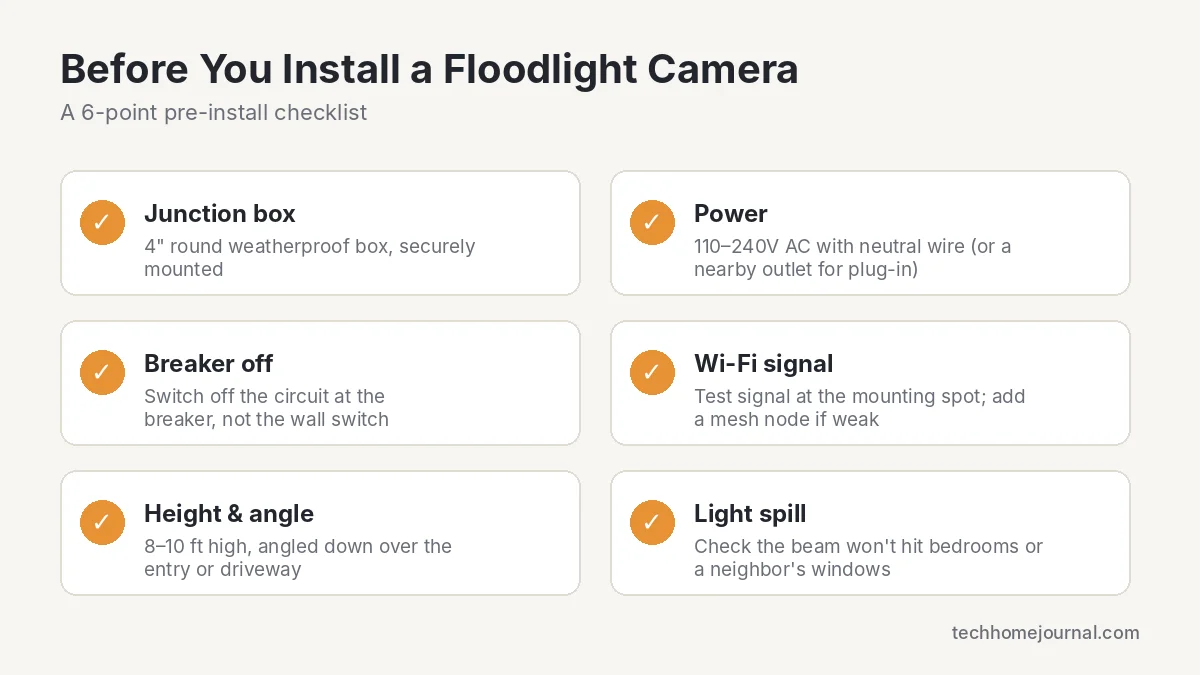
Before ordering, confirm three things: the existing junction box is a 4-inch round weatherproof box that’s securely mounted, the fixture has standard line, neutral and ground wires, and your Wi-Fi signal is strong at the mounting location.
A signal test matters more than people expect. Floodlight cameras mounted on detached garages or far corners of a house often sit at the edge of router range, causing dropped clips and delayed notifications. Hold your phone at the mounting spot and run a speed test, then check the signal strength (RSSI) in the Ring app after setup. A Wi-Fi extender, mesh node or Ring Chime Pro nearby solves weak signal before it becomes a daily annoyance.
Turn off power at the breaker, not just the wall switch, before disconnecting the old fixture. Most installations take 30 to 60 minutes with the hardware Ring includes. If you’re not comfortable working with mains wiring, hire a licensed electrician. Ring also has step-by-step installation guides and videos for each model.
Matching the Hardware to a Scandinavian Exterior
Scandinavian design leans on restraint: muted tones, natural materials and minimal visual clutter. A bulky black floodlight camera with a visible logo fights against that every time someone glances at the entry.
Both Ring floodlight models come in white as well as black. White sits far better against white cedar siding, pale stucco or light render, while black suits dark-painted wood or charcoal cladding. Pick the color that matches your trim, not your front door.
Mounting placement matters too. A fixture centered above a garage or door reads as deliberate; one awkwardly offset to clear a window reads as an afterthought. If your porch has a covered overhang, mounting under it protects the unit and keeps the sightline cleaner from the street. For indoor options that blend in just as well, see our pick of the best indoor security cameras that don’t look like a camera.
Pros and Cons of a Ring Floodlight Camera
Pros
- Bright 2,000-lumen lights with a warm 3000K color
- Two adjustable light heads cover wide or L-shaped areas
- Plug-in option avoids electrical work
- 4K and radar-based 3D motion on the Pro model
- Excellent Alexa and Echo Show integration
- Black and white finishes
Cons
- Recording history requires a monthly subscription
- No microSD or built-in local storage
- No official Google Home or Apple HomeKit support
- Bulkier than single light-bar designs
Choosing the Right Fit for Your Home
A Ring floodlight camera is really three purchases bundled into one: lighting, surveillance and smart home connectivity. Getting the wiring right matters more than chasing the highest lumen count, and getting the color temperature right matters more than most buyers realize until they see a cold blue light against warm wood siding after dark.
- Choose Floodlight Cam Plus if you want good 1080p coverage on a budget, or you need the plug-in version with no wiring.
- Choose Floodlight Cam Pro if you have a long driveway, want face and license plate detail, or want radar-based motion control.
- Look at a no-subscription brand if avoiding monthly fees matters more to you than Alexa integration.
Whatever model you land on, confirm your home’s wiring and Wi-Fi coverage can support it before you buy, since those two factors cause more returns than any feature complaint. For a broader look at protecting your home, read our home security buyer’s guide and our wireless home security system guide.
Free tools: How much storage will your cameras need? Our free security camera storage calculator shows how many days of footage your hard drive or microSD card will hold.
Frequently Asked Questions
Do I need an electrician to install a Ring floodlight camera?
If you’re replacing an existing wired light that sits on a 4-inch round weatherproof junction box, most homeowners can do it themselves in under an hour. If there’s no fixture or box, either hire a licensed electrician or choose the plug-in Floodlight Cam Plus, which only needs an outdoor outlet.
Does a Ring floodlight camera need a subscription?
No, it works without one. You get live view, motion alerts, two-way talk and light control for free. But to save, replay and share recordings, or use smart alerts like person detection, you need a Ring Home plan, which starts at about $4.99 per month.
Can a floodlight camera work without Wi-Fi?
The light itself still turns on with motion, but the camera needs an internet connection to send alerts, stream live video and save footage. A weak signal causes dropped clips and delayed notifications even if the camera is working fine.
Will the floodlight stay on all night?
By default, Ring floodlights turn on with motion rather than staying on, which saves energy and avoids light pollution into neighboring windows. You can set a light schedule in the Ring app if you want dusk-to-dawn lighting instead.
Does Ring floodlight camera work with Google Home or HomeKit?
Not officially. Ring works natively with Amazon Alexa. Google Home and Apple HomeKit users can only connect it through unofficial bridges like Homebridge or Home Assistant, which may stop working after updates.
How do I stop false alerts from cars or trees?
Use the app’s motion zone editor to exclude the street, sidewalk and any swaying branches. Then turn on People Only Mode, which filters out non-human motion before sending a notification. On the Pro, you can also set a distance limit with 3D Motion Detection.
Is local storage better than a cloud subscription?
Local storage avoids a monthly fee and keeps footage off third-party servers. Cloud storage gives you off-site backup if the camera is stolen or damaged. Ring is cloud-first, so if local storage is a must, consider a brand that supports microSD or a home base station.



