

Doorbell wiring looks confusing until you see how simple it really is. A standard wired doorbell has just three parts and three wires: a transformer, a button and a chime. Once you understand how they connect, you can fix a dead doorbell, add a second button or install a video doorbell with confidence.
This guide includes a clear doorbell wiring diagram for one doorbell, a second diagram for front and rear doors, and step by step instructions for wiring, testing and troubleshooting, plus what changes when you install a video doorbell.

Safety first: The doorbell button and chime run on low voltage, but the transformer connects to 120 volt house power. Turn off the breaker before working on any part of the system, and hire a licensed electrician for any 120V work if you are unsure.
The Three Parts of a Wired Doorbell
- Transformer. Converts 120V household power into low voltage AC, usually 10 to 24 volts. It has two low voltage screw terminals, often labeled T1 and T2 or left unlabeled. Our doorbell transformer guide explains how to find and test it.
- Doorbell button. A simple switch outside your door with two screw terminals. Pressing it completes the circuit.
- Chime. The device inside that makes the sound. It usually has three terminals: Front, Trans (transformer) and Rear. See our doorbell chime guide for chime types.
Doorbell Wiring Diagram: One Doorbell
This is the most common setup in homes with a single front doorbell.
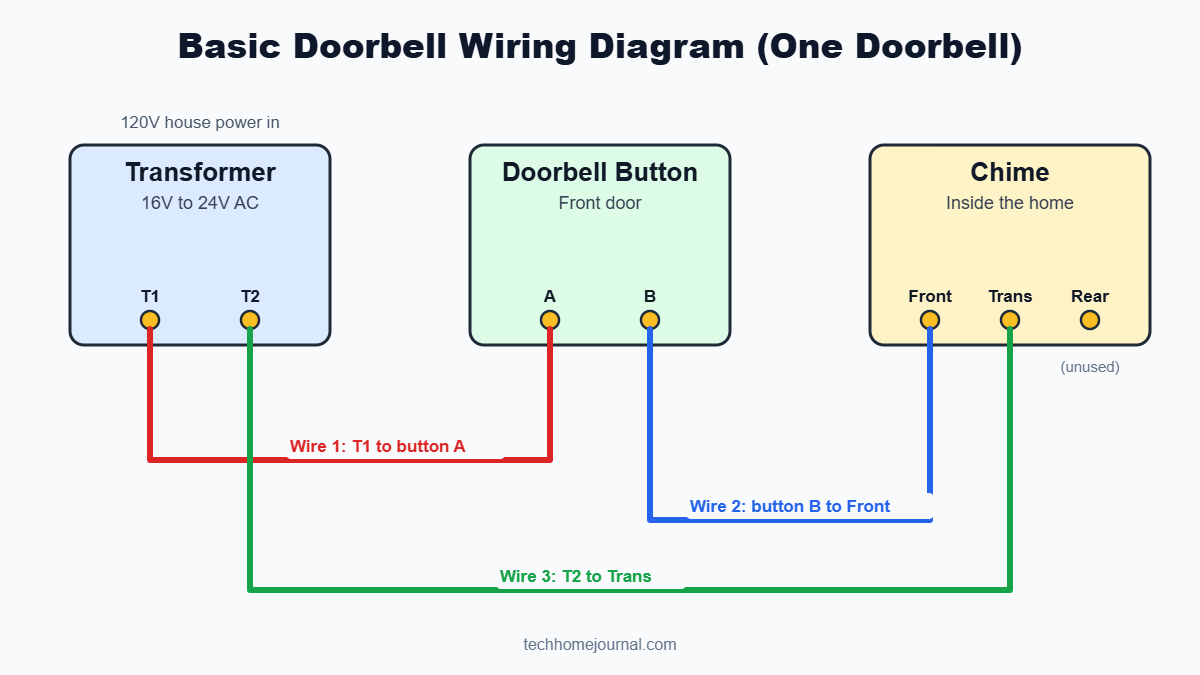
How the wires connect:
| Wire | From | To |
|---|---|---|
| Wire 1 | Transformer terminal T1 | Doorbell button terminal A |
| Wire 2 | Doorbell button terminal B | Chime Front terminal |
| Wire 3 | Transformer terminal T2 | Chime Trans terminal |
How it works: When nobody presses the button, the circuit is open and nothing happens. When someone presses the button, it connects Wire 1 to Wire 2. Current flows from the transformer, through the button, into the chime’s Front terminal, through the chime coil and back to the transformer through the Trans terminal. The chime plays its “ding dong.”
The order of the two wires on the button does not matter, and the two transformer terminals are interchangeable.
Doorbell Wiring Diagram: Front and Rear Doors
Many homes have a second button at a back or side door. Both buttons share the same transformer and chime.

How the wires connect:
| Wire | From | To |
|---|---|---|
| T1 feed | Transformer T1 | Terminal A on both the front and rear buttons |
| Front signal | Front button terminal B | Chime Front terminal |
| Rear signal | Rear button terminal B | Chime Rear terminal |
| Return | Transformer T2 | Chime Trans terminal |
When the front button is pressed, the chime plays two notes. When the rear button is pressed, it usually plays a single “ding,” so you know which door to answer.
What the Wires Look Like in Real Life
In a real home, the wires are not always neatly separated like the diagrams. Common layouts include:
- Chime box as the hub. All wires meet at the chime. You will see one wire from the transformer, one from each button, and one or more short jumper wires.
- Transformer near the panel. A thin two conductor cable runs from the transformer to the chime box.
- Splices in the wall. Some installers join wires with a wire nut inside the chime box, so one transformer wire feeds both buttons.
- Wire colors vary. Doorbell wire is often white, red, blue or striped. There is no strict color code, so always follow where each wire goes rather than its color.
Tip: Before disconnecting anything, take a clear photo of the chime terminals and button terminals. It is the easiest way to put everything back correctly.
How to Wire a Doorbell Step by Step
Tools you need
- Screwdriver
- Wire stripper
- Non contact voltage tester
- Multimeter
- Doorbell wire (18 or 20 gauge, if you are running new wire)
- Wire nuts and electrical tape
Steps
- Turn off the breaker that powers the doorbell transformer.
- Remove the chime cover and photograph the wiring.
- Connect the transformer wire to the chime’s Trans terminal.
- Connect the front button wire to the chime’s Front terminal.
- Connect the rear button wire (if you have one) to the chime’s Rear terminal.
- At the button, strip about half an inch of insulation and attach one wire to each screw terminal.
- Make sure the transformer’s other terminal connects to the wire that runs to the button(s).
- Tighten all screws, tuck the wires in neatly and replace the chime cover.
- Turn the breaker back on and press each button to test.
Doorbell Wiring for a Video Doorbell
A wired video doorbell replaces your existing button and uses the same two wires. The big differences are power and the chime.
- Check the transformer. Most video doorbells need 16 to 24 volts AC and more power (VA) than a basic button. Upgrade the transformer if needed.
- Install the chime kit or adapter. Many brands include a small module that connects to the chime’s Front and Trans terminals. It lets the doorbell draw steady power without making the chime buzz.
- Connect the doorbell. Attach the two button wires to the video doorbell’s terminals. Polarity usually does not matter for AC doorbells.
- Set the chime type in the app. Choose mechanical, digital or none, so the doorbell manages power correctly.
If you want to skip wiring completely, a battery doorbell may be easier. See our guide to the best wireless doorbell camera with no subscription. For wired models, compare options in our best smart doorbell for home security guide.
How to Test Doorbell Wiring With a Multimeter
Testing tells you exactly where a problem is.
- At the transformer: Measure AC volts across the two low voltage terminals. You should see roughly its rated voltage, such as 16V.
- At the chime: Measure between Trans and Front. With the button not pressed, you should see close to transformer voltage. If you see zero, the wire between the transformer and chime or between the button and chime may be broken.
- At the button: Remove the button and measure across its two wires. You should see voltage. If you do, briefly touching the two wires together should ring the chime. If the chime rings, the button is bad.
| Test | Expected result | If not |
|---|---|---|
| Transformer terminals | Close to rated voltage | Check the breaker or replace the transformer |
| Chime Trans to Front | Close to transformer voltage | Look for a broken wire or loose connection |
| Button wires | Voltage present | Wire break between chime and button |
| Touch button wires together | Chime rings | Replace the button |
Common Doorbell Wiring Problems and Fixes
| Problem | Likely cause | Fix |
|---|---|---|
| Doorbell does not ring | Bad button, loose wire, dead transformer | Test each part with a multimeter |
| Chime buzzes continuously | Stuck button or shorted wires | Free or replace the button, check for pinched wires |
| Rings by itself | Moisture in the button or a short | Replace the button, dry and seal connections |
| Only rear doorbell works | Front wire disconnected | Check the Front terminal and front button |
| Video doorbell keeps restarting | Not enough power | Upgrade to a higher VA transformer, install the chime kit |
| Chime makes a faint sound | Low voltage or dirty plunger | Test voltage, clean the chime plunger |
Running New Doorbell Wire
If a wire is broken inside the wall, you may need to run new wire. Use 18 or 20 gauge low voltage doorbell wire (two conductor). For long runs, 18 gauge reduces voltage drop, which helps video doorbells. Feed the new wire through the existing hole using the old wire as a pull string, or route it through the attic or basement. Because this is low voltage wire, it does not normally require conduit indoors, but always follow local codes.
Doorbell Wiring Without a Chime
Some homes have no chime, or you may want to remove an old one. For a basic doorbell, you can connect the two wires directly from the transformer to the button, but nothing will ring inside. For video doorbells, many brands support a “no chime” setup using a small jumper or resistor in place of the chime, and the doorbell sends alerts to your phone or a plug in chime instead. Check your doorbell’s instructions.
Doorbell Wiring for Two Chimes
Large homes sometimes have two chimes, for example one downstairs and one upstairs. There are two common ways to wire them:
- Parallel wiring (most common). Both chimes connect to the same Front and Trans wires. Each chime receives the same signal and rings at the same time. This requires a transformer with enough power for both chimes, often 16V to 24V and 20VA or more.
- Wireless extension. Keep one wired chime and add a plug in wireless chime that listens to a wireless transmitter connected to the doorbell circuit. This avoids running new wire upstairs.
If your chimes become quiet or the doorbell starts acting strangely after adding a second chime, the transformer is usually too weak. Test the voltage and upgrade if needed.
Doorbell Wire Gauge and Distance
Doorbell wire is thin, but the right gauge matters for longer runs and video doorbells.
| Wire gauge | Typical use | Max practical run |
|---|---|---|
| 22 gauge | Very short runs, older systems | Short runs only |
| 20 gauge | Standard doorbell wire | Typical homes |
| 18 gauge | Longer runs, video doorbells, two chimes | Long runs with less voltage drop |
If the voltage at the button is noticeably lower than at the transformer, a thicker wire or a higher voltage transformer (within your doorbell’s limits) can help.
How to Replace a Doorbell Button
A worn out button is one of the most common reasons a doorbell stops working. Replacing it takes about ten minutes.
- Turn off the breaker for the doorbell transformer.
- Remove the old button. Most pry off or unscrew from the door frame.
- Pull the wires out gently and wrap them around a pencil so they do not slip back into the wall.
- Disconnect the wires from the old button.
- Connect the wires to the new button’s two terminals. Either wire can go on either terminal.
- Mount the new button, turn the breaker back on and test it.
Lighted buttons draw a tiny amount of current to power their glow. If you install a lighted button with a digital chime, check compatibility, because some digital chimes can buzz or ring faintly with lighted buttons.
Doorbell Wiring Checklist
Before you close everything up, run through this quick checklist:
- Transformer reads close to its rated voltage.
- Trans terminal on the chime goes to the transformer.
- Front terminal goes to the front button, Rear terminal to the back button.
- All screws are tight, with no loose strands touching other terminals.
- No wires are pinched behind the chime base or button plate.
- Every button rings the chime with the correct tone.
- For video doorbells, the chime kit is installed and the chime type is set in the app.
Frequently Asked Questions
How many wires does a doorbell have?
A basic single doorbell system uses three wire runs: transformer to button, button to chime, and chime to transformer. Two doorbells add one more run for the rear button.
Does it matter which wire goes where on a doorbell button?
No. The two wires on a standard doorbell button are interchangeable because it is a simple switch on an AC circuit.
What do Front, Rear and Trans mean on a chime?
Trans connects to the transformer, Front connects to the front doorbell button and Rear connects to the back door button.
Can I touch doorbell wires?
Doorbell button wires carry low voltage and are generally safe to handle, but always turn off the breaker first, especially near the transformer, which connects to 120V power.
Why does my doorbell buzz instead of ring?
Usually because the button is stuck, the wires are shorted, or the transformer voltage is too low for the chime.
Do video doorbells use the same wiring?
Yes. They connect to the same two button wires, but they often need a stronger transformer and a chime adapter.
Final Thoughts
A doorbell wiring diagram shows that the system is simpler than it looks: one transformer, one or two buttons, one chime and a few low voltage wires. Use the diagrams above to trace your wiring, test each part with a multimeter, and fix problems one step at a time. When you upgrade to a video doorbell, check the transformer and install the chime kit, and your doorbell will work reliably for years.



