

Most energy saving advice tells you to turn off lights and unplug things. That works, until you forget. Smart home devices fix the forgetting part. They switch things off, turn the heat down and shift your usage to cheaper hours automatically, every single day.
Here are the smart home upgrades that actually lower your bill, roughly in order of how much they save for the money, plus a realistic plan for adding them over time.
Free tools: See what your appliances cost with our Appliance Energy Cost Calculator, and estimate thermostat savings with our Smart Thermostat Savings Calculator.
Table of Contents
- Where Your Energy Money Goes
- 1. Cut Standby Power With Smart Plugs
- 2. Install a Smart Thermostat
- 3. Switch to LED and Smart Lighting
- 4. Track Usage With an Energy Monitor
- 5. Shift Heavy Use to Off-Peak Hours
- 6. Use Sensors to Stop HVAC Waste
- 7. Consider Solar and Battery Storage
- 8. Make Water Heating Smarter
- How Much Can Each Upgrade Save?
- A Realistic Upgrade Path
- Frequently Asked Questions
Where Your Energy Money Goes
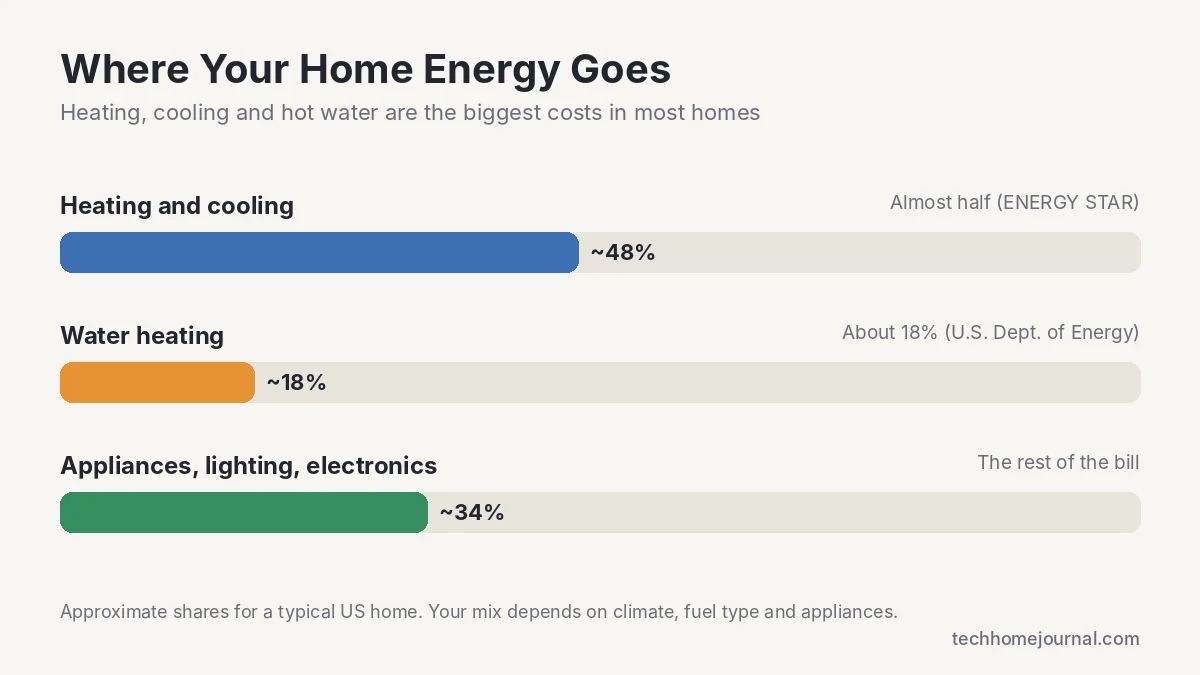
Before buying anything, it helps to know where the money goes. According to ENERGY STAR, heating and cooling make up almost half of a typical American home’s energy bill. Water heating accounts for about 18% of home energy use, according to the U.S. Department of Energy. Lighting, appliances and electronics make up the rest.
That’s why a smart thermostat usually saves more than a dozen smart bulbs. Focus on the big loads first.
1. Cut Standby Power With Smart Plugs
Lots of devices keep drawing power when they’re “off”: TVs, game consoles, cable boxes, printers, speakers and chargers. The Natural Resources Defense Council found that idle loads like these can account for about 23% of household electricity use. Each device uses only a few watts, but they run 24 hours a day.
A smart plug cuts power completely on a schedule, or when you say “Alexa, turn off the TV.” Plugs with energy monitoring show exactly how much each device draws, which is a quick way to find the worst offenders. Put your entertainment center, home office and space heaters on scheduled plugs first. See our best smart plug picks.
- Typical cost: $10 to $25 per plug
- Best for: TVs and consoles, desk setups, space heaters, dehumidifiers, holiday lights
- Tip: Don’t put fridges, freezers or medical devices on a schedule.
2. Install a Smart Thermostat
For most homes, this is the single best smart home upgrade for saving energy. A smart thermostat lowers the temperature when you’re asleep or away, learns your routine and uses your phone’s location to know when the house is empty. ecobee says its thermostats can save up to 23 to 26% on heating and cooling, and many utilities offer rebates of $50 or more on ENERGY STAR certified models.
Not sure which one to pick? Our guide to the best smart thermostats of 2026 compares Nest, ecobee and others, and our savings calculator estimates what you’d save.
3. Switch to LED and Smart Lighting
LED bulbs use at least 75% less energy than incandescent bulbs and last up to 25 times longer, according to the Department of Energy. If you still have old bulbs anywhere, replacing them is the easiest saving you can make.
Smart lighting adds automation on top. There are two main ways to do it:
| Option | Example | Approx. cost | Best for |
|---|---|---|---|
| Smart bulbs | Philips Hue, Wiz, Kasa | $10 to $50 per bulb | Renters, color and mood lighting, lamps |
| Smart switches and dimmers | Lutron Caseta, Leviton, Kasa | $25 to $70 per switch | Rooms with several bulbs on one switch, homeowners |
Smart switches are usually the better value for rooms with lots of fixtures, since one switch controls every bulb on the circuit. Add motion sensors in hallways, garages and laundry rooms so lights turn off when nobody is there. Our smart switch guide covers the best options.
4. Track Usage With an Energy Monitor
A home energy monitor clips into your electrical panel and shows your usage in real time. It’s the best way to find waste you didn’t know about, like an old garage freezer, a water heater that cycles too often or a pump that never stops. Our guide to the best home energy monitors compares options from about $70 to whole-home smart panels.
5. Shift Heavy Use to Off-Peak Hours
Many utilities now charge more for electricity in the late afternoon and evening, and less overnight. These time-of-use (TOU) plans can work in your favor if you shift heavy loads:
- Schedule the dishwasher, washer and dryer to run after peak hours.
- Charge your EV overnight using the car’s or charger’s schedule.
- Pre-cool or pre-heat the house before peak hours start, then let the thermostat coast.
- Check your utility’s website for its exact peak hours and rates.
Smart plugs, smart appliances and EV chargers make this automatic, so you don’t have to remember.
6. Use Sensors to Stop HVAC Waste
Heating and cooling empty rooms is pure waste. A few small sensors can fix that:
- Room sensors (included with some ecobee and Nest models) help the thermostat focus on rooms you’re actually using.
- Window and door sensors can pause the HVAC when a window is left open.
- Smart vents let you cut airflow to unused rooms, though they work best in homes with good ductwork. Don’t close too many vents at once, as this can strain your system.
7. Consider Solar and Battery Storage
Solar panels and home batteries are the biggest investment on this list, often $10,000 or more after incentives. They pay off best in sunny areas, in homes with high bills and where utilities use time-of-use rates, because a battery can power your home during expensive peak hours. Get several quotes and check federal, state and utility incentives before committing.
8. Make Water Heating Smarter
Water heating is the second biggest energy cost in most homes, yet it gets far less attention than lighting. A few changes, some smart and some simple, make a real difference:
- Lower the temperature. Many water heaters ship set to 140°F. The Department of Energy recommends 120°F for most households, which is still plenty hot and cuts standby heat loss.
- Add a timer or smart controller. For electric tank heaters, a heavy-duty smart switch or water heater controller can stop the tank from reheating overnight or while you’re away.
- Wash clothes in cold water. Most of the energy a washing machine uses goes into heating water, and modern detergents clean well in cold.
- Fix drips and use low-flow fixtures. Less hot water used means less water heated.
- Consider a heat pump water heater when your old tank needs replacing. They use far less electricity than standard electric tanks and often qualify for rebates.
How Much Can Each Upgrade Save?
Savings depend on your home, climate and habits, but here’s a realistic picture of what each upgrade costs and where it pays off. You can plug your own appliances into our Appliance Energy Cost Calculator to see your numbers.
| Upgrade | Typical cost | Where it saves | Payback |
|---|---|---|---|
| LED bulbs | $2 to $5 per bulb | Lighting | Months |
| Smart plugs | $10 to $25 each | Standby power, heaters | Under a year for big loads |
| Smart thermostat | $130 to $280 | Heating and cooling | About 1 to 3 years |
| Water heater set to 120°F | Free | Water heating | Immediate |
| Home energy monitor | $70 to $300 | Finds hidden waste | Depends on what you find |
| Solar and battery | $10,000+ | Whole bill | Many years, varies widely |
The pattern is clear: the cheapest changes often pay back fastest, while big upgrades need a closer look at your bills and local incentives. Start small, measure the results and build from there.
A Realistic Upgrade Path
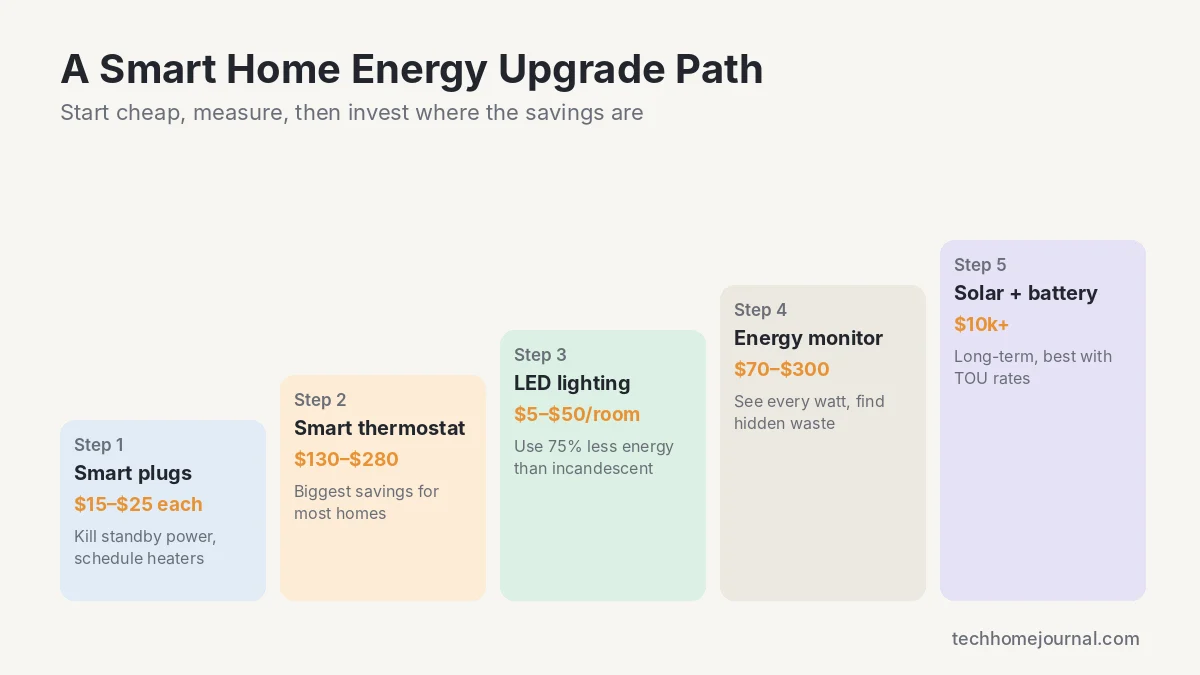
- Month 1: Replace any remaining old bulbs with LEDs and add smart plugs to your entertainment center and office.
- Month 2: Install a smart thermostat and set up home/away and sleep schedules.
- Month 3: Add a home energy monitor to find hidden waste.
- Later: Add smart switches and motion sensors, then look at solar and batteries if the numbers work for your home.
For more no-cost and low-cost ideas, read our full guide on how to lower your electricity bill at home.
Planning for outages too? Use our free generator size calculator to find the running and starting watts your essential appliances need.
Frequently Asked Questions
Which smart home device saves the most energy?
For most homes, a smart thermostat, because heating and cooling make up almost half of a typical energy bill.
Do smart plugs really save money?
Yes, when they cut standby power or keep devices like space heaters and dehumidifiers from running longer than needed. Savings per plug are small, but they add up across a home.
Do smart devices use electricity themselves?
A little. Most smart plugs, switches and hubs draw less than a watt or two on standby, which is far less than the waste they prevent.
Are smart bulbs or smart switches better for saving energy?
Both save the same energy if you use LEDs. Smart switches are usually cheaper per room when one switch controls several bulbs, while smart bulbs are better for renters and lamps.
Is solar worth it for saving on electricity?
It depends on your location, roof, electricity rates and incentives. In sunny areas with high rates, solar can cut bills significantly, but it is a long-term investment.



