

A Ring camera is one of the easiest ways to keep an eye on your home, but the lineup has grown so much that choosing one can feel confusing. There are indoor cameras, pan-tilt cameras, battery outdoor cameras, spotlight cameras, floodlight cameras and, since October 2026, a new family of 4K models. Each one fits a different spot and a different budget.
This guide explains every type of Ring camera in plain language, compares the current models, and helps you work out which one belongs in your living room, on your porch or above your driveway. We also cover subscriptions, power options, privacy settings and the mistakes people make when setting up Ring cameras for the first time.
Table of Contents
- Quick Picks: Best Ring Camera for Each Job
- Ring Camera Comparison Table
- The New Ring 4K Cameras (October 2026)
- Ring Indoor Cameras
- Ring Outdoor Cameras
- Ring Spotlight and Floodlight Cameras
- Battery, Solar, Wired or PoE?
- Do You Need a Ring Subscription?
- How to Choose the Right Ring Camera
- Setup and Placement Tips
- Privacy and Security Settings
- Ring vs Other Camera Brands
- Common Ring Camera Problems and Fixes
- Frequently Asked Questions
- Final Verdict
Quick Picks: Best Ring Camera for Each Job
- Best indoor Ring camera: Ring Indoor Cam 4K: sharp 4K video, Wi-Fi 6 and a physical privacy shutter.
- Best budget indoor pick: Ring Pan-Tilt Indoor Cam 2K: covers a whole room with 360° pan and motion tracking.
- Best all-round outdoor camera: Ring Outdoor Cam 4K Plus: 4K video with battery, plug-in, hardwired, solar or PoE power.
- Best for dark side paths: Ring Spotlight Cam 4K Plus: a 550-lumen spotlight for colour night video.
- Best for driveways and big yards: Ring Floodlight Cam 4K Plus: bright floodlights plus support for 24/7 recording.
- Best for renters and flats: Ring Peephole Cam: fits into an existing door peephole with no drilling into walls.
Ring Camera Comparison Table
Prices below are approximate US list prices at launch. Ring runs frequent sales, so check current deals before you buy.
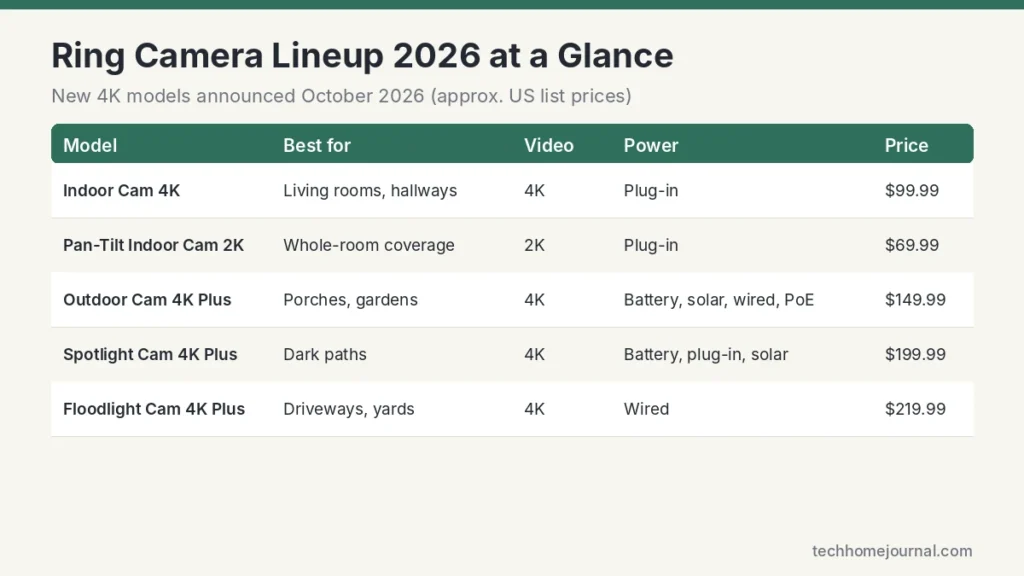
| Camera | Best for | Video | Power | Approx. list price |
|---|---|---|---|---|
| Indoor Cam 4K | Living rooms, hallways | 4K | Plug-in | $99.99 |
| Pan-Tilt Indoor Cam 2K | Covering a whole room | 2K | Plug-in | $69.99 |
| Outdoor Cam 4K Plus | Porches, gardens, side doors | 4K | Battery, plug-in, hardwired, solar, PoE | $149.99 |
| Spotlight Cam 4K Plus | Dark paths and back doors | 4K + 550-lumen light | Battery, plug-in, solar | $199.99 |
| Floodlight Cam 4K Plus | Driveways, garages, large yards | 4K + floodlights | Wired | $219.99 |
| 4K Pro models (Outdoor, Spotlight, Floodlight) | Maximum detail and extra features | 4K | Varies by model | Higher than Plus models |
The New Ring 4K Cameras (October 2026)
On 7 October 2026, Ring announced four new 4K cameras and an upgraded pan-tilt indoor camera. TechRadar’s launch coverage lists the full range: Indoor Cam 4K, Pan-Tilt Indoor Cam 2K, Outdoor Cam 4K Plus, Spotlight Cam 4K Plus and Floodlight Cam 4K Plus.
Ring markets the new image system as “Retinal 4K Vision”. In simple terms, it means higher resolution plus processing aimed at better colour, sharper zoom and clearer video in tricky light, such as a bright sky behind a visitor. As The Gadgeteer points out, real-world results still depend on distance, lighting, Wi-Fi strength and compression, so 4K doesn’t automatically mean you’ll read a number plate across the street.
What 4K does help with is digital zoom. When you pinch in on a recording, a 4K image keeps more detail than 1080p or 2K, which makes faces and package labels easier to make out. The trade-off is higher bandwidth, so a strong Wi-Fi signal matters even more with these models.
Plus vs Pro: what’s the difference?
The new “Plus” models sit below the existing 4K “Pro” models launched earlier. Pro cameras generally add premium extras such as radar-based 3D Motion Detection and Bird’s Eye View on supported models, or a brighter light (the Spotlight Cam 4K Pro uses a 660-lumen spotlight versus 550 lumens on the Plus). For most homes, the Plus models give the best balance of price and performance.
Ring Indoor Cameras
Indoor cameras let you check on pets, see when children get home, or keep an eye on the house while you’re away. Ring now has two main indoor options.

Ring Indoor Cam 4K
Specs: 4K video, 115° field of view, dual-band Wi-Fi 6, physical privacy shutter, plug-in power, about $99.99.
This is Ring’s first 4K indoor camera. The 115° view covers most living rooms from a corner shelf, and Wi-Fi 6 helps it hold a steady stream on busy home networks. The physical shutter is the feature privacy-minded families will like most: when it’s closed, the lens is covered, not just switched off in software.
- Pros: very sharp video, privacy shutter, small enough to sit on a bookshelf, works with Alexa and Echo Show screens.
- Cons: fixed view, so one camera may not cover an L-shaped room; cloud recording needs a plan.
Ring Pan-Tilt Indoor Cam 2K
Specs: 2K video, 360° pan, 175° tilt, motion tracking, privacy shutter that disables camera and microphone, plug-in power, about $69.99.
The pan-tilt model turns to follow movement, so one camera can watch a whole open-plan living and dining area. You can also steer it manually from the app to check the kitchen, the sofa or the front window. It’s the better value choice if you want coverage rather than maximum sharpness.
- Pros: covers an entire room, motion tracking, low price, privacy shutter.
- Cons: 2K rather than 4K, and moving parts make it more noticeable on a shelf.
If you want a camera that blends into a calm Scandinavian-style room, look at our guide to the best indoor security cameras that don’t look like cameras.
Ring Outdoor Cameras
Ring’s outdoor cameras (the range once sold as Stick Up Cam) are compact, weather-resistant cameras you can mount on a wall, place on a shelf under a porch roof, or fix to a fence post.
Ring Outdoor Cam 4K Plus
Specs: 4K video, power by battery, plug-in, hardwired, solar or Power over Ethernet (PoE), about $149.99.
The Outdoor Cam 4K Plus is the most flexible camera in the new range. You can start with the battery, add a solar panel later, or run a single PoE cable for steady power and data. That makes it a good fit for side doors, back gardens and garages where you don’t want to run mains wiring.
- Pros: five power options, 4K detail, small and easy to mount.
- Cons: no built-in light, so night video relies on infrared or nearby lighting.
Older Outdoor Cam and Stick Up Cam models
Ring still sells or supports earlier 1080p and 2K outdoor cameras, and they often drop in price during sales. They’re fine for watching a garden shed or a side gate, but the newer 4K models give clearer zoom and better low-light performance. Our guide to battery-powered outdoor security cameras compares Ring with other wire-free options.
Ring Spotlight and Floodlight Cameras
Lights matter at night. A camera with its own light gives you colour video, warns off visitors and lights the way for you. Ring has two families.
Ring Spotlight Cam 4K Plus
Specs: 4K video, 550-lumen spotlight, battery, plug-in or solar power, about $199.99.
The spotlight is bright enough for a back door, a side path or a small driveway. Because it can run on a battery or solar panel, it’s a good choice where there’s no outdoor power.
- Pros: colour night video, flexible power, siren and two-way talk.
- Cons: the light drains the battery faster on busy paths, so solar or plug-in power works best.
Ring Floodlight Cam 4K Plus
Specs: 4K video, motion-activated floodlights, smart detection, support for 24/7 recording, wired power, about $219.99.
Floodlight cameras replace an existing outdoor light fitting. With constant power, they can support continuous recording on the right plan, which is useful for driveways where you want the full picture rather than short motion clips. For a closer look at installing one, read our Ring Floodlight Camera guide, and see our floodlight camera buying guide for other brands.
- Pros: very bright, always powered, 24/7 recording support.
- Cons: needs an outdoor light fitting or wiring; installation takes longer.
Battery, Solar, Wired or PoE?
Power choice affects how reliable a Ring camera is and how much maintenance it needs.
| Power type | Good for | Watch out for |
|---|---|---|
| Battery | Quick installs, rentals, places without power | Recharging every few weeks or months; shorter life in cold weather |
| Solar | Sunny walls, fences and sheds | Needs a few hours of direct sun; less charge in winter |
| Plug-in | Indoors, porches with a nearby socket | Visible cable |
| Hardwired | Floodlights and permanent outdoor installs | May need an electrician |
| PoE | Most reliable power and connection | Running an Ethernet cable through the wall |
PoE deserves special mention. One cable carries power and data, so the camera doesn’t depend on Wi-Fi. If you’re building or renovating, it’s the most dependable choice. Our PoE home security camera system guide explains how PoE switches work.
Do You Need a Ring Subscription?
No, but you’ll miss a lot without one. Every Ring camera gives you live view, motion alerts and two-way talk for free. What you don’t get without a plan is saved video history, so if you miss an alert, you can’t go back and watch it.
Ring replaced its old Ring Protect plans with Ring Home plans in late 2024. At launch there were three tiers, Basic, Standard and Premium, at roughly $5, $10 and $20 a month in the US. Basic covers one device, Standard covers all devices at one address, and Premium adds extras such as 24/7 recording on supported wired cameras. Prices and features change, so always check Ring’s current plan page.
If you’d rather avoid monthly fees altogether, our guide to security cameras without a subscription covers brands that record locally.
How to Choose the Right Ring Camera
- Start with the location. Indoors, pick the Indoor Cam 4K or Pan-Tilt Cam. Outdoors, decide whether the spot needs light. Dark paths need a spotlight or floodlight model.
- Check power. No socket nearby? Choose battery or solar. Existing outdoor light? A floodlight camera can replace it.
- Decide on resolution. 4K helps when you need to zoom in on faces or plates. For a small garden or a hallway, 2K is often enough.
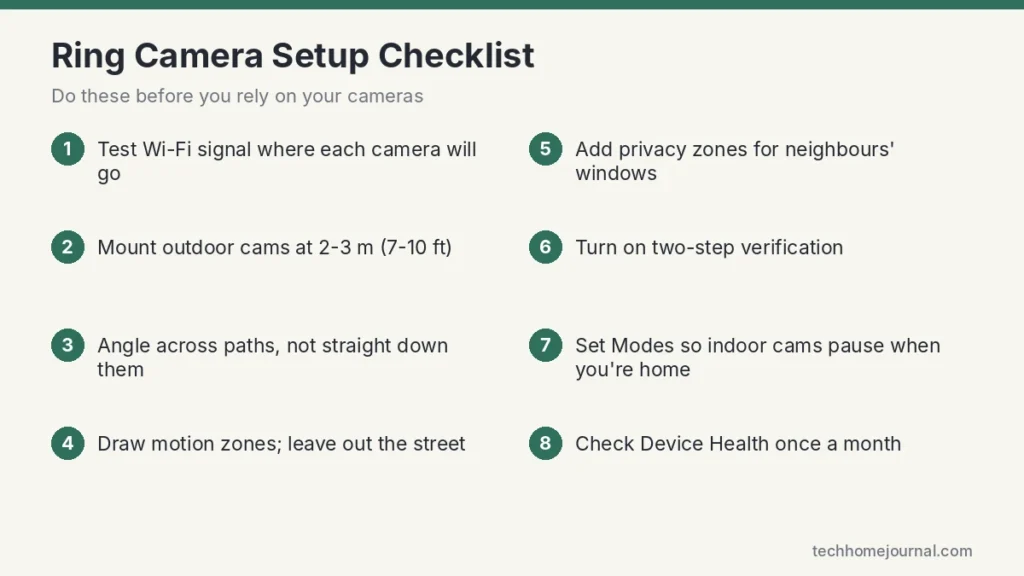
- Test Wi-Fi first. Stand where the camera will go and check your phone’s signal. Weak Wi-Fi causes slow live view and missed clips.
- Count your devices. If you’ll have more than one Ring camera or doorbell, a whole-home plan is better value than single-device plans.
- Think about the whole system. Ring cameras work with Ring Alarm, Ring doorbells and Alexa, so it’s easy to build up a system over time.
Setup and Placement Tips
- Mount outdoor cameras at about 2 to 3 m (7 to 10 ft), high enough to be out of reach but low enough to see faces.
- Angle cameras across a path rather than straight down it. Motion sensors notice side-to-side movement more easily. Our explainer on how motion sensors work covers why.
- Draw motion zones around your path, porch and driveway, and leave out the street.
- Use privacy zones to black out neighbours’ windows and gardens.
- Avoid pointing at the sun or bright white walls, which darken faces.
- Link cameras to Ring Alarm sensors, such as a Ring motion sensor, so a camera records when the alarm detects movement.
Need a step-by-step plan for the whole house? Our home security camera setup guide walks through it.
Privacy and Security Settings
Cameras inside the home raise fair privacy questions. Ring gives you several tools to stay in control:
- Two-step verification: turn it on in Account settings. It’s the single most important step.
- Privacy shutters: the new indoor cameras have physical shutters. Close them when you’re home.
- Modes: set indoor cameras to stop recording in Home mode and start in Away mode.
- End-to-end encryption: available on many Ring devices. It limits some features, but only your enrolled phone can view the video.
- Shared Users: review who has access and remove anyone who no longer needs it.
- Secure your Wi-Fi: a strong router password protects every camera. See our guide to securing your home Wi-Fi network.
Ring’s own support centre explains each privacy setting in more detail.
Ring vs Other Camera Brands
| Brand | Strengths | Weaknesses |
|---|---|---|
| Ring | Huge range, easy app, strong Alexa integration, works with Ring Alarm | Video history needs a plan |
| Google Nest | Good AI alerts, best with Google Home | Fewer models; longer history needs a plan |
| Arlo | Excellent image quality, wide range | Most smart features need a plan |
| eufy | Local storage, no monthly fee for core features | Smaller ecosystem |
| Reolink | Local storage, PoE options, very good value | App is less polished |
Ring is the easiest choice if you already use Alexa or a Ring doorbell. If you want no fees, local-storage brands deserve a look.
Common Ring Camera Problems and Fixes
| Problem | Likely cause | Fix |
|---|---|---|
| Slow or failing live view | Weak Wi-Fi at the camera | Check Device Health; add a mesh node or Ring Chime Pro |
| Too many alerts | Motion zones include the street or trees | Shrink zones, lower sensitivity, turn on person alerts |
| Missed events | Zones too small or camera angle too steep | Angle across the path; widen zones slightly |
| Battery drains fast | Busy area, cold weather, frequent live view | Add solar, tighten zones, reduce live view |
| Dark night video | No light source nearby | Use a spotlight or floodlight model, or add a porch light |
| Camera offline after router change | New Wi-Fi name or password | Use “Change Wi-Fi network” in Device Health |
Frequently Asked Questions
Which Ring camera is best for a living room?
The Ring Indoor Cam 4K gives the sharpest picture and has a privacy shutter. If your living room is large or open-plan, the Pan-Tilt Indoor Cam 2K can turn to cover the whole space.
Do Ring cameras work without a subscription?
Yes. Live view, motion alerts and two-way talk are free. You need a Ring Home plan to save and replay recordings.
Are Ring 4K cameras worth it?
They’re worth it if you want to zoom in on faces, packages or number plates. For a small garden or hallway, a 2K camera is usually enough and costs less.
Can Ring cameras record 24/7?
Supported wired cameras can record continuously with the Premium plan. Battery cameras record motion clips to save power.
How long do Ring camera batteries last?
It depends on how busy the area is and your settings. Quiet spots can last months; busy paths may need charging every few weeks. Solar panels and tight motion zones help a lot.
Do Ring cameras work with Google Home or Apple Home?
Ring is built around Alexa. It doesn’t officially support Apple Home or Google Home, so Ring suits Alexa homes best.
Can I install a Ring camera myself?
Yes. Indoor, battery, solar and plug-in models are easy DIY installs. Hardwired floodlights and PoE cameras may need an electrician or some cable work.
Final Verdict
For most homes, the best Ring camera setup is simple: an Indoor Cam 4K or Pan-Tilt Indoor Cam 2K inside, an Outdoor Cam 4K Plus for side doors and gardens, and a Spotlight or Floodlight Cam where you need light at night. The new 4K models give clearer zoom and better low-light video, while older 2K models remain good value when they’re on sale.
Plan for a Ring Home subscription if you want to replay events, secure your account with two-step verification, and take a few minutes to set motion and privacy zones. Do that, and a Ring camera system becomes a quiet, reliable part of your home rather than a source of constant alerts.



