The Best Fluffy Pancakes recipe you will fall in love with. Full of tips and tricks to help you make the best pancakes.

Somewhere in your house right now, something is quietly costing you money. Not the appliances you actually use, the ones you forgot are even plugged in. A cable box that never fully powers down. A game console sitting in standby. An old mini-fridge in the garage that draws more than it should because the compressor is starting to fail. Standby loads like these can add up to a real chunk of a typical electric bill, and most people have no idea which devices are the real offenders.
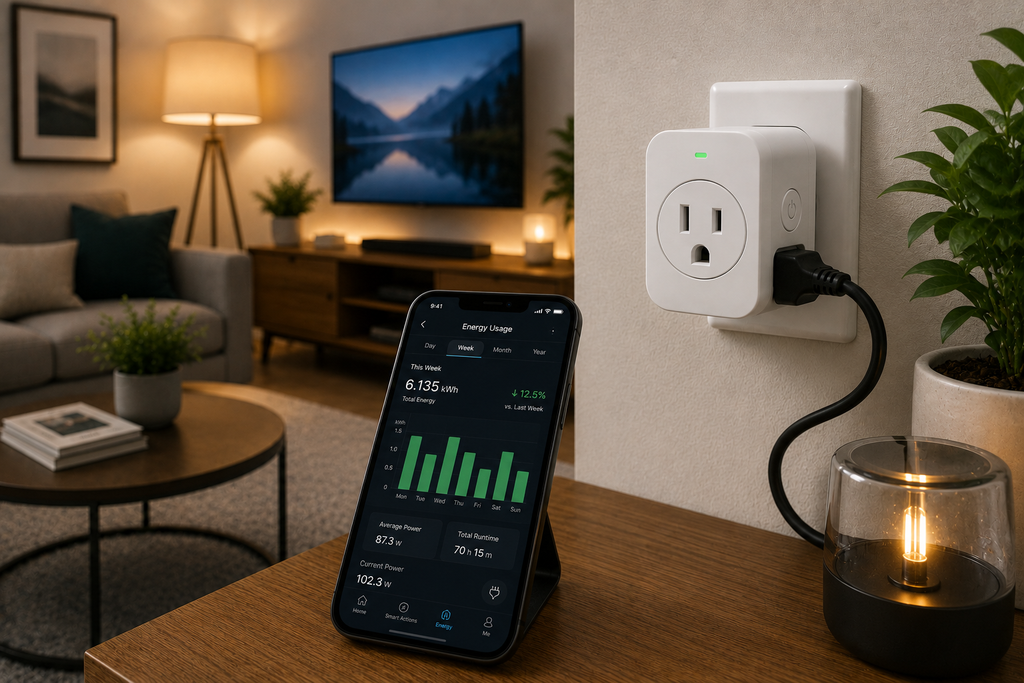
Energy-monitoring smart plugs solve that problem. Plug one in between the wall and the device, and instead of guessing, you get real numbers: how many watts it’s pulling right now, how many kilowatt-hours it burns through in a day or a month, and often an estimated dollar cost based on your actual electricity rate. Pair that with scheduling and remote control (similar to what you’d get from our favorite smart thermostats on the heating and cooling side), and a good energy-monitoring plug can pay for itself within a single billing cycle.
The catch is that not every plug labeled “energy monitoring” actually measures well. Plenty of budget models report numbers that are little more than a guess, off by 15-20% or more from what a dedicated power meter would show. If you’re trying to make real decisions, such as whether an old freezer is worth replacing or whether that space heater is really costing you $40 a month, precision matters. This guide breaks down which options are worth trusting, what “accurate” really means in this category, and how to choose the right one for your home.
What Accurate Really Means for a Smart Plug
Before comparing specific models, it helps to know what you’re actually evaluating. Three factors determine whether a plug’s readings are worth relying on.
Real-time wattage versus cumulative kWh. Wattage tells you how hard a device is working at this exact moment, which is useful for catching something drawing far more than it should. Kilowatt-hours (kWh) show accumulated usage over time, which is what actually shows up on your bill. A plug that only reports watts gives you a snapshot; one that tracks kWh over days, weeks, and months gives you the full story. When shopping, confirm the listing specifically mentions kWh tracking and not just an instantaneous readout, since some cheaper models only offer the latter.
Measurement precision against a reference meter. The standard way to test this is comparing a plug’s reading against a dedicated power meter (a “Kill-A-Watt” style device) across a range of loads, from a small phone charger up to a space heater or window AC unit. The better models on the market land within roughly 1-3% of a reference meter across that range. Weaker ones can drift by 8% or more, especially at low wattages, which matters if you’re trying to catch small standby loads in the 5-15 watt range.
Sampling frequency. A plug that only updates its reading every few minutes will miss short spikes, like a fridge compressor kicking on or a power tool starting up. Models with more frequent internal sampling tend to produce more reliable totals over time, even if the app only shows hourly summaries.
One honest note worth repeating: none of these devices are billing-grade instruments, and none should replace your utility meter. What they’re genuinely good at is relative comparison, telling you which of your devices draws the most and whether a change actually reduced your usage.
How We Evaluated These Picks
For this roundup we compared specs and published independent testing (measured against reference power meters across a range of household loads), alongside real-world factors: app quality, ecosystem compatibility (Alexa, Google Home, Apple Home, Matter, Thread), physical build, and price per unit. We prioritized options with confirmed UL or ETL safety certification, a non-negotiable for anything staying plugged into a wall outlet long-term. If you’re new to this category entirely, our smart home starter guide for beginners covers the basics before you dive into specific hardware. (Double-check this link on your end, the URL was partially cropped in your screenshot.)
The Best Energy-Monitoring Smart Plugs
1. TP Link Kasa KP125M: Best Overall
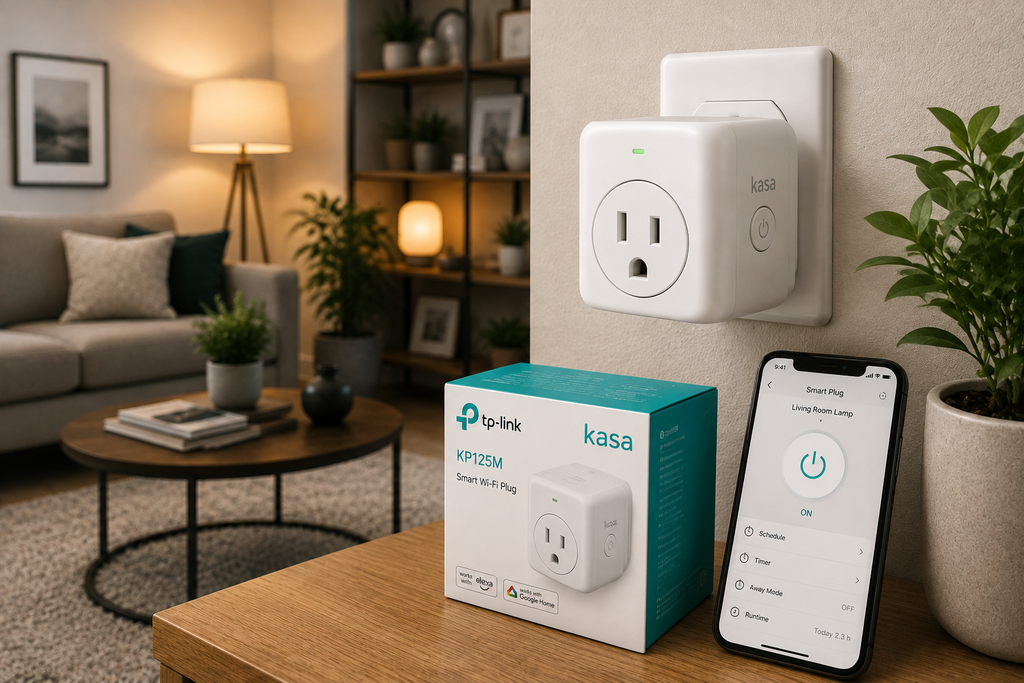
The Kasa KP125M is the model that keeps showing up at the top of independent comparisons, and for good reason. Reported precision sits in the 1-3% range against a reference meter across both high and low loads, about as good as this category gets at a mainstream price. The Kasa app presents real-time wattage alongside daily, weekly, and monthly kWh graphs, plus a projected cost once you enter your local electricity rate, giving you a layered view without digging through menus.
It also supports Matter over Wi-Fi, so basic on/off control works natively with Apple Home, Google Home, Amazon Alexa, and Samsung SmartThings without extra hubs. Detailed history still routes through the Kasa app itself, a minor tradeoff for the price, typically around $14-15 per unit.
Best for: Anyone who wants trustworthy numbers without paying a premium.
2. Govee Smart Plug (4-Pack): Best Value for Multiple Rooms
If you want to track several devices at once, an entertainment center, kitchen appliances, a home office setup, buying a single precise plug five times over gets expensive fast. The Govee 4-pack solves that by keeping quality respectable (independent tests have measured it within about 2% of a calibrated reference meter across a range of loads) while bringing the per-unit cost down significantly.
It also offers dual Wi-Fi and Bluetooth connectivity, a genuinely useful reliability feature: if your router hiccups, Bluetooth can keep local scheduling and on/off control working. The Govee Home app stores a rolling history (commonly cited around 100 days), long enough to catch slow seasonal shifts, like an AC unit’s summer draw creeping up as a filter gets dirty. Pairing this with a smart irrigation controller is a natural next step if you’re building out a whole-home efficiency setup.
Best for: Outfitting multiple rooms without spending premium money on every outlet.
3. Eve Energy: Best for Apple Home and Thread
If you’re deep in the Apple ecosystem, the Eve Energy is the model most reviewers point to. It runs on Thread rather than Wi-Fi, meaning it doesn’t just connect to your smart home, it actively strengthens your Thread mesh for other devices too. Consumption data integrates directly into the Apple Home app, showing up right alongside your other accessories instead of living in a separate app.
Reviewers consistently describe its monitoring as more granular than most competitors, precise enough, in some accounts, to catch a refrigerator compressor that’s starting to work harder than it should, an early warning sign of a failing appliance. Build quality is noticeably sturdier than budget alternatives, though that shows up in the price, which sits well above the Kasa and Govee options.
Best for: HomeKit households that want the tightest native integration and don’t mind paying for it.
4. TP-Link Tapo P125M: Best Budget Matter Pick
The Tapo P125M is TP-Link’s slimmer, cheaper Matter-certified option. It’s compact enough that two can fit side-by-side in a standard duplex outlet without blocking each other, a small detail that matters a lot in older homes with limited outlet space. It supports Matter over Wi-Fi and works across every major voice assistant.
Where it differs from its sibling, the KP125M, is price and a slight step down in monitoring depth. It’s positioned as the budget-friendly, Matter-first choice, while the KP125M remains the pick specifically for households prioritizing tracking precision. If your main goal is smart control with consumption data as a nice-to-have, the Tapo is the more cost-effective route.
Best for: Budget-conscious buyers who want Matter compatibility and decent, not best-in-class, tracking.
5. Zooz ZEN15: Best for Heavy Appliances
Most smart plugs are designed around lamps, chargers, and small electronics. The Zooz ZEN15 is built differently. It’s a Z-Wave device rated to handle higher continuous loads, making it a better match for refrigerators, sump pumps, window AC units, and other appliances that draw more current than a typical smart plug can safely handle. Because it runs on Z-Wave rather than Wi-Fi, it also works through a hub (like a SmartThings or Home Assistant controller) rather than connecting directly to your home network, which some users prefer for reliability and local control. If heavy appliances and door security are both on your radar, it’s worth reading alongside our guide on smart lock safety compared to traditional locks as part of a broader home-upgrade plan.
Best for: Monitoring and controlling heavier appliances that other smart plugs aren’t rated to handle safely.
6. Wyze Plug: Cheapest Option, With a Real Tradeoff
The Wyze Plug deserves an honest mention because it’s genuinely one of the least expensive options available, often sold in multi-packs for less than half the price of the picks above. The tradeoff shows up in precision: independent testing has found its readings can drift by roughly 8 watts or more compared to a reference meter, noticeably looser than the 1-3% range from the Kasa and Govee models. For rough estimates and basic on/off scheduling, that’s fine. If you’re trying to make a real decision about replacing an appliance based on precise cost data, it’s not the right tool for that job.
Best for: Budget-first buyers who mainly want remote control and only a rough sense of usage.
Quick Comparison
| Plug | Reported Precision | Ecosystem | Best For |
| TP-Link Kasa KP125M | ~1-3% | Matter, Alexa, Google, Apple, SmartThings | Overall best precision |
| Govee Smart Plug (4-pack) | ~2% | Wi-Fi + Bluetooth | Multi-room value |
| Eve Energy | High (granular) | Thread, Apple Home | HomeKit households |
| TP-Link Tapo P125M | Moderate | Matter, all major assistants | Budget + Matter |
| Zooz ZEN15 | Moderate to high | Z-Wave (hub required) | Heavy appliances |
| Wyze Plug | ~±8W | Wi-Fi, Alexa, Google | Cheapest option |
What to Look for When You’re Shopping
Confirm it tracks kWh, not just watts. This is the single biggest gap between a “smart plug” and a genuinely useful energy-monitoring one. Check the listing or manual specifically for kilowatt-hour tracking over time, not just an instantaneous readout.
Check the ecosystem you actually use. Matter is becoming the universal standard for basic on/off control across Apple Home, Google Home, Alexa, and SmartThings, but detailed history usually still lives in the manufacturer’s own app. If you’re Apple-first, Thread-based options like Eve Energy tend to integrate more natively. If you’re ecosystem-agnostic, Wi-Fi models with Matter support give you the most flexibility.
Match the amperage rating to the device. A plug designed for lamps and phone chargers isn’t rated for a window AC unit or a chest freezer. Check the maximum amperage before buying, and size up (like the Zooz ZEN15) for anything drawing serious continuous current.
Look for real safety certification. UL or ETL certification isn’t a formality, it’s the difference between a device that’s been independently tested for fire and electrical safety and one that hasn’t. That matters more here than for almost any other smart home gadget, given it stays plugged into a wall outlet around the clock.
Don’t ignore the app experience. Precision only helps if you’ll actually look at the data. A cluttered app that buries your monthly total three menus deep will get ignored within a week. The best options in this guide surface daily, weekly, and monthly numbers clearly, without extra taps.
Getting the Most Reliable Data Once You’ve Bought One
Choosing the right hardware is only half the equation. How you use it affects how trustworthy the numbers end up being.
Let it run a full cycle before judging it. A single day of readings won’t tell you much about a refrigerator or water heater, since their draw naturally varies by time of day and season. Give any new device at least a full week, ideally a full billing cycle, before drawing conclusions about a specific appliance’s cost.
Enter your actual electricity rate. Every model in this guide estimates cost based on a rate you enter in the app. If you leave the default figure in place instead of your real per-kWh price (check a recent utility bill), every dollar estimate you see will be off, even if the underlying wattage reading itself is spot on.
Compare like for like. If you’re deciding whether an old appliance is worth replacing, monitor the old one for a week, then monitor a comparable new model (or check the manufacturer’s rated wattage) rather than comparing raw numbers from very different device types.
Watch for firmware updates. Manufacturers occasionally push calibration improvements. Keeping the companion app and device firmware current is a small step that can noticeably improve long-term precision.
Frequently Asked Questions
How accurate are smart plug energy monitors compared to my actual electric meter? The best consumer options land within about 1-3% of a dedicated reference meter across a range of loads. That’s precise enough to identify which devices in your home draw the most power and to track relative changes over time, but it’s not a replacement for your utility’s billing meter, which is professionally calibrated.
Can a smart plug actually lower my electric bill? Indirectly, yes. The device itself doesn’t save energy; what it does is show you exactly where your electricity is going, which lets you make informed decisions: unplugging or scheduling off devices that draw standby power, catching an appliance using more than it should (often a sign it needs maintenance or replacing), and setting realistic schedules for things like space heaters or window units.
Do I need a hub for these plugs to work? Most Wi-Fi based models (Kasa, Govee, Tapo, Wyze) connect directly to your home network and need no hub. Thread-based options like Eve Energy need a Thread border router, often already built into newer Apple TVs, HomePods, or some routers. Z-Wave models like the Zooz ZEN15 require a Z-Wave hub or a smart home controller like Home Assistant or SmartThings.
Is it safe to leave an energy-monitoring smart plug plugged in permanently? Yes, as long as it carries genuine UL or ETL certification and is rated for the load you’re putting through it. Avoid unbranded, uncertified products sold purely on price; the failure modes for electrical hardware aren’t worth the small savings.
The Bottom Line
For most households, the TP-Link Kasa KP125M offers the best combination of precision, app quality, and price, making it the pick we’d recommend first if tracking is your main priority. If you’re outfitting multiple rooms, the Govee 4-pack stretches your budget further without a meaningful tradeoff in quality. Apple Home users should look at the Eve Energy for the tightest integration, and anyone monitoring a fridge, freezer, or AC unit should size up to something like the Zooz ZEN15 rather than risk overloading a standard-duty plug.
For more ways to trim your home’s energy use, see our full smart thermostat buying guide and our roundup of budget home security cameras, both worth pairing with the picks above if you’re building out a smarter, more efficient home from scratch.
Whichever option you choose, the real value isn’t the hardware itself, it’s the decision it helps you make. Every plug in this guide can tell you, within a reasonable margin, exactly where your electricity is going. What you do with that information is what actually shows up on your next bill.