The Best Fluffy Pancakes recipe you will fall in love with. Full of tips and tricks to help you make the best pancakes.

Intro
You keep hearing about smart homes — from commercials, from neighbors, from tech news — but nobody has given you a straight, jargon-free answer about what one actually is or whether you need one.
What is a smart home? At its simplest, it’s a house where everyday devices — lights, locks, thermostat, cameras, appliances — connect to the internet and to each other, letting you control and automate them from your phone, your voice, or a set schedule.
The smart home definition goes beyond remote control though. The best smart homes don’t just respond to your commands — they anticipate your needs, learn your patterns, and make decisions automatically to save you time, money, and energy without any daily input from you.
According to Statista, over 63 million US households already use at least one smart home device — and that number grows by millions every year. Statista
In this guide, you’ll find a complete plain-English explanation of smart home technology, how it works, what devices are involved, the real benefits of smart home living, honest costs, and exactly how to start your own — regardless of your technical background.
Quick Answer A smart home is a residence equipped with internet-connected devices that you can monitor, control, and automate remotely via smartphone, voice assistant, or automated schedules. The most common smart home devices include thermostats, locks, lights, cameras, and plugs. You can start a basic smart home for under $200 with no technical skills required.
Table of Contents
- Best For: Quick Reference
- What Is a Smart Home? The Complete Definition
- Smart Home Technology: How It Actually Works
- Benefits of Smart Home Living: What You Actually Gain
- Smart Home Devices: What’s Actually Worth Buying
- What to Look For When Building Your Smart Home
- Smart Home Meaning in Real Life: Real Examples
- Frequently Asked Questions
- Bottom Line
Best For: Quick Reference
Best Starter Smart Home: Smart plug + smart bulb + smart speaker — under $80, zero installation skill needed
Best Budget Approach: Kasa smart plugs (~$10 each) + Google Nest Mini (~$35) — full voice control for under $100
Best Security Focus: Ring Video Doorbell (~$100) + Schlage Encode Plus smart lock (~$250) — see and control who enters
Best Energy Savings: Google Nest Learning Thermostat (~$130) — single device with highest proven ROI
Best Whole-Home Approach: Start with thermostat + lock + doorbell — then expand one device category at a time
What Is a Smart Home? The Complete Definition
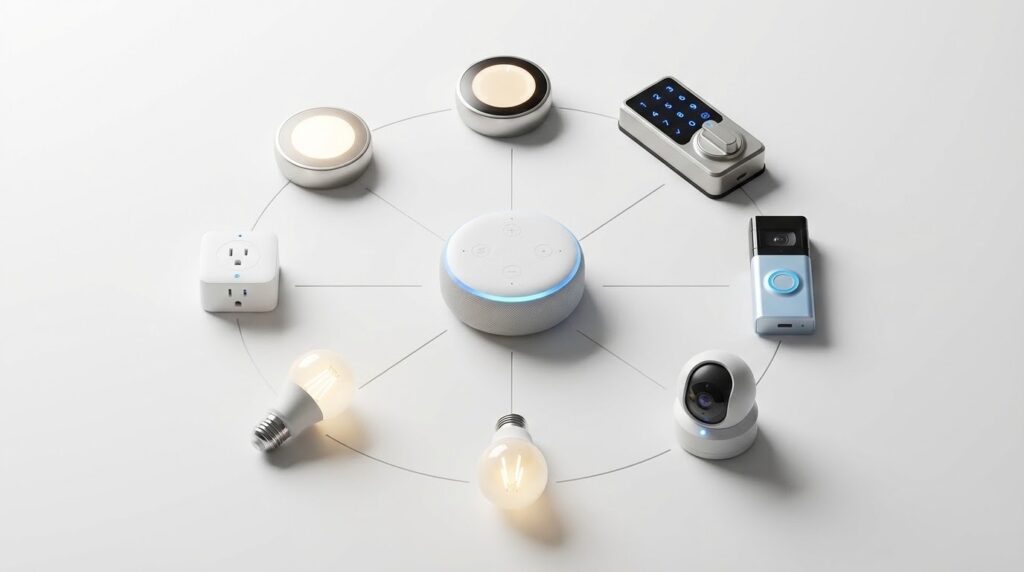
The smart home definition that actually makes sense: a home where devices connect to your WiFi network, communicate with each other, and respond to remote commands — from your phone, your voice, or pre-set automation rules you create once and forget.
The “smart” part has three layers:
Layer 1 — Remote Control You control devices from anywhere using a smartphone app. Turn off the light you left on. Check your doorbell camera from the office. Adjust your thermostat before you leave work. Basic remote control is the entry point — and it’s genuinely useful from day one.
Layer 2 — Automation Devices follow rules you set without any ongoing input. Your porch light turns on at sunset automatically. Your thermostat drops to Eco temperature when your phone leaves home. Your coffee maker starts at 6:45am every weekday. Automation is where smart home technology shifts from convenient to genuinely time-saving.
Layer 3 — Intelligence The best devices learn your patterns and make decisions proactively. A learning thermostat observes when you wake up and come home — then builds a schedule automatically. A smart security system distinguishes between your family members and unknown visitors. This layer is what separates a truly smart home from a remote-controlled one.
Most homeowners operate comfortably at layers one and two — and layer three adds value naturally as devices accumulate data over months of use.
Smart Home Technology: How It Actually Works
Understanding the basics of smart home technology removes the mystery — and helps you make smarter buying decisions from the start.
The Four Components of Every Smart Home:
1. Smart Devices The physical products — thermostats, bulbs, locks, cameras, plugs, speakers. Each contains a small computer chip and a wireless radio that connects to your network.
2. Your Home Network (WiFi) The backbone of your smart home. Every device connects to your home WiFi router — either directly (WiFi devices) or through a hub (Zigbee/Z-Wave devices). Your network quality directly determines your smart home reliability.
3. A Hub or Platform (Optional but Helpful) A central control point that connects devices from different brands into one unified system. Examples: Amazon Echo (Alexa), Google Nest Hub (Google Home), Apple HomePod (HomeKit), Samsung SmartThings. Many devices work without a hub — but a platform makes automation significantly more powerful.
4. Your Smartphone and Apps Your primary interface for control, monitoring, and automation setup. Most devices have dedicated apps — and the best platforms (Alexa, Google Home, HomeKit) consolidate control across all your devices into one interface.
Smart Home Communication Protocols:
| Protocol | How It Works | Hub Needed | Best For |
| WiFi | Connects directly to your router | No | Most common devices |
| Zigbee | Low-power mesh network | Yes | Lights, sensors, locks |
| Z-Wave | Low-power mesh network | Yes | Locks, security devices |
| Thread | Next-gen low-power mesh | Border router | Apple HomeKit devices |
| Bluetooth | Short-range direct connection | No | Speaker, some locks |
For most homeowners starting out — WiFi devices are the simplest path. No hub required, connects to your existing router, works immediately.
Smart Home Installation: DIY vs Professional — Full Cost Guide
Benefits of Smart Home Living: What You Actually Gain
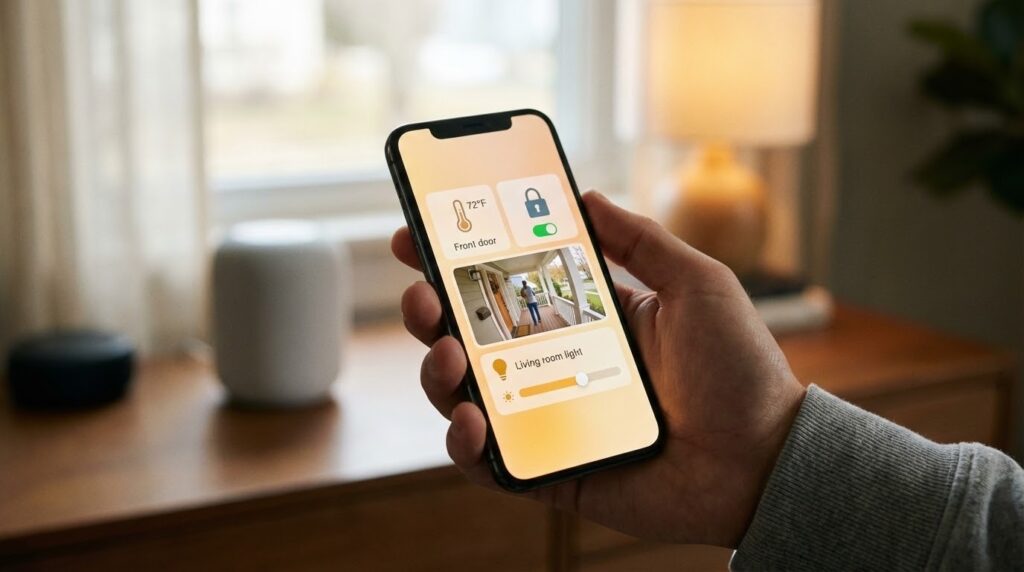
The benefits of smart home technology aren’t theoretical — they’re measurable, daily improvements that most homeowners notice within the first week.
1. Real Energy Savings
Smart thermostats alone save most US households $100–$200 per year. Add smart plugs eliminating standby power waste, automated lighting turning off empty rooms, and optimized HVAC scheduling — and the total savings add up quickly.
The U.S. Department of Energy confirms that smart thermostats reduce heating and cooling costs by 10–23% annually — the single largest energy expense in most homes. [EXTERNAL LINK: U.S. Department of Energy → energy.gov]
2. Genuine Security Improvements
- See who’s at your door from anywhere in the world
- Receive instant alerts when motion is detected outside
- Lock and unlock your door remotely — no more hiding keys
- Check camera footage from the past 24 hours anytime
3. Real Convenience — Not Just Gadget Novelty
Imagine arriving home on a cold January evening. Your thermostat detected your phone approaching and started warming the house 20 minutes ago. Your porch light turned on automatically at sunset. Your door unlocks as you reach it. This is smart home meaning in daily practice — not a demo video.
4. Peace of Mind
Did you leave the garage door open? Is the back door locked? Is the basement flooding? Smart sensors answer all of these questions instantly from your phone — eliminating the low-level anxiety that comes with leaving home.
5. Accessibility Benefits
For elderly family members or people with mobility limitations, smart home technology removes physical barriers. Voice-controlled lights, locks, and thermostats eliminate the need to physically reach switches, keypads, and thermostat controls throughout the home.
Benefits Summary:
| Benefit | Real-World Impact |
| Energy savings | $100–$300/year for most homes |
| Security | 24/7 remote visibility and control |
| Convenience | Automated routines save 15–30 min/day |
| Peace of mind | Remote monitoring from anywhere |
| Accessibility | Voice and remote control for all abilities |
Smart Home Devices: What’s Actually Worth Buying
Not every smart home device delivers equal value. Our team at TechHomeJournal has tested dozens of devices across three years — here’s the honest ranking of what’s genuinely worth buying versus what’s mostly novelty.
Tier 1 — Highest Value (Buy These First):
| Device | Best Pick | Price | Why It’s Worth It |
| Smart thermostat | Google Nest Learning | ~$130 | Pays for itself in under 12 months |
| Smart plug | Kasa EP25 | ~$17 | Energy monitoring + automation |
| Video doorbell | Ring Video Doorbell 4 | ~$100 | See visitors from anywhere |
| Smart lock | Schlage Encode Plus | ~$250 | Keyless entry + remote control |
| Smart speaker/hub | Amazon Echo (4th Gen) | ~$50 | Controls everything by voice |
Tier 2 — Good Value (Buy After Tier 1):
- Smart bulbs — Philips Hue starter kit (~$80 for 3 bulbs)
- Outdoor security cameras — Ring Stick Up Cam (~$100)
- Smart smoke/CO detector — Google Nest Protect (~$119)
- Smart garage door controller — Meross (~$30)
Tier 3 — Nice to Have (Buy When Budget Allows):
- Smart display — Amazon Echo Show 8 (~$130)
- Robot vacuum — Roomba j7+ (~$600)
- Smart doorbell with video — Nest Doorbell (~$180)
- Smart irrigation controller — Rachio 3 (~$150)
What to Look For When Building Your Smart Home
Before buying your first smart home device — or your fifteenth — run through these five checks. Getting them right from the start prevents the most common smart home mistakes.
1. Choose One Ecosystem and Stick With It
The biggest mistake new smart home buyers make: mixing incompatible platforms. Pick one primary ecosystem before you buy your first device:
| Ecosystem | Best For | Hub Device |
| Amazon Alexa | Most device compatibility | Echo speaker |
| Google Home | Google users, Android phones | Nest Hub |
| Apple HomeKit | iPhone users, privacy focus | HomePod mini |
| Samsung SmartThings | Advanced automation, multi-brand | SmartThings hub |
Most devices work with multiple platforms — but choosing one primary ecosystem simplifies setup, automation, and daily use significantly.
2. Start With High-Impact Devices
Don’t buy smart bulbs before you buy a smart thermostat. The thermostat delivers 10x more financial return and 10x more daily utility. Prioritize devices that solve real problems you have — not devices that seem impressive in a showroom.
3. Check Your WiFi Coverage First
Smart home technology runs on your home network. Before buying any device, confirm your WiFi reaches every area where you plan to install smart devices — garage, backyard, basement, far bedrooms. A $99 WiFi mesh upgrade (TP-Link Deco or Eero) prevents 80% of smart home connectivity frustrations before they start.
4. Think About Privacy
Smart home devices collect data. Cameras record video. Speakers listen for wake words. Understand each device’s privacy policy before installing it. For privacy-conscious homeowners, Apple HomeKit processes more data locally and sends less to cloud servers than most alternatives.
5. Plan for Expansion
Your smart home will grow. Buy devices that work within your chosen ecosystem and support the Matter standard — the new universal smart home protocol that ensures compatibility across all major platforms going forward.
Smart Home Installers Near Me How to Find the Best in 2026
Smart Home Meaning in Real Life: Real Examples
The smart home meaning becomes clearest through real daily scenarios — not spec sheets.
Morning Routine — Automated: 6:30am — Your smart thermostat starts warming the house from its overnight Eco setting. 6:45am — Your smart coffee maker starts brewing automatically. 7:00am — Your bedroom smart bulbs gradually brighten to simulate sunrise. You wake up naturally without an alarm jarring you awake.
Leaving Home — Automated: Your phone crosses the geofence boundary as you drive away. Your thermostat shifts to Eco temperature. Your smart locks confirm the front door is locked and send you a confirmation notification. Your smart plugs cut power to devices in standby mode. All of this happens automatically — you did nothing.
Coming Home — Automated: Your thermostat detects your phone approaching and starts returning to a comfortable temperature 15 minutes before you arrive. Your porch light turns on at your driveway. Your smart lock recognizes your arrival and unlocks as you reach the door.
Security Check — From Anywhere: You’re at dinner and wonder if you locked the back door. You open your app — locked. You see your front porch camera has detected motion — it’s a delivery package. You use two-way audio to tell the driver where to leave it. You’re back to dinner in 30 seconds.
This is what smart home technology actually delivers in daily life — not impressive demos, but small consistent time savings and peace of mind that compound into something genuinely valuable.
Frequently Asked Questions
What is a smart home in simple terms? A smart home is a house where devices like lights, locks, thermostat, and cameras connect to your WiFi and can be controlled remotely via smartphone or voice commands. The smart home definition also includes automation — devices following schedules and rules you set once, then operating independently without daily input from you.
What are the main benefits of smart home technology? The primary benefits of smart home living include energy savings ($100–$300/year from smart thermostat and plugs alone), improved security through remote camera and lock access, daily convenience through automated routines, and peace of mind from being able to monitor your home from anywhere. Most homeowners notice real benefits within the first week.
How much does a smart home cost to set up? A basic smart home — smart speaker, two smart plugs, and smart bulbs — costs $80–$150. A practical starter setup adding a thermostat, lock, and doorbell costs $400–$600. A comprehensive whole-home setup with 15–20 devices runs $1,500–$3,000 DIY. Professional installation adds $500–$3,000 depending on complexity and your location.
What smart home technology do I need to start? Start with a smart speaker (Amazon Echo at ~$50 or Google Nest Mini at ~$35) as your control hub, then add a smart thermostat (~$130) for immediate energy savings. Those two devices give you voice control and real financial return from day one. Add a video doorbell and smart lock next for security — then expand from there.
Does smart home meaning include any privacy risks? Yes — smart home devices collect usage data, cameras record video, and smart speakers listen for wake words. These are real privacy considerations. Minimize risk by reviewing each device’s privacy policy, disabling features you don’t use, choosing local-processing devices where possible (Apple HomeKit processes more locally), and using strong unique passwords for all accounts.
Which smart home ecosystem is best for beginners? Amazon Alexa is the best starting point for most beginners — it supports the widest range of compatible devices, has the most intuitive voice commands, and Echo speakers start at ~$30. Google Home is the best choice for Android phone users. Apple HomeKit is best for iPhone users who prioritize privacy and local processing over device variety.
Are smart home devices difficult to set up without technical skills? Most smart home devices are designed for non-technical users. Smart plugs take 3 minutes to set up. Smart bulbs take 2 minutes. Smart thermostats take 30–45 minutes with clear in-app guidance. The only devices requiring real technical comfort are in-wall smart switches that involve electrical panel work. Everything else is genuinely accessible to any homeowner.
Bottom Line
What is a smart home worth to the average US homeowner? More than most people expect — and less complicated than almost everyone fears.
Start small and practical. A $130 Nest thermostat, a $100 Ring doorbell, and a $250 Schlage smart lock give you real energy savings, real security, and real daily convenience for under $500. Add a $50 Echo speaker and you control all three by voice from anywhere.That’s a genuinely useful smart home — not a science project. Build from there at your own pace, one device category at a time, and the smart home meaning becomes clear through daily experience rather than spec sheets.